Laravel Debugbar: Tu navaja suiza para depurar aplicaciones Laravel
¿Te suena familiar? Estás desarrollando una nueva funcionalidad en una aplicación Laravel y algo sale mal. Hay un error en algún lugar, una consulta a la base de datos se ejecuta lentamente, o simplemente no entiendes por qué un fragmento de código no funciona. Y así sigues insertando dd() o dump() por todo tu código solo para ver qué está pasando por dentro. Tedioso, ¿verdad?
¿Y si te dijera que existe una herramienta que te muestra todo lo que está sucediendo en tu aplicación, de manera conveniente e interactiva, directamente en tu navegador? Déjame presentarte Laravel Debugbar – una herramienta indispensable para cualquiera que trabaje con Laravel.
¿Qué es esta herramienta y por qué cada desarrollador Laravel la necesita?
Laravel Debugbar no es solo otra utilidad. Es una poderosa integración del popular PHP Debug Bar en el ecosistema Laravel. Piénsalo como el tablero de instrumentos de tu coche, pero para tu aplicación web. Añade un panel especial en la parte inferior de la página que muestra un montón de información útil sobre la solicitud actual en tiempo real.
¿Quién la necesita? ¡Cada desarrollador Laravel! Desde un principiante que apenas está comenzando a explorar el framework hasta un gurú experimentado que necesita encontrar rápidamente un cuello de botella de rendimiento o atrapar un error escurridizo. Debugbar simplifica significativamente el proceso de depuración, haciéndolo más visual y menos laborioso.
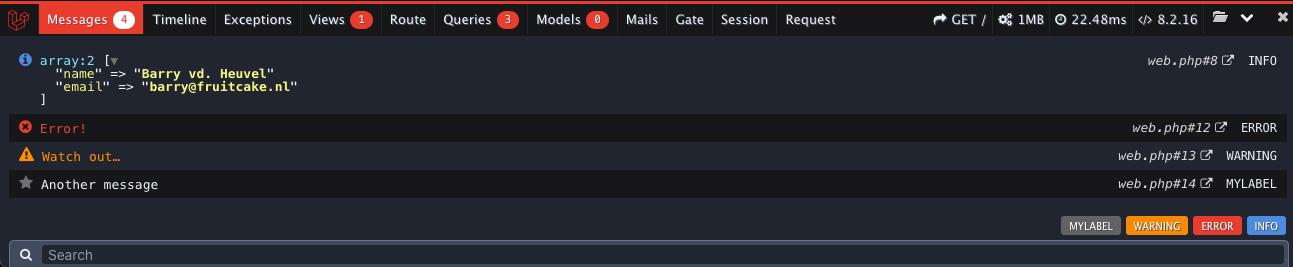
Características clave: Un vistazo bajo el capó de tu aplicación
Laravel Debugbar es toda una colección de herramientas reunidas bajo un mismo techo. Veamos las más útiles:
1. Análisis detallado de consultas a la base de datos
Uno de los problemas más comunes en el desarrollo web son las consultas lentas a la base de datos. Debugbar lo resuelve en un abrir y cerrar de ojos. Te muestra todas las consultas que tu aplicación envió a la base de datos durante la solicitud HTTP actual. Y no son solo consultas, sino también:
- La consulta SQL real.
- El tiempo de ejecución de cada consulta.
- Los parámetros que se pasaron a la consulta (bindings).
Esto es invaluable cuando necesitas optimizar el rendimiento o entender por qué el ORM genera algo ligeramente diferente a lo que esperabas.
// Пример того, как вы могли бы увидеть запросы
// Debugbar автоматически перехватывает их
$users = User::where('active', true)->get();
2. Rutas, controladores y vistas – Todo de un vistazo
A menudo, una solicitud llega al servidor, pero no estás seguro de qué ruta la maneja, qué controlador y método se llama, y qué vistas finalmente se renderizan. Debugbar te mostrará:
- Información sobre la ruta actual.
- Una lista de todas las vistas cargadas.
- Incluso los datos pasados a esas vistas (si habilitas esta opción).
Esto te ayuda a navegar rápidamente por la estructura de la aplicación y entender cómo fluyen los datos a través de las capas.
3. Monitoreo de rendimiento y eventos
Tu aplicación está "lagging", pero no sabes exactamente dónde? Debugbar incluye colectores para medir el tiempo de ejecución de varias partes de la aplicación:
- Tiempo total de carga de la página (tiempos de arranque y aplicación).
- Uso de memoria.
- Incluso puedes medir manualmente el tiempo de ejecución de cualquier sección de código:
Debugbar::startMeasure('long_operation','Моя долгая операция');
// ... какой-то ресурсоемкий код ...
Debugbar::stopMeasure('long_operation');

// Или еще проще с замыканием:
Debugbar::measure('Another long task', function() {
    // ... что-то, что нужно измерить ...
});
Esto te permite identificar "cuellos de botella" y optimizar el código.
4. Helpers convenientes para logging y depuración
¡Olvídate de dd()! Debugbar proporciona una fachada Debugbar conveniente y helpers globales que te permiten enviar mensajes, excepciones, e incluso volcar variables directamente al panel de depuración, sin saturar la salida de la página.
// Логирование сообщений разных уровней
Debugbar::info($user);
Debugbar::warning('Внимание! Что-то пошло не так.');
Debugbar::error('Критическая ошибка!');
Debugbar::addMessage('Это просто сообщение', 'категория');

// Отладка переменных с помощью хелпера
debug($someVariable, $anotherVariable);

// Или прямо из коллекции
collect(['item1', 'item2'])->debug();
Esto hace que el proceso de depuración sea mucho más limpio y estructurado.
5. Logs, configs, caché y mucho más
Más allá de las características principales, Debugbar ofrece muchos otros colectores que puedes habilitar según necesites:
- LogsCollector: Muestra las últimas entradas de los logs de Laravel.
- ConfigCollector: Muestra valores de los archivos de configuración.
- CacheCollector: Rastrear eventos de caché.
- EventsCollector: Todos los eventos que fueron despachados.
- FilesCollector: Lista de todos los archivos que fueron incluidos/requeridos por PHP (útil para entender dependencias).
¡Es como tener visión de rayos X para tu aplicación!
Instalación y uso práctico
Instalar Laravel Debugbar es ridículamente simple. Dado que es una herramienta de desarrollo, solo debe instalarse como dependencia de desarrollo:
composer require fruitcake/laravel-debugbar --dev
Laravel 5.5+ detectará automáticamente el paquete, y no necesitarás registrar manualmente un ServiceProvider. Después de la instalación, Debugbar se activará si APP_DEBUG está configurado como true en tu archivo .env.
Para tener control total sobre la configuración, puedes publicar el archivo de configuración:
php artisan vendor:publish --provider='Barryvdh\Debugbar\ServiceProvider'
Ahora tendrás un archivo config/debugbar.php donde podrás afinar finamente qué colectores habilitar, cómo mostrar el panel, y mucho más.
Importante: ¡Usa Debugbar solo durante el desarrollo! Por su naturaleza, revela mucha información interna sobre tu aplicación y puede ralentizarla. Nunca lo habilites en servidores de producción accesibles públicamente. Esto es una cuestión de seguridad y rendimiento.
En mi práctica, a menudo me encuentro con desarrolladores que pasan horas buscando el origen de un error simplemente porque no tienen la imagen completa de lo que está sucediendo. Debugbar proporciona instantáneamente esta imagen, reduciendo el tiempo de depuración muchas veces. Ayuda no solo a encontrar errores sino también a entender mejor cómo funcionan el framework y tu aplicación en su conjunto.
Conclusión: ¿Vale la pena probarlo? ¡Definitivamente sí!
Si trabajas con Laravel y aún no usas Laravel Debugbar, te estás perdiendo una gran oportunidad de simplificar significativamente tu vida. No es solo "otro paquete", es una herramienta fundamental que debería estar en el arsenal de todo desarrollador Laravel.
Te ayudará a:
- Encontrar y corregir errores rápidamente.
- Optimizar el rendimiento identificando consultas y operaciones lentas.
- Entender mejor el funcionamiento interno de tu aplicación y del framework.
- Hacer el proceso de desarrollo más agradable y productivo.
¡Así que no lo pospongas! Instala fruitcake/laravel-debugbar hoy, y verás cómo el proceso de depuración se transforma de una tarea tediosa en una exploración emocionante. ¡Tu código y tus nervios te lo agradecerán!
Proyectos relacionados