Cómo instalar cualquier app en iOS sin dolor ni Xcode
Imagina esto: encontraste un reproductor de código abierto o emulador de consola genial para tu iPhone, pero por supuesto no está en la App Store. Antes tenías dos opciones: sufrir con el voluminoso Xcode en Mac, o confiar en servicios chinos poco confiables que revocan certificados cada tres días. ¿Pero qué pasaría si te dijera que ahora existe una herramienta escrita en Rust que hace que el proceso de sideloading (instalar IPAs de terceros) sea simple, rápido y, lo más importante, multiplataforma?
Conoce Impactor (anteriormente conocido como PlumeImpactor). Es un sucesor moderno de las ideas de Cydia Impactor, devolviéndonos el control sobre nuestros dispositivos.
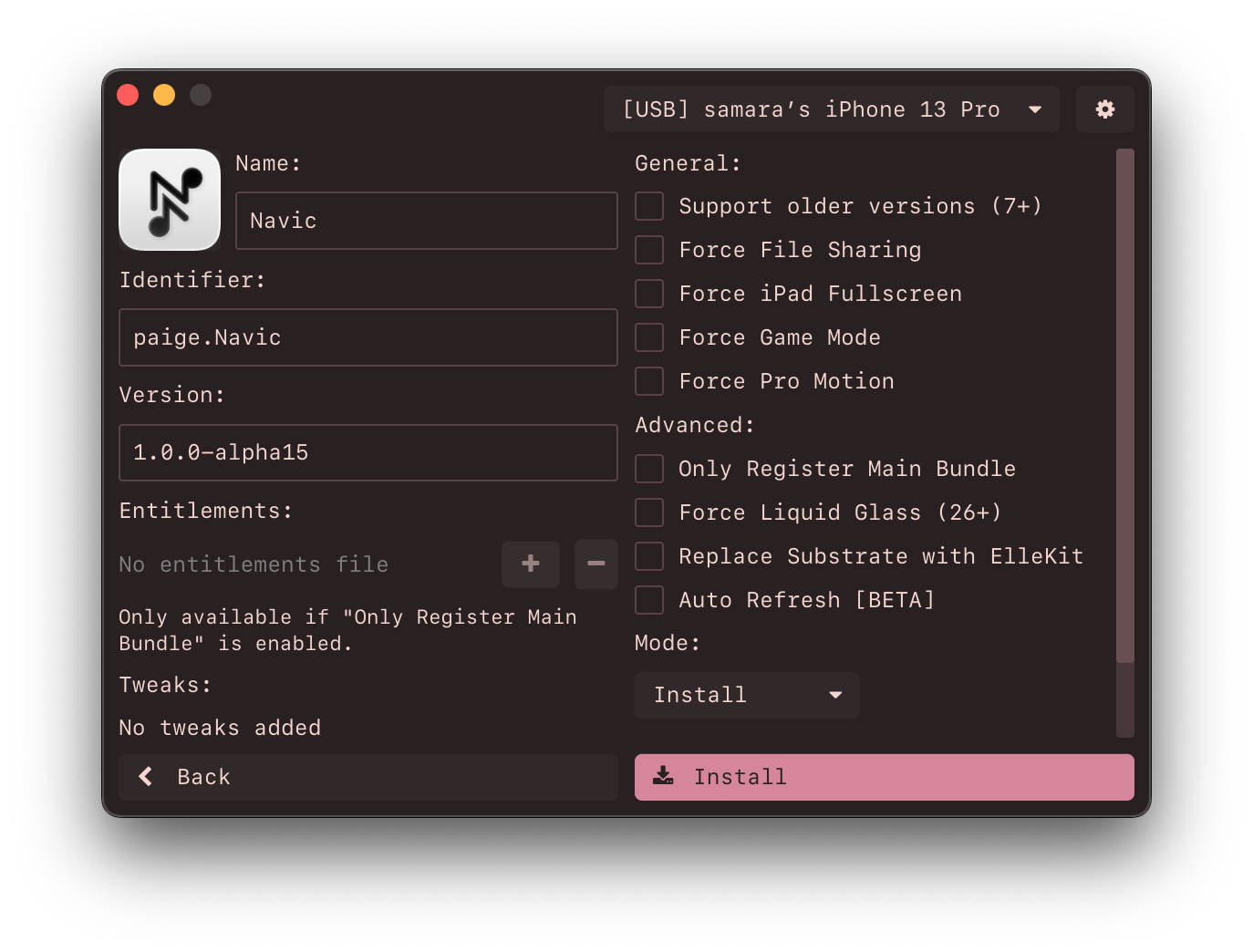
¿Qué es y por qué lo necesitas?
Impactor es una aplicación GUI de código abierto que permite firmar e instalar archivos IPA en dispositivos iOS usando tu Apple ID habitual. La principal "característica asesina" aquí es que el proyecto está escrito en Rust y funciona en todas partes: en Windows, macOS e incluso Linux.
Si eres desarrollador o simplemente un usuario avanzado, sabes lo mucho que Apple restringe las cosas. Impactor actúa como un puente. Imita el comportamiento de Xcode: se conecta a los servidores de Apple, solicita los certificados y perfiles de aprovisionamiento necesarios, firma el binario y lo envía a tu teléfono.
Cinco razones para darle un vistazo a Impactor
1. Verdadera compatibilidad multiplataforma
Muchas alternativas están atrapadas en el ecosistema Apple. Impactor, sin embargo, se siente como en casa en Linux (vía Flatpak) y Windows. En Linux, usa usbmuxd para la comunicación con dispositivos, mientras que en Windows depende de los drivers de iTunes. Esto lo convierte quizás en la única solución sensata para usuarios de Linux que quieren hacer "sideloading" de software en sus iPhones.
2. Soporte para SideStore y LiveContainer
Para quienes quieren ir más allá de la instalación regular de apps, Impactor ofrece soporte nativo para SideStore. Esto te permite instalar una "tienda" a través de tu computadora una vez, y luego actualizar apps directamente desde tu teléfono por Wi-Fi. También hay soporte para LiveContainer: una tecnología que te permite ejecutar apps en contenedores aislados, evitando el límite de Apple en el número de apps gratuitas instaladas (generalmente solo 3).
3. Inyección de tweaks al vuelo
Esta es una característica para verdaderos geeks. Puedes tomar un archivo IPA regular y directamente en la interfaz de Impactor agregar paquetes de .deb o .dylib. El programa usa ElleKit para la inyección de código. ¿Quieres agregar funciones extra a YouTube o Instagram? Ahora es solo un par de clics antes de la instalación.
4. Manejo inteligente de Entitlements
Apple limita las capacidades de las apps (por ejemplo, la cantidad de RAM disponible). Impactor puede solicitar entitlements extendidos como increased-memory-limit. Esto es crítico para emuladores como UTM o MelonX, que necesitan muchos recursos para funcionar sin problemas.
5. Generación de archivos de emparejamiento
Muchas herramientas modernas de iOS (para depuración o ver registros del sistema) necesitan un archivo de emparejamiento. Impactor puede generarlos automáticamente para toda una variedad de utilidades: desde Protokolle (visualización de logs) hasta ByeTunes (importar música evitando iTunes).
Cómo funciona internamente
Los desarrolladores de Impactor han hecho una cantidad enorme de trabajo para que no tengamos que abrir la terminal. Aquí tienes un resumen breve de lo que sucede cuando haces clic en el botón "Instalar":
- Registro del dispositivo: El programa registra tu iPhone en los servidores de Apple como un dispositivo de desarrollo.
- Manejo de certificados: Se crea un certificado (válido por 365 días) y una clave privada, con la clave almacenada localmente.
- Preparación del perfil: Basado en el binario del archivo IPA, se genera un Provisioning Profile.
- Modificación: Si seleccionaste agregar tweaks o cambiar el icono, Impactor modifica la estructura del paquete.
- Firma: El paso más importante. Usando la librería
apple-codesign-rs, la aplicación firma cada componente dentro del IPA. - Instalación: Usando el protocolo
idevice, el paquete listo se envía ainstallden tu iPhone.
¿Cómo empezar?
La instalación es sencilla y no requiere compilar desde el código fuente (aunque la comunidad de Rust lo agradece).
- macOS:
brew install --cask impactor - Linux: Disponible en Flathub.
- Windows: Solo descarga
.exedesde la página de releases (no olvides que iTunes debe estar instalado para los drivers).
Veredicto: ¿vale la pena?
Si estás cansado de las restricciones de la App Store y quieres aprovechar al máximo tu iPhone, Impactor es una herramienta "imprescindible". Es limpia, rápida y, a diferencia de muchas alternativas propietarias, completamente transparente sobre cómo maneja tus datos de Apple ID.
El proyecto será especialmente apreciado por quienes usan Linux o Windows y no quieren comprar una Mac solo para instalar un par de apps de terceros. Es un gran ejemplo de cómo una comunidad abierta encuentra soluciones elegantes para ecosistemas cerrados.
Puedes probar el proyecto aquí: github.com/claration/Impactor
Por cierto, el proyecto se está desarrollando activamente, y si echas de menos alguna funcionalidad: ¡la comunidad de Rust siempre está encantada de dar la bienvenida a nuevos contribuidores!
Proyectos relacionados