Forget About Website Builders — Academic Pages Is Your Ticket to Professional Portfolios
Sound familiar? You're a developer, researcher, or student, and you've long needed a personal website. A place to gather all your projects, publications, talks, and just tell people about yourself. And then it begins: choose a hosting provider, set up WordPress, figure out plugins, or maybe pay for Tilda? What if I told you that you can create a stylish and functional portfolio website completely free, managing it right from your GitHub repository?
Today we'll look at a project that has already earned the trust of thousands of professionals worldwide (over 16,000 stars on GitHub, by the way!) — Academic Pages. This isn't just another template; it's a thoughtfully designed system for creating personal websites on GitHub Pages.
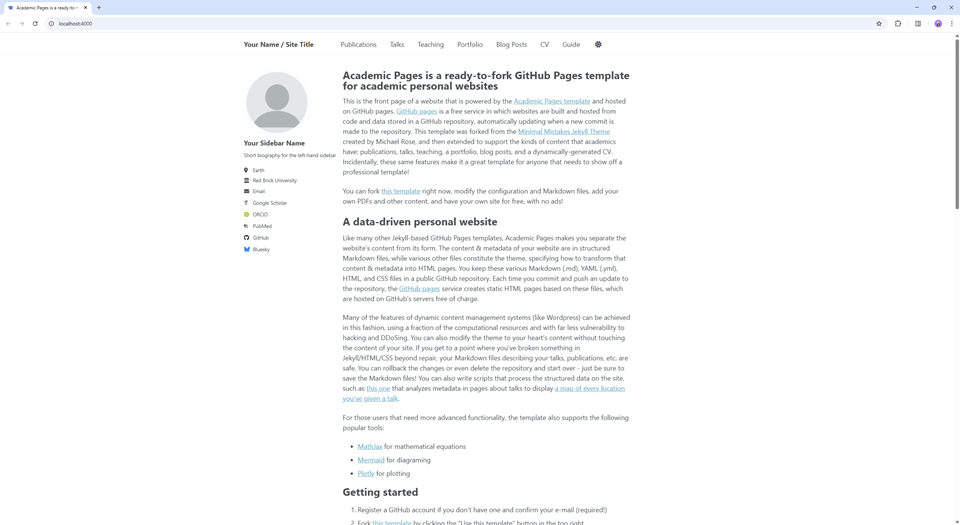
What is it and who is it for?
Academic Pages is a ready-made Jekyll template, a static site generator perfectly integrated with GitHub's free hosting service — GitHub Pages. To put it simply: you get a website skeleton that just needs to be filled with information about yourself. You write all content in familiar .md files (Markdown), and the system automatically transforms them into beautiful HTML pages.
The project was originally created for the academic environment — scientists, researchers, graduate students. But in practice, it turned out to be so convenient that developers, designers, and many other professionals happily use it too.
Who should definitely take a closer look:
- Students and graduate students: To beautifully present their projects, coursework, first research paper, and resume.
- Scientists and researchers: To create a central hub with a list of publications, talks, grants, and teaching activities.
- Developers: To start a personal blog, showcase pet projects, and share experience. This is a great alternative to Medium or Habr, but fully under your control.
Key features that stand out
Let's figure out what makes Academic Pages so good and why it's better than "just building a website from scratch."
1. Lightning-fast start
Forget about FTP, databases, and hosting control panels. The website launch process takes literally five minutes:
- Go to the Academic Pages repository.
- Click the green "Use this template" button.
- Create a new repository with the name
your-username.github.io. - That's it! Your website is already live at
https://your-username.github.io.
After that, you just need to edit the configuration file _config.yml, specifying your name and social media links, and start adding content.
2. Content is just Markdown
You don't need to know HTML or CSS to add a new blog post or project information. All pages are simple text files with the .md extension. You write a heading, text, add images — everything like in a regular README.md file on GitHub. This is incredibly convenient because it lets you focus on content rather than form.
3. Automation — the cherry on top
And this is where the real magic happens, especially for those with many publications or talks. The repository contains a markdown_generator folder with Python scripts. What do they do?
Imagine you have a table (in TSV format) with a list of all your conference presentations: title, date, location, link to slides. You run one script, and it automatically creates a separate, beautifully formatted page for each presentation on your website. The same can be done for research papers. This saves dozens of hours of tedious work.
4. Flexible configuration and local development
Although the template looks great "out of the box," it can be easily customized to your needs. Want to change colors, fonts, or menu structure? All of this is done through simple configuration files.
And for those who like to have full control, there's the option to deploy the site locally before publishing changes. The project README offers several paths:
- Classic method: Install Ruby and Jekyll.
- Via Docker: To avoid cluttering your system with dependencies, you can run the site in a container with a single command.
- Via VS Code DevContainer: If you use Visual Studio Code, this is the most convenient option. You open the project in a container, and it automatically configures everything and launches a local server with live reload.
After that, the site will be available at localhost:4000, and you'll be able to see all changes in real time.
How it works under the hood
The entire magic is powered by a combination of three technologies:
- Jekyll: This is a static site generator. It takes your Markdown files, runs them through HTML templates, and produces a ready-made website with HTML, CSS, and JavaScript. No databases, no complex backend.
- GitHub Pages: This is GitHub's free hosting service. It can run Jekyll on the fly for your repository and publish the result as a website.
- Academic Pages: This is essentially a very smart and beautiful "outfit" (theme) for Jekyll, tailored for a specific purpose — creating portfolios.
This combination ensures high page load speeds, security (since there's practically nothing to break into), and zero hosting costs.
Conclusions: who needs this and why?
Academic Pages is the ideal tool for those who value their time and prefer working with code and text rather than visual builders. It provides the best of both worlds: you get a professionally looking website without having to build everything from scratch, while maintaining full control over content and structure.
Should you try it?
- Absolutely yes, if you're a researcher or student. You'll get the perfect platform for your academic career.
- Yes, if you're a developer and want to start a minimalist blog or portfolio without getting distracted by administration.
- Probably not, if you need a complex online store or an interactive service with a backend. There are other tools for that.
In a world where personal branding plays an increasingly important role, having your own portfolio website is no longer a luxury — it's a necessity. And Academic Pages makes the process of creating one as simple, fast, and, importantly, free as possible. Perhaps this is the best reason to finally create that about page you've been putting off for so long.
Projets similaires