ChaiNNer: Your Image Processing Constructor on Steroids

When Standard Tools Are No Longer Enough
Do you know that feeling when you want to do more than just apply a filter to an image — you want full control over every step of its processing? Or when you need to batch-process hundreds of photos using multiple neural network models in sequence? That's where ChaiNNer comes in — a visual editor for image processing that gives you freedom comparable to writing code, but without the need to program.
What's Under the Hood?
ChaiNNer is a cross-platform application (works on Windows, macOS, and Linux) that:
- Lets you build complex image processing chains through an intuitive drag-and-drop interface
- Supports multiple neural network inference engines: PyTorch, NCNN, and ONNX
- Automatically manages Python dependencies
- Provides hundreds of nodes for various operations — from basic transformations to complex neural network models
5 Reasons to Try ChaiNNer Right Now
-
Code-level flexibility, drag-and-drop simplicity Assemble processing chains like building blocks — connect nodes and see the result immediately.
-
Support for all popular neural network formats Work with PyTorch (.pth), NCNN (.bin/.param), and ONNX models right out of the box.
-
Batch processing without the headache Process entire folders of images or even videos with a single button press.
-
Built-in dependency manager No need to manually mess with pip — all dependencies are installed through a convenient interface.
-
Active community and ready-made templates Use ready-made processing chains from the community as a starting point.
How It Looks in Practice
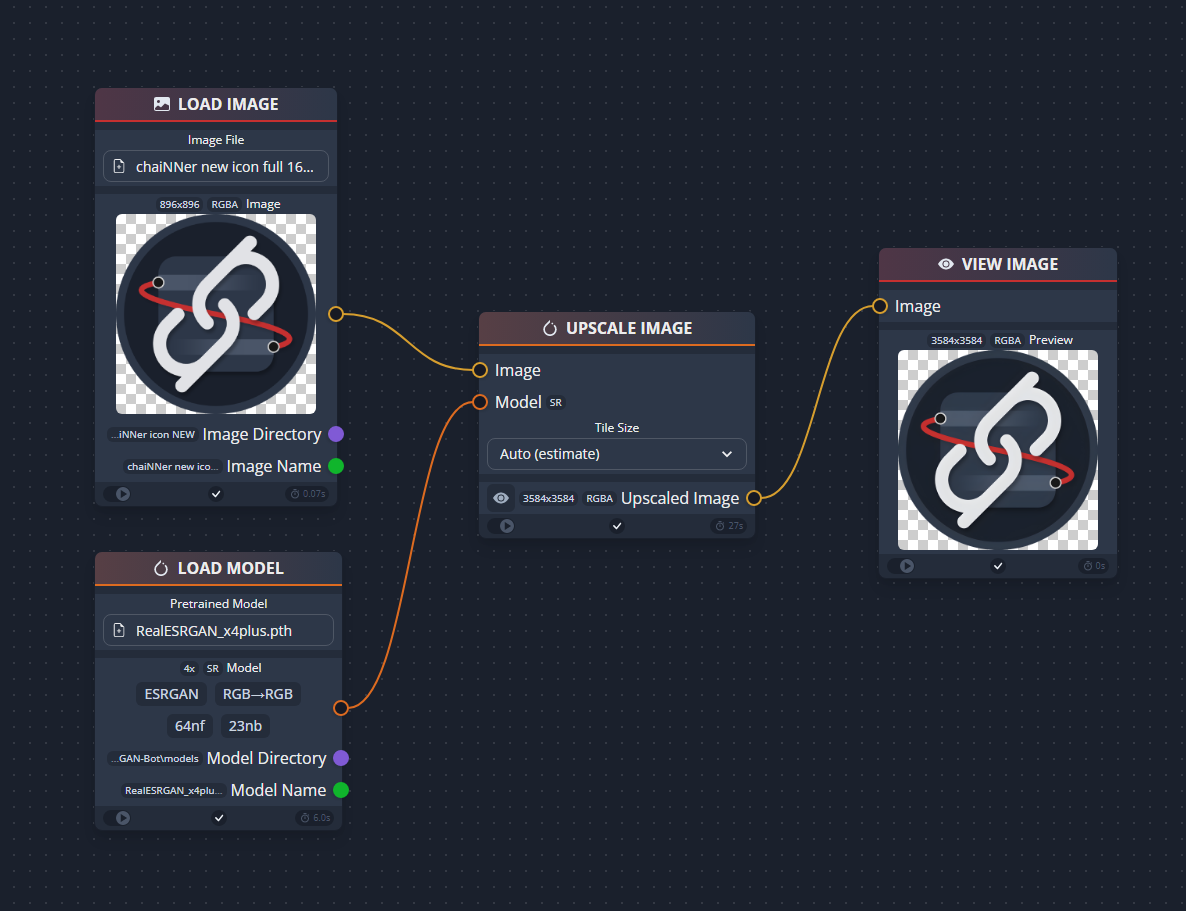
A typical workflow in ChaiNNer:
- Add an image loading node
- Connect preprocessing nodes to it (e.g., resize)
- Add a neural network model for quality enhancement
- Finish the chain with a result-saving node
- Press "Run" and get your finished image
Technical Details
Under the hood, ChaiNNer uses:
- PyTorch with CUDA support for NVIDIA GPUs
- NCNN for working with AMD/Intel GPUs
- ONNX Runtime for cross-platform inference
- Its own Spandrel engine for working with neural network architectures
And you don't need to manually configure the environment — ChaiNNer comes with built-in Python and all the necessary libraries.
Who Will Find It Particularly Useful?
- Graphic designers who want to automate routine image processing
- Photographers working with large archives of shots
- Game developers who need to prepare hundreds of textures
- Researchers testing different neural network models
- Photo archive enthusiasts who want to "bring to life" old photographs
On Your Marks, Get Set... Go!
Installing ChaiNNer is as easy as it gets:
- Download the latest version from the releases page
- Run the installer (no Python required!)
- Use the Dependency Manager to install the neural network frameworks you need
- Start creating!
What's Next?
ChaiNNer is under active development, and its capabilities are constantly expanding. Right now it's already one of the most flexible tools for programmable image processing, and given its modular architecture, the growth potential is simply enormous.
I recommend checking out the project's Discord community — they're always ready to help with advice and share ready-made solutions. And if you're a developer in TypeScript, React, or Python — your contributions will be especially valuable to the project!
As is often the case with powerful tools, ChaiNNer requires some time to learn. But trust me — when you assemble your first complex processing chain and see the result, you'll understand that the time was well spent.
Projets similaires