iOS Development Without a MacBook Using the Builder Utility
Anyone who has tried to write mobile apps in Flutter or React Native while sitting on Linux or Windows inevitably hits Apple's hardware wall. Building for Android takes a couple of minutes locally, but iOS always requires a Mac with Xcode installed. Buying a Mac mini just to build a test artifact twice a week looks like a questionable investment, especially for pet projects or small teams.
Recently I came across the ios-builder repository from the MobAI team. It's a small Go utility that handles the routine: triggers a build in GitHub Actions cloud, downloads the ready IPA file, and connects the local development process to a real iPhone.
How It Works Under the Hood
The idea is obvious, but here they've turned it into a ready CLI tool. Instead of manually configuring complex pipelines, you install the builder utility, which generates a workflow file for GitHub Actions.
The workflow looks like this:
- You run the build command in the terminal.
- The CLI pushes the code to your repository and starts a GitHub Actions runner on macOS.
- Xcode in the cloud compiles the project and packages the artifact.
- The utility downloads the ready IPA to the local
./dist/folder.
This means you don't need to pay for a Mac—you use the free CI minutes from GitHub. However, free accounts have a x10 multiplier for macOS. Out of 20,000 free minutes per month on Mac runners, you'll have about 2,000 minutes left. That's roughly 15-20 builds. That's plenty for releases and periodic testing, but you won't be able to run CI on every commit.
What the Utility Can Do
The tool is designed to work with popular cross-platform stacks and native projects.
- Automatic project structure detection. The utility understands Flutter, plain React Native, exported Expo, Cordova/Ionic, and native Swift projects.
- Code signing management. You can upload certificates and provisioning profiles directly to GitHub secrets via the
builder signing setupcommand. - Hot Reload. The most useful part for those writing in Flutter or React Native.
- Running on a remote simulator. Through the MobAI service, you can test the built app in a simulator right from your browser or desktop client, though this option requires a Pro subscription.
Setup and First Run
Installation is straightforward. On Windows, you can download a ready-made binary from the releases page, and on Linux, WSL, or macOS, run the command via terminal:
curl -sSL https://raw.githubusercontent.com/MobAI-App/ios-builder/main/install.sh | bash
Or build from source if you already have Go on your machine:
git clone https://github.com/MobAI-App/ios-builder.git
cd ios-builder
go build -o builder ./cmd/builder
After installation, you need to authorize with GitHub and initialize the project in the repository root:
builder auth github
cd your-ios-project
builder init
The builder init command in interactive mode will create a configuration file .github/workflows/ios-build.yml and a local builder.json.
Example builder.json contents:
{
  "project": "MyApp",
  "platform": "ios",
  "github": {
    "owner": "username",
    "repo": "my-ios-app"
  },
  "ios": {
    "path": "ios",
    "scheme": "",
    "signing": true
  },
  "mobai": {
    "url": "http://localhost:8686",
    "device_id": ""
  },
  "flutter": {
    "watch": {
      "dirs": ["lib"],
      "patterns": [".dart"],
      "ignore": [".g.dart", ".freezed.dart"],
      "debounce": 100
    }
  }
}
A build is launched with a single line:
builder ios build
If Apple Developer certificates aren't set up yet, you can build an unsigned build with the --unsigned flag.
Development with Hot Reload Without macOS
Building an IPA file is only half the battle. The real pain starts when you need to quickly fix the UI and logic. Rebuilding the project in CI for every button change is pointless because the build takes several minutes.
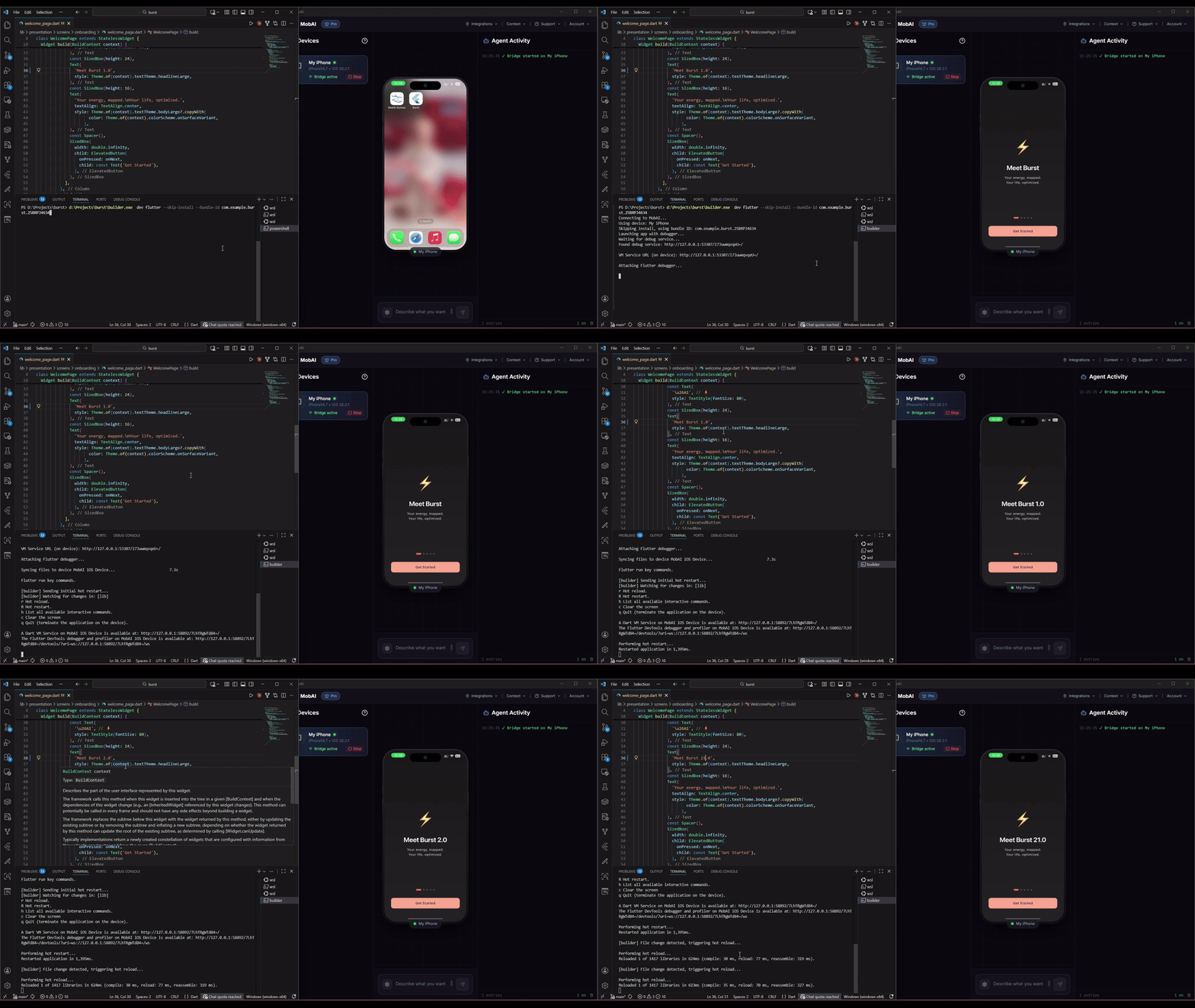
The developers solved this problem by integrating with their MobAI app, which connects a physical iPhone to your computer via USB.
The Flutter workflow looks like this:
- You connect your iPhone to your Windows or Linux PC via cable.
- You build the base IPA through
builder ios buildand install it on the device. - You start development mode:
builder dev flutter
The utility starts a file watcher in the lib/ directory. When you change Dart code and save the file, builder sends a Hot Reload signal through flutter attach. Generated files like .freezed.dart and .g.dart are ignored to avoid triggering unnecessary reloads.
You'll only need to rebuild the entire app through the cloud when you touch native code: changing Podfile, adding plugins with complex native dependencies, or editing Swift files.
For React Native, the process is practically the same:
builder dev rn
The command starts a local Metro server, forwards the correct port, and connects the bundler to the app running on the phone. If you're working inside WSL2, you'll need to allow external connections in MobAI settings and specify the network address of the host Windows machine.
Pitfalls
The tool looks attractive, but there are several practical questions about it:
When re-signing the app on the fly via a free Apple ID account, the Bundle ID changes (a team suffix is added). This can break push notifications or Sign in with Apple if they're tied to a specific identifier.
Dependency on the third-party MobAI utility. The CLI builder itself is distributed under the free MIT license and is written transparently. However, part of the functionality (installing on devices, simulators) relies on the proprietary MobAI app, where some features are paid.
GitHub Actions limits. If you're working in an active phase of native UI layout without frameworks, the free minutes on runners will run out quickly.
Is It Worth Trying
If you write in Flutter or React Native on Windows/Linux and occasionally need to test the app on a real iPhone or build a test version for a client, ios-builder will save a lot of time and nerves. It eliminates the need to manually write YAML files for GitHub Actions and configure artifact downloads.
For large projects with strict certificate security requirements and complex CI/CD pipelines, you'll still need a dedicated Mac. But for indie developers and small teams, it's a convenient workaround.
Related projects