Bringing a Biology Textbook to Life with React and Three.js
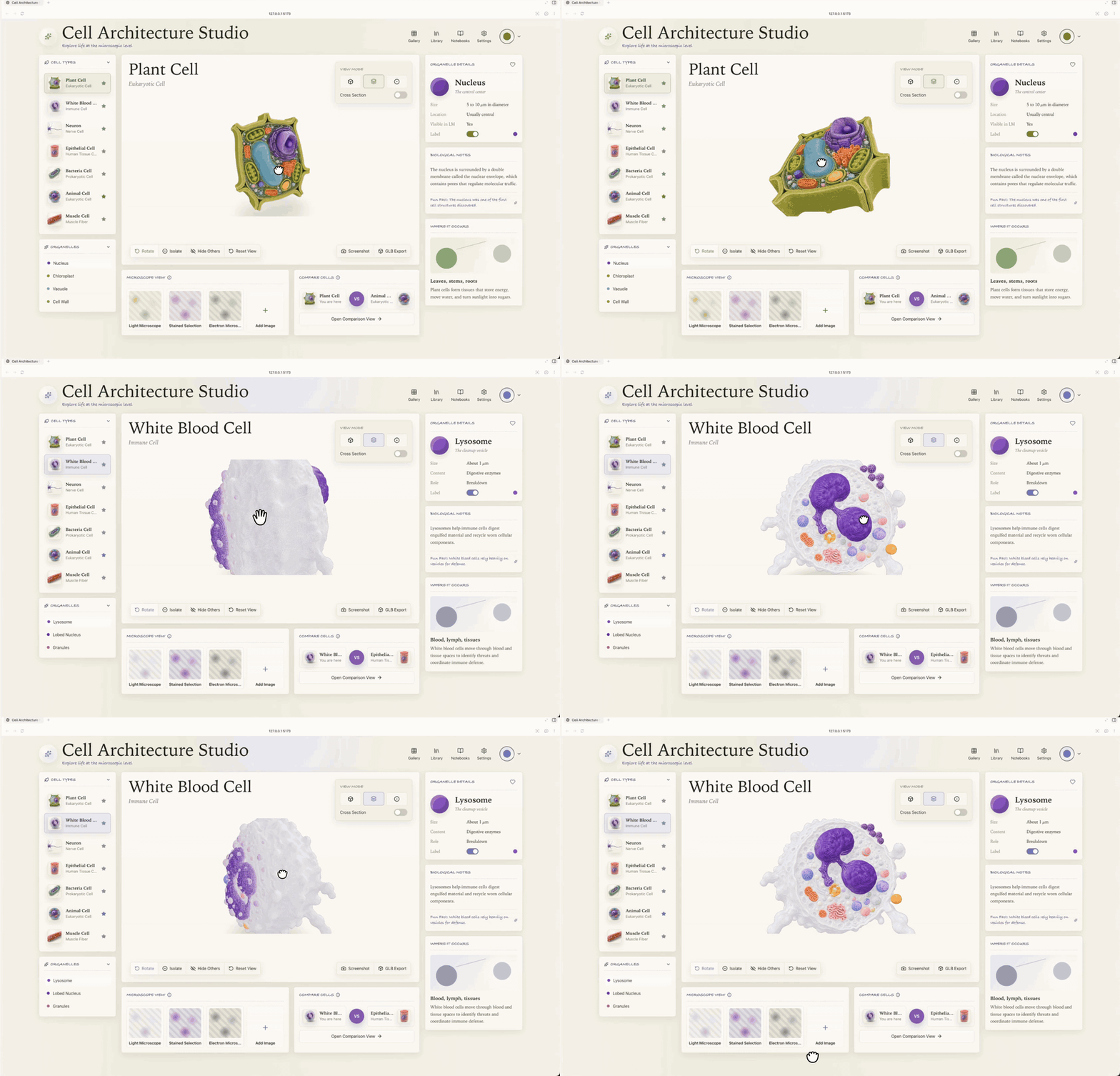
Remember those boring cell diagrams in school textbooks? Flat pictures with a bunch of arrows, where mitochondria look like slippers and the nucleus is just a regular circle. At some point you realize that static images simply don't convey how everything is arranged in three dimensions. Developer cclank solved this problem by creating Cell Architecture Studio. It's an interactive gallery that turns the study of cytology into exploring 3D models right in the browser.
What it is
The project is an interactive studio where you can examine seven types of cells: from neurons and bacteria to plant cells and leukocytes. This isn't just a 3D file viewer. The author built a full-fledged educational app interface with detailed descriptions of organelles, comparison modes, and even the beginnings of an AI tutor.
Why should we, as developers, care? First, it's a great example of how to pair React 19 with heavy Three.js graphics. Second, there's an interesting implementation of visual testing here. If you've ever broken a 3D scene after updating styles, you'll find something worth looking at in the source code.
What the studio can do
The app has several features that set it apart from ordinary demo scenes.
Detail and viewing modes
The most detailed models are the plant cell and leukocyte. They load in GLB format with native textures preserved. There are two main modes:
- Mesh: standard model viewing with all the details.
- Focus: a mode that highlights specific organelles, removing unnecessary visual noise. This is useful when you need to study, say, only the Golgi apparatus.
Smart interface
The project includes an AI Tutor. For now it's more of a concept with pre-written prompts and progress tracking, but it shows the direction educational software is heading. There's a comparison panel where you can compare the structure of different cells, and detailed metadata cards for each object.
Responsive 3D
Developers often struggle with fitting Canvas into mobile layouts. Here, three layout variants are implemented: desktop, compact, and mobile. And this isn't just tested "by eye" — it's verified with automated screenshots.
Technical stack under the hood
The project is built on a modern stack, no legacy code:
- React 19 and TypeScript: the latest foundation.
- Vite: for fast builds.
- Three.js + React Three Fiber (R3F): the de facto standard for 3D on the web.
- Drei: a helper library for R3F that handles the routine work like loading models.
- Playwright Core: used for visual verification.
Interesting point: if the user has slow internet and a heavy GLB model hasn't finished downloading yet, the app doesn't crash or show a blank screen. Instead, a procedural fallback kicks in — simplified geometry is generated with plain Three.js while the main assets load.
How to verify visual integrity
Usually tests check logic, but in 3D projects it's important that the image doesn't "drift." There's a script verify.mjs in the repository. It launches Playwright, takes screenshots at different resolutions, and compares pixel metrics in Canvas. This lets you catch bugs when a model fails to render or the UI overlaps important controls.
To run the verification yourself:
- Start a local server:
npm run dev - In another terminal, run:
npm run verify
The script will check the plant cell render, leukocyte, and modal window functionality. This is a good example of how to automate QA in graphics applications.
Who should explore this project
I'd recommend looking at the code in two cases. If you're just starting to work with React Three Fiber, you can pick up the correct component structure and event handling within the scene. And if you're working on EdTech projects, Cell Architecture Studio is a ready-made reference for what a modern digital textbook should look like.
Of course, the project is still in prototype status. Not all cells have high-quality models ready, and the documentation is concise in places. But as a foundation for an educational platform or an example of integrating complex 3D into a React app — this is very solid work.
You can try the live demo here, and the source code is in cclank's repository.
Related projects