How to create videos from a single line of text using Pixelle-Video
Recently stumbled upon the Pixelle-Video repository, which tries to solve the eternal problem of lazy people: how to create content for YouTube or social media without touching a video editor at all. The idea isn't new, similar things pop up all the time, but the folks at ATH-MaaS approached the question with engineering enthusiasm.
The project is an "engine" for complete automation of short videos. You feed it a topic, and get a ready-made MP4 with voiceover, subtitles, background music, and images (or video clips) generated by a neural network. This isn't just a Python script, but a full-fledged wrapper around a bunch of AI services.
Why bother when CapCut exists
If you need to edit a family vlog, Pixelle-Video won't help. It's designed for a different scenario — mass-producing explainers, educational videos, or quote visualizations. You know those "10 facts about space" channels where a cheerful voice narrates over AI-generated images? That's exactly the kind of content Pixelle-Video is perfect for automating.
Instead of sitting in Premiere Pro adjusting audio cuts to match visuals, you describe the video structure in a config file or just specify a topic. The tool writes the script itself via LLM, breaks it into logical segments, and sends requests for graphics generation.
How it works internally
The project architecture is quite flexible. The diagram below shows that the author divided the process into atomic parts.
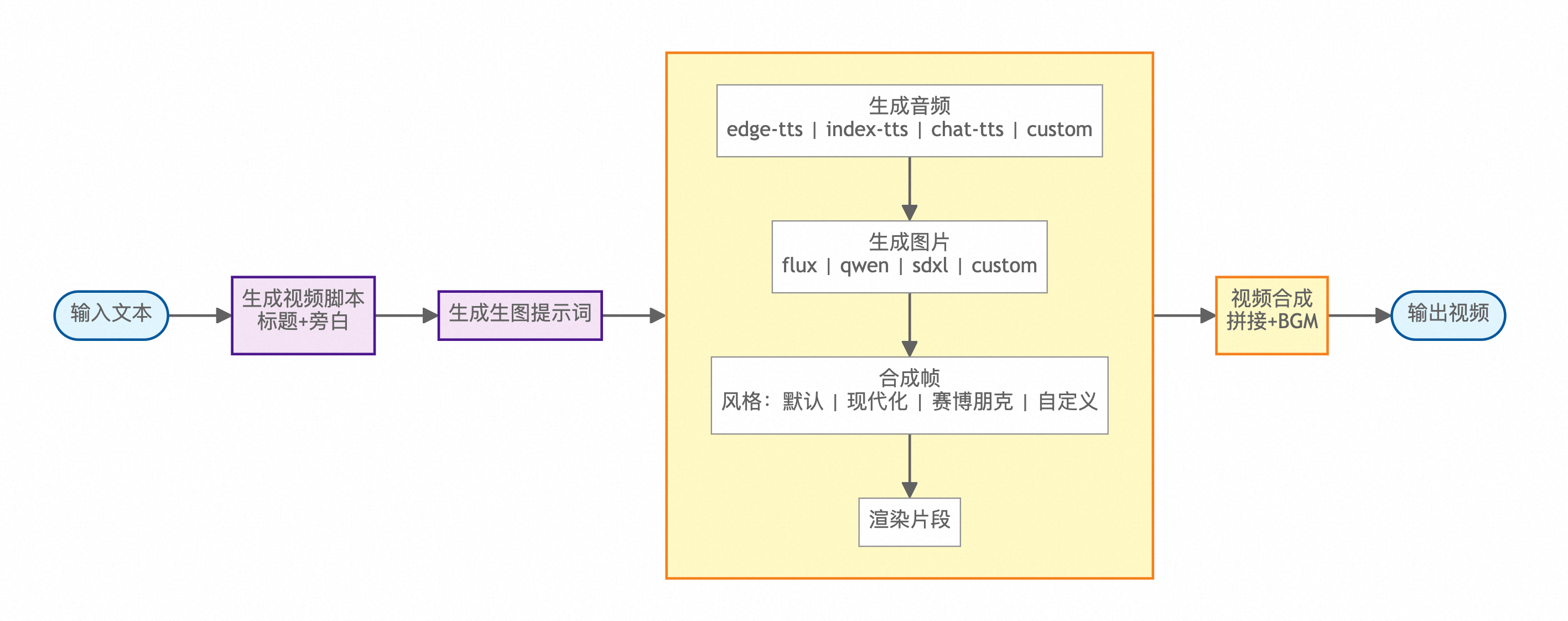
At the center of everything is a Streamlit web interface. Through it, you manage the model zoo. The main system components look like this:
- Text core. LLMs handle script generation. The project supports practically everything: from GPT-4o to local models via Ollama. If you don't trust the neural network to write text, you can simply insert your own ready-made script.
- Visual layer. This is where it gets interesting. Pixelle-Video can work with ComfyUI. This means you can connect custom workflows for image or video generation. If you don't want to deal with ComfyUI, there's direct integration with APIs like Kling or DashScope.
- Voice and audio. For voiceover, it uses Edge-TTS (free and effective) or more advanced options with voice cloning like Index-TTS.
- Templating. Final assembly goes through HTML templates. This is a smart solution: instead of complex video rendering via FFmpeg with a bunch of filters, frames are composed like a web page, giving flexibility in subtitle design and effect overlays.
Key features that stood out
The repository has many features, but I'd highlight a few of the most practical ones.
Visual style customization through prefixes
You can set a global style for all generations. For example, specifying "Minimalist black-and-white sketch style" will make the neural network try to keep all illustrations in the video consistent. This eliminates visual clutter where one frame looks like anime and another looks like a realistic photo.
Working with your own source materials
The project recently added "Custom Materials". Now you don't have to generate everything from scratch. You can upload your own photos or videos, and AI will analyze their content and write a script that ties your files into a cohesive narrative.
RunningHub integration
For those without a powerful GPU, the authors included RunningHub support. It's a cloud platform for running ComfyUI. This means the heavy graphics generation work can be offloaded to the cloud, leaving the local script only for process management.
How to get this running
The developers prepared two paths.
For Windows users there's a ready-made exe file (build in releases). Download, run start.bat, and within a minute the interface opens in your browser. No dealing with Python or dependencies.
For Linux and macOS it's all standard:
git clone https://github.com/ATH-MaaS/Pixelle-Video.git
cd Pixelle-Video
uv run streamlit run web/app.py
Using uv here is critical — the project pulls in a decent number of libraries, and a regular pip might choke on version conflicts.
Any pitfalls?
Of course. The documentation is sometimes specific: the developers' main focus is the Chinese community, so some code comments or links point to resources like Bilibili. But the English interface and README are quite functional.
The second consideration is cost. If you use cloud models (OpenAI, Kling), you'll need to pay for API tokens for each video. A completely free option is only possible with Ollama + local ComfyUI, but then be prepared for a 30-second video to take 10–15 minutes to generate on a mid-range GPU.
Verdict: is it worth trying
Pixelle-Video is an excellent constructor. It won't create a cinematic masterpiece for you, but as a tool for automating routine work, it's damn good. If you're into content marketing or just enjoy tinkering with neural network automation, this repository definitely deserves a star.
The project will especially appeal to those who already know ComfyUI, as Pixelle-Video lets you turn your complex node-based workflows into a simple interface for generating ready-made products.
Gerelateerde projecten