FanControl - Take Full Control of Your PC's Cooling
Imagine: it's summer outside, +30°C, and your gaming PC in the heat of battle starts humming like a taking off plane? Or, conversely, you're working on an important project, but the fans are barely spinning, and the processor is already approaching critical temperatures? Familiar picture, isn't it? Standard BIOS settings or meager manufacturer utilities rarely satisfy everyone. We want either complete silence or maximum cooling, and often both, but only when we actually need it. What if I told you there's a tool that lets you take full control over every fan in your computer, turning it from a "black box" into a docile orchestra?

FanControl: Your Personal Cooling Conductor
That's exactly what FanControl is. This isn't just another fan speed adjustment program—it's a genuine Swiss Army knife for managing cooling on your Windows computer. Forget about compromises and limitations. FanControl lets you configure each fan's behavior as finely as humanly possible, creating the perfect balance between performance, silence, and component longevity. If you've ever wondered how to make your PC quieter, cooler, or simply smarter, this project is definitely for you.
What Can FanControl Do? Key Features
Let's pop the hood and see what makes FanControl so special:
1. Unprecedented Flexibility in Fan Curve Configuration
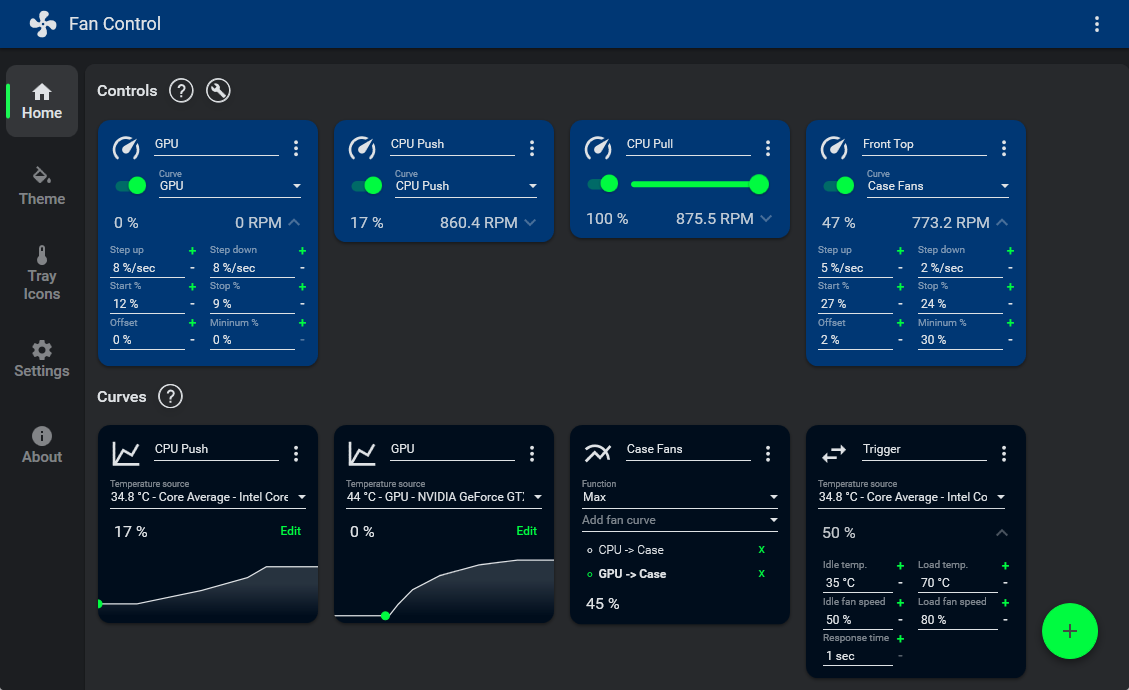
Forget about linear "temperature X = speed Y" relationships. FanControl offers not just preset modes, but a full-featured graphical curve editor. You can literally draw how a fan should behave:
- Multiple points: Add as many points on the graph as needed to precisely set speed across different temperature ranges.
- Hysteresis: This is like "memory" for the fan. So it doesn't jitter every second if the temperature fluctuates by 1-2 degrees, you can set a delay or range within which it won't change speed. In my experience, this saves you from annoying "whir-whir" sounds at the slightest load change.
- Start and stop percentages: Configure the minimum speed at which a fan should start spinning and at what temperature it should stop completely (if it supports 0 RPM, of course). This is very convenient for creating silent idle systems.
2. Multiple Temperature Sources and Their Combinations
FanControl isn't limited to just one sensor. It can read data from:
- CPU: Overall temperature, core temperatures.
- GPU: Chip temperature, Hot Spot, memory (for Nvidia, for example, via plugins).
- Motherboard: Various sensors on VRM, chipset.
- Hard drives (HDD/SSD): For those who care about their storage health.
- Even external sources: Through plugins, you can connect smart home sensors (Home Assistant) to monitor room temperature!
The most interesting part is that you can mix these sources. For example, case fans can respond to the maximum temperature between CPU and GPU, or to their average value. This provides amazing precision in managing airflow inside the case.
3. Profile Management and Aesthetics
Created the perfect gaming setup? Save it as the "Gaming" profile. Need an absolutely silent mode for watching movies or working on documents? The "Silent" profile. Switching between them takes just one click. Plus, you can customize the program's appearance by selecting a theme and accent color so it blends seamlessly with your desktop. A small thing, but nice!
4. Extensibility Through Plugin System
This is probably one of FanControl's strongest sides. If your hardware isn't supported "out of the box" (which is rare but does happen), or you want access to specific sensors, the community has probably already written a plugin.
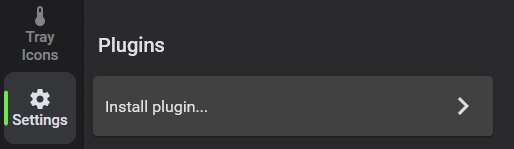
For example, there are plugins for:
- Interface with NZXT Kraken or Corsair AIO systems.
- Controlling fans on ASUS motherboards via WMI.
- Integration with AquaComputer devices.
- Getting additional temperature data from HWInfo or even GPU-Z.
This makes FanControl a truly universal tool that can work with almost any PC configuration.
Technical Details: How It Works
Under the hood, FanControl is essentially a very smart and beautiful wrapper for existing, time-tested libraries. Its "engine" is, of course, LibreHardwareMonitor, the legendary hardware monitoring library. It's responsible for "talking" to your sensors and fans. It's important to understand that if you're having problems detecting some specific hardware, the cause is most likely in LHM compatibility, not FanControl itself.
By the way, the developers are actively working to eliminate antivirus issues. Previously, some versions of FanControl used the WinRing0 driver, which was sometimes falsely flagged as malware. This caused inconvenience since sensors might simply not be detected. But in recent versions (starting from V238), FanControl switched to PawnIO's LHM build, which significantly improves the false positive situation. So if you've encountered this problem, make sure to update to the latest version—it will solve your antivirus headache and ensure stable sensor operation.
You can install FanControl in several ways:
Via Scoop:
scoop bucket add extras
scoop install fancontrol
Via Winget:
winget install Rem0o.FanControl
Or simply download the archive from GitHub releases and extract it.
Practical Applications: Who Needs This and Why?
So, who will FanControl benefit the most and in what scenarios will it truly shine?
- For gamers and content creators: When every second and every degree counts. You can set aggressive curves for maximum cooling during gaming or rendering to avoid throttling and squeeze every drop of performance from your hardware. And after, with one click, switch to quiet mode.
- For silence enthusiasts: If your PC is in the bedroom or you simply can't stand constant humming, FanControl is your best friend. Create a profile where fans completely stop or run at minimum RPM when idle, and enjoy absolute silence. Just don't forget to configure smooth startup to avoid sudden speed spikes.
- For enthusiasts and overclockers: Those squeezing every last drop from their hardware need full control over cooling. FanControl lets you do exactly that, giving you the ability to finely adjust every fan based on the temperature of specific components, which is critically important for stable operation of overclocked systems.
- For custom loop or exotic hardware owners: Thanks to the powerful plugin system, FanControl can become a single control hub for complex cooling systems, combining data from various sources and controllers that stock software often doesn't see or can't properly handle.

In general, if you want your computer to work the way you want, not the way the manufacturer intended, FanControl is just what the doctor ordered.
Conclusion: Is It Worth Trying?
So is FanControl worth your attention? My answer is unequivocal: if you care even slightly about your PC's health, performance, and noise level, then yes, definitely give it a try! It's not just a utility—it's an entire climate control center inside your system unit. It gives you power over every fan, letting you create the perfect balance between silence and cooling efficiency.
FanControl is a great example of how a community-driven project can surpass commercial solutions in functionality and convenience. It's free, constantly updated, and its flexibility is staggering. I'm confident that once you've configured your fans your way with FanControl, you'll never want to go back to factory settings. Your PC will run quieter, cooler, and most importantly, exactly the way you need it to. Give it a try—and your computer will thank you!
Gerelateerde projecten