How to Build a Network of AI Agents in an Evening Without Losing Your Mind
When you start working with LLM agents, you quickly hit a ceiling. A single agent gets tangled in long instructions, forgets context, or simply hallucinates where precision is needed. The logical solution is to split tasks between several specialized agents. But that's where the real orchestration hell begins: how do they communicate with each other, how do you pass data, and who is responsible for what?
Recently I came across the Neuro SAN Studio project from the folks at Cognizant AI Lab. It's essentially a sandbox for their Neuro SAN framework. In short: they offer a way to build multi-agent systems not through endless Python code chains, but via declarative configs.
What's Inside This Studio
Neuro SAN Studio is a ready-to-use working environment. The authors packaged the framework itself, a visual editor, and a bunch of examples that can be run with a single command. The core idea is that a developer can sketch out an agent interaction scheme in an HOCON file (that's an extended JSON from Lightbend), and the system handles the connections automatically.
Interestingly, the project isn't aimed only at people who write code 24/7. They added the Agent Network Designer — essentially a meta-agent. You feed it a description of your task in plain human language, and it generates the network structure, writes prompts for each participant, and links them into a working chain.
What Sets This Project Apart from Similar Tools
I've seen a lot of agent frameworks, but here several specific things caught my attention.
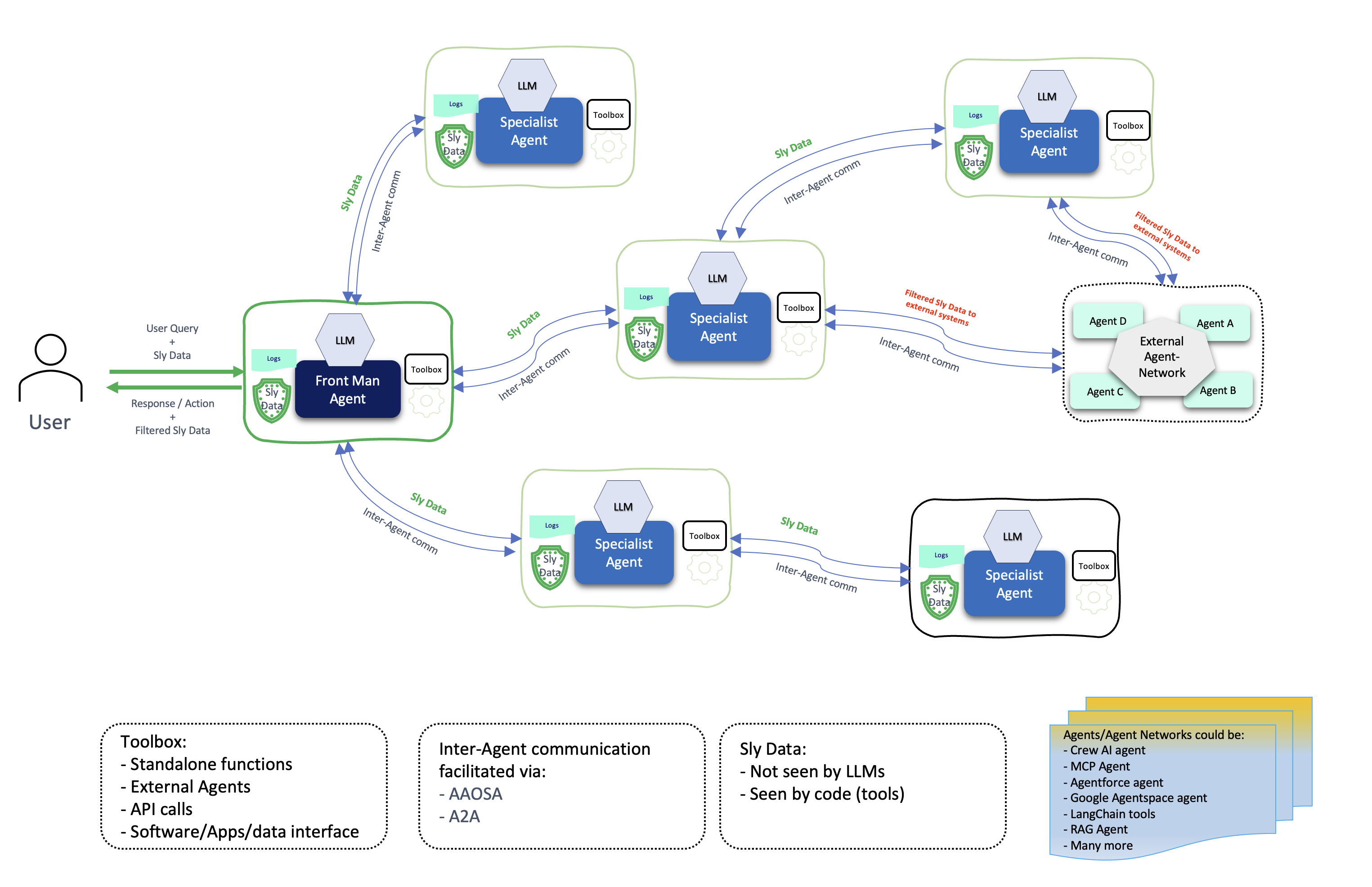
First, the AAOSA protocol. It sounds like academic jargon, but in practice it's a useful thing. Agents decide on their own who to delegate a subtask to, based on the situation. This makes the system more flexible than the rigid graphs in LangGraph.
Second, data security. They have the concept of Sly-Data. The idea is that sensitive data (passwords, customer personal information) can be passed between agents, but the language model itself doesn't see it. This is critical if you're building something for fintech or healthcare.
Third, MCP (Model Context Protocol) support. This is a fresh standard from Anthropic that allows agents to easily connect to various tools — from Google Drive to local databases.
How to Get Hands-On
To get started, you'll need Python and the uv package manager (it's all the rage right now and works really fast).
After ns init the studio will ask which models you want to use (OpenAI, Anthropic, or Gemini). Then you need to pass API keys to environment variables and you can launch the UI:
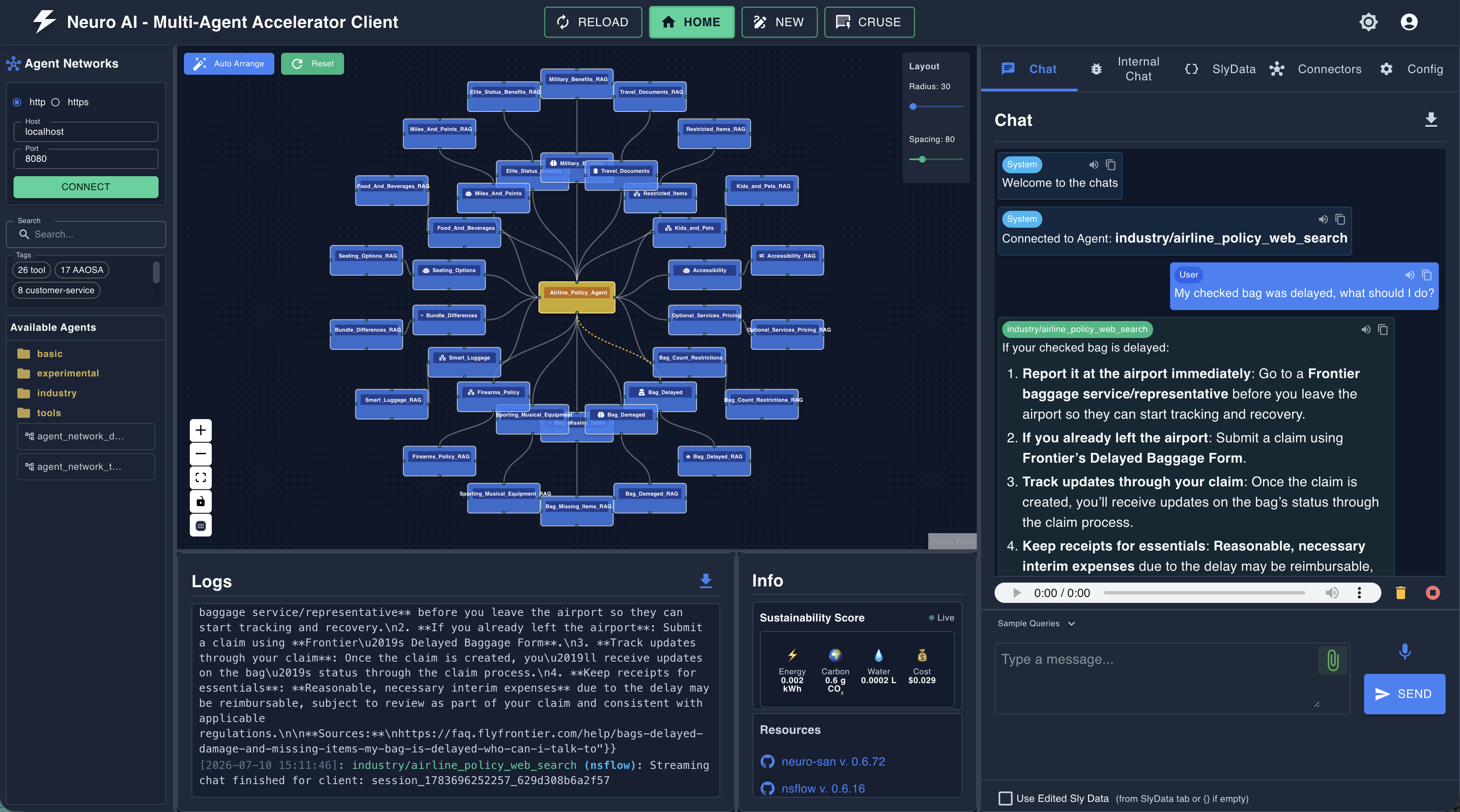
The interface will spin up on localhost. There you can import ready-made examples. I recommend checking out the Industry section — it has configs for banking compliance, airline customer support, and even market analysis. This helps understand how to structure complex prompts.
Practical Use Cases
The repository contains examples showing this isn't just a toy for chatbots. For example:
- Therapeutic supervision: several expert agents analyze a patient case and jointly develop a treatment plan.
- Tochiro file organizer: an agent for macOS that analyzes folders, suggests a cleanup plan, and reorganizes files after your approval.
- Annual report analysis: the system reads your LinkedIn profile and extracts from a massive PDF company report only the sections relevant to your experience and position.
Is It Worth Your Time
The project looks solid, especially if you need to quickly build a prototype of a complex system. On the downside, the documentation sometimes forces you to dig into the source code, and HOCON configs require some getting used to. But the ability to visually debug agent reasoning chains in real time is worth it.
If you're tired of writing hundreds of lines of code just to pass context between two LLMs, Neuro SAN Studio might be exactly the tool that saves you a couple of weeks of your life. At the very least, playing around with the Agent Network Designer is definitely worth it — watching one agent design the work of others is quite fascinating.
Who it's for:
- Developers building RAG systems more complex than "Q&A over a single PDF."
- Architects who need to visualize and control AI logic.
- Those who want to try a multi-agent approach but aren't ready to build everything from scratch in pure Python.
Related projects