How to Turn a Raspberry Pi into a Radio Intelligence Station with Intercept
Have you ever wondered how much invisible data is flying past you right now? Planes pass overhead transmitting their coordinates; tire pressure sensors in neighboring cars broadcast telemetry; neighbors' weather stations exchange data with displays in living rooms. Usually, to "hear" all this, you need to fiddle with a dozen different command-line utilities, each with its own finicky syntax.
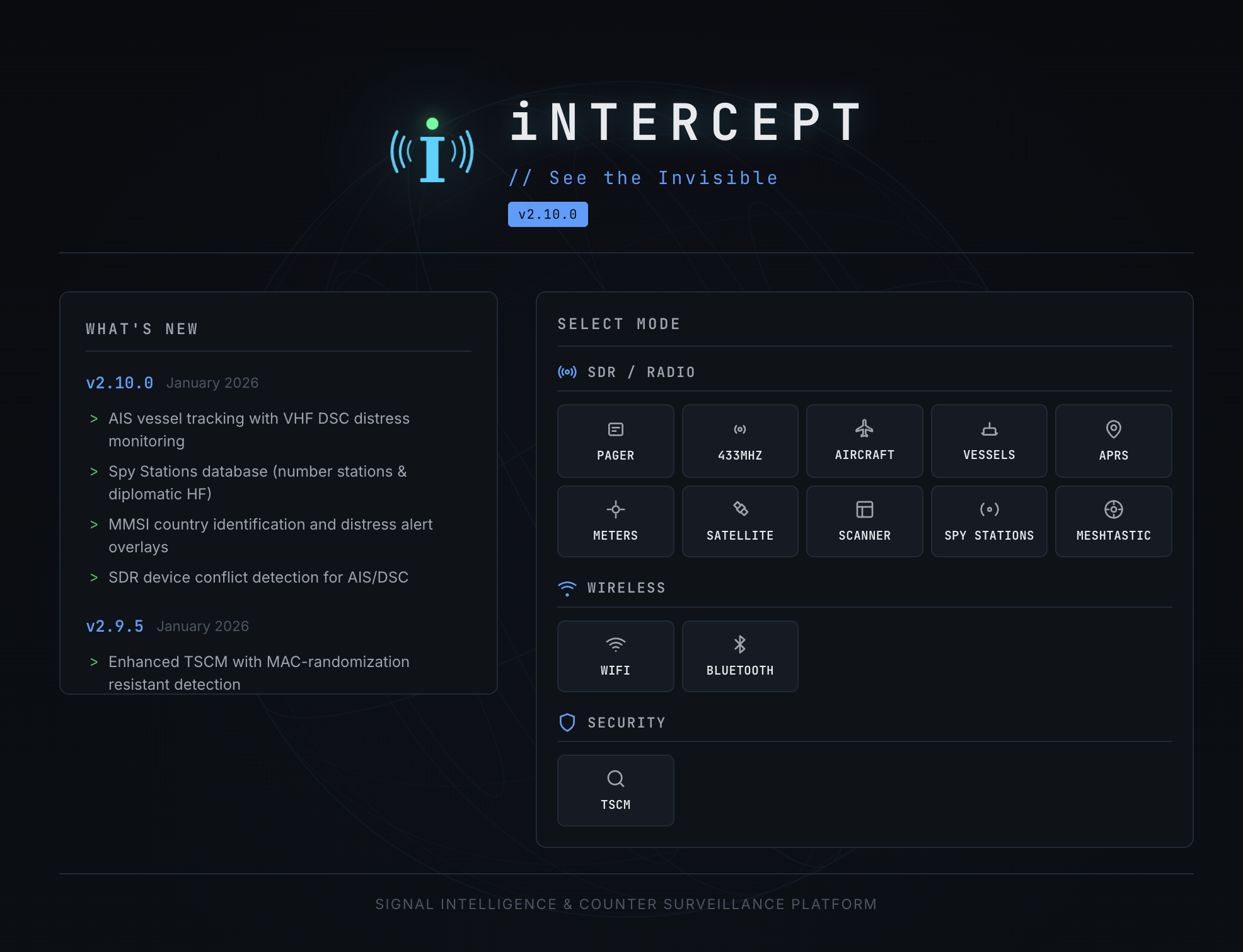
But what if you could combine the power of radio scanners into one beautiful web interface? That's exactly what the Intercept project does. It's a kind of "Swiss Army knife" for radio hacking enthusiasts and Signal Intelligence (SIGINT), turning an ordinary cheap RTL-SDR dongle into a full-fledged monitoring center.
What is Intercept and why do you need it
Intercept is an open-source platform that brings together the best software-defined radio (SDR) tools under one roof. Instead of manually running rtl_433, dump1090, or multimon-ng, you get a unified control panel in your browser.
The project is ideal for those who:
- Want to explore the radio spectrum without deep diving into the Linux command line.
- Are building an autonomous monitoring station based on a Raspberry Pi.
- Are interested in cybersecurity and want to visually see the "digital footprint" of surrounding devices.
By the way, the project is written in Python and nicely packaged in Docker, making deployment a matter of five minutes.
Five cool things Intercept can do
The platform's capabilities are impressive: it covers practically everything from household sensors to satellites.
1. Aviation and maritime tracking (ADS-B and AIS)
Intercept includes a full-featured radar. You can see planes on a map in real time (ADS-B), read their messages (ACARS), and even track maritime vessels (AIS). If you connect a Postgres database, the system will store the history of all aircraft that flew by — a great foundation for your own FlightRadar.
2. Hacking IoT devices on 433 MHz
Your neighbor bought a wireless weather station? Intercept will intercept temperature and humidity data. Someone drove by in a car with tire pressure sensors (TPMS)? You'll see it on screen. The system can decode signals from hundreds of types of devices operating in the unlicensed band.
3. Hunting satellites and the ISS
This is perhaps the most romantic part of the project. Intercept can predict satellite passes and automatically schedule image reception from NOAA or Meteor weather satellites. Moreover, if the International Space Station is transmitting images in SSTV format (slow-scan television), you'll be able to receive and decode them.
4. Bluetooth and WiFi reconnaissance
Beyond radio frequencies, Intercept works with Bluetooth and WiFi. The BT Locate feature allows you to plot GPS tracks of Bluetooth devices on a map. This can be useful for finding lost tags or analyzing device density in a specific area.
5. Bug hunting (TSCM)
The counter-surveillance feature allows you to compare the current radio noise floor with a baseline. If a new signal source appears in the area, the system will help you locate it. Of course, this isn't professional equipment worth millions of rubles, but for an enthusiast — an excellent entry-level tool.
Technical internals
Under the hood, Intercept is a well-orchestrated combination of time-tested tools. Rather than reinventing the wheel, the author uses:
- rtl_433 for sensors.
- dump1090 for aircraft.
- SatDump for satellites.
- Direwolf for packet radio (APRS).
All this zoo is wrapped in a Python web interface. Information can be collected remotely: Intercept supports "agents" that can be placed at different ends of the city and transmit data to a single central server.
How to run this yourself
The easiest way is to use Docker. You'll need any RTL-SDR receiver (the cheapest costs about 2-3 thousand rubles).
git clone https://github.com/smittix/intercept.git
cd intercept
docker compose --profile basic up -d --build
After startup, the interface will be available at http://localhost:5050. Default login and password: admin / admin.
Important note: For USB device access inside the Docker container, privileged rights are required, so make sure your SDR dongle is connected before startup.
Is it worth trying?
If you have an old RTL-SDR gathering dust in a drawer or have long wanted to understand how radio intelligence works — definitely yes. Intercept eliminates the "dependency hell" and config file tweaking, allowing you to immediately get to the most interesting part — observing the invisible world.
The project is actively developing, and the use of AI in its creation (which the author honestly acknowledges) has made the interface truly friendly. This is a great example of how modern development tools help create complex engineering systems accessible to everyone.
Just remember the legal aspects: listening to the airwaves for educational purposes is cool, but intercepting private communications may be illegal. Use your new superpowers responsibly!
Related projects