Lan Mouse: One Keyboard and Mouse Set for All Your Computers
Imagine: you have two monitors on your desk, connected to different computers — work Linux and personal Mac. Switching between them is exhausting: two keyboards, two mice, constant confusion. The solution? Lan Mouse — an open-source Apple Universal Control alternative for all platforms.
What this "digital KVM switch" can do
Lan Mouse is a cross-platform solution for sharing a mouse and keyboard between multiple computers on the same network. Key benefits:
- Cross-platform: Linux (GNOME, KDE, Sway, Hyprland), Windows, macOS
- High speed: Rust implementation ensures minimal latency
- Security: traffic is encrypted via DTLS (WebRTC)
- Flexibility: support for different backends for various environments
- Simplicity: GTK interface and TOML-based configuration
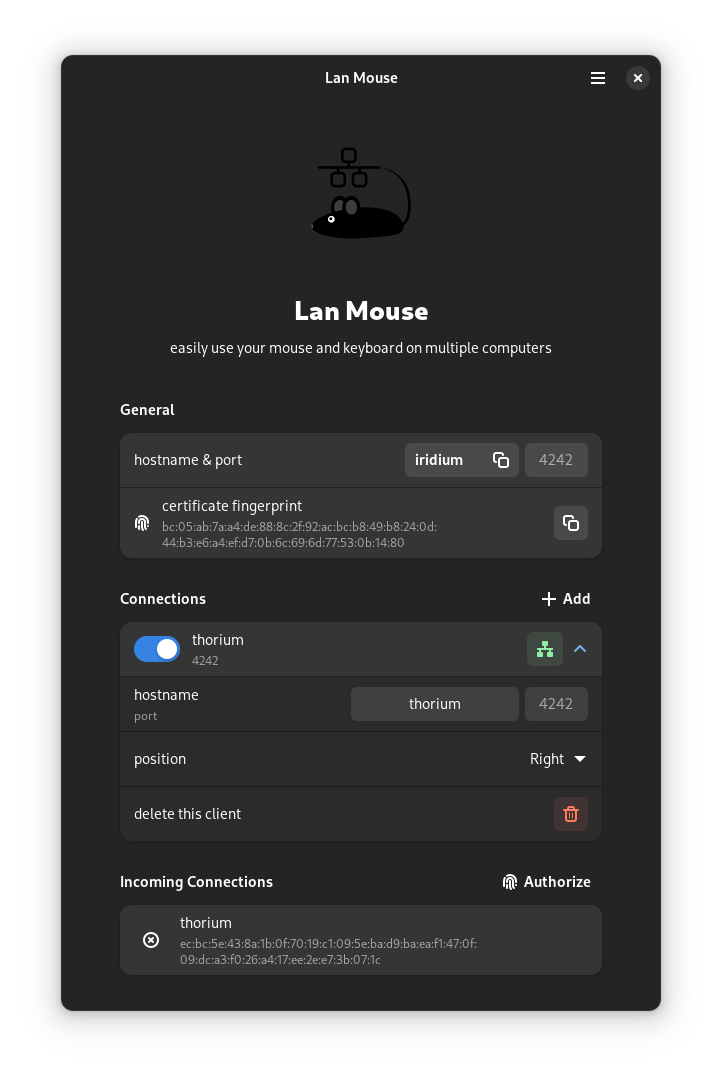
How it works technically
The project uses different input mechanisms depending on the platform:
- Wayland: wlr-virtual-pointer and virtual-keyboard protocols for wlroots, libei for GNOME/KDE
- Windows/MacOS: native APIs for input emulation
- Input capture: layer-shell protocol or libei depending on the environment
Fun fact: for Wayland compositors like Sway, a single-pixel window is created at the screen edges for smooth cursor handoff.
Practical use: three scenarios
- Home office — control your work Linux and personal MacBook with one mouse
- Gaming + streaming — control your gaming PC and streaming machine without extra devices
- Cross-platform development — test applications on different OSes without switching
Installation in 5 minutes
For Arch Linux:
pacman -S lan-mouse
Or via Cargo for all platforms:
cargo install lan-mouse
Configuration via a simple TOML file:
[[clients]]
position = "right"
hostname = "work-pc"
activate_on_startup = true
What's on the developers' roadmap
- X11 input capture support
- Latency measurement and visualization
- Clipboard sharing between devices
Conclusion: who should try it
Lan Mouse is a great solution for:
- Developers working with multiple machines
- Users of hybrid workstations (Linux + Windows/Mac)
- Wayland enthusiasts looking for Synergy alternatives
The project is actively developed and already offers stable core functionality. If you're tired of the switching dance — it's time to try this open-source tool.
Related projects