How Windhawk Works and Why Modifying Windows Became Convenient Again
Anyone who has tried to customize Windows to their preferences inevitably ran into system limitations. Windows 11 removed familiar taskbar features, Explorer periodically changes its behavior, and a needed small feature in a third-party program cannot be configured with built-in tools. Previously, each such fix required searching for separate tweakers, patching system libraries, or downloading questionable binaries from forums.
The Windhawk project approached the task from a different angle. Its idea resembles Tampermonkey for browsers or Magisk for smartphones, but works in the environment of classic Windows applications.
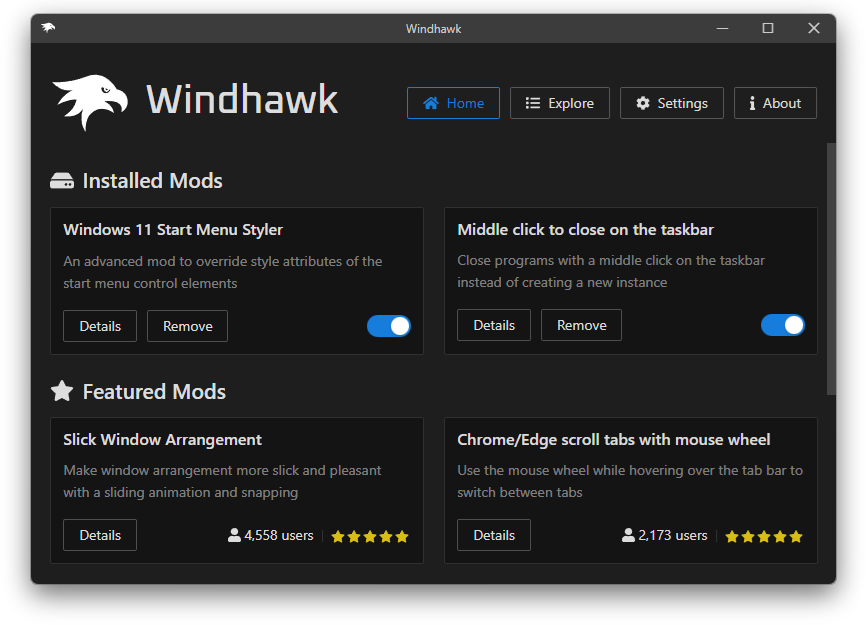
What is Windhawk
Windhawk was created by developer m417z, known in the system utilities community for the 7+ Taskbar Tweaker project. Unlike old tweakers, which were monolithic utilities, the author built an open platform here.
The essence is simple: there is a unified code injection engine and a catalog of small mods. Each mod solves a specific problem — restores the classic taskbar, adds volume adjustment with the mouse wheel over the tray, or removes unnecessary buttons from Explorer.
Users see a neat graphical interface where they can enable the needed fix with a single click. For developers, Windhawk opens a full-featured C++ hook creation environment right inside the program, with a built-in code editor and instant compilation.
Architecture and Technical Details
The main challenge when modifying programs in Windows is to ensure that code is injected on time, works stably, and does not break neighboring processes.
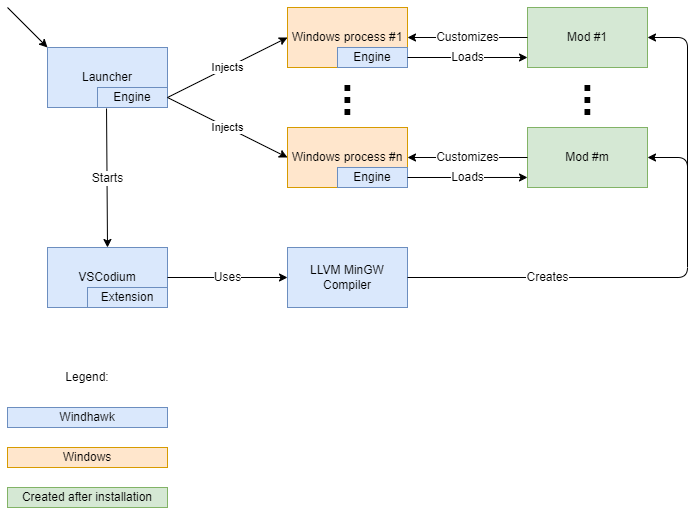
In the repository, the source code is divided into three main components:
windhawk— the system servicewindhawk.exe, as well as 32-bit and 64-bitwindhawk.dlllibraries responsible for global injection and function interception;vscode-windhawk— the interface backend managing mod installation, updates, and configuration;vscode-windhawk-ui— the frontend based on web technologies and the Monaco editor, where mod parameters are configured and code is written.
The engine uses global interception and DLL injection into target processes. When a program covered by modification rules is launched, Windhawk injects its library. This library intercepts Win32 API calls or internal undocumented functions of the application, replacing their behavior with what is described in the mod.
This approach protects the operating system from corruption. Files on disk are not modified, system libraries remain untouched, and sfc /scannow integrity checks do not report errors. If some mod starts failing after a Windows update, you can simply disable it in the interface or boot the system in safe mode.
How Mods are Written
Writing modifications does not require setting up a heavy Visual Studio with all system SDKs. Windhawk downloads the necessary compiler toolchain in the background.
A mod's source code is a C++ file with special metadata in comments, similar to browser userscripts:
// ==WindhawkMod==
// @id              custom-window-title
// @name            Custom Window Title
// @description     Изменяет заголовок окна блокнота
// @version         1.0
// @include         notepad.exe
// ==/WindhawkMod==

#include <windhawk_api.h>

typedef HWND (WINAPI *CreateWindowExW_t)(
    DWORD dwExStyle, LPCWSTR lpClassName, LPCWSTR lpWindowName,
    DWORD dwStyle, int X, int Y, int nWidth, int nHeight,
    HWND hWndParent, HMENU hMenu, HINSTANCE hInstance, LPVOID lpParam
);

CreateWindowExW_t pOriginalCreateWindowExW;

HWND WINAPI Hook_CreateWindowExW(
    DWORD dwExStyle, LPCWSTR lpClassName, LPCWSTR lpWindowName,
    DWORD dwStyle, int X, int Y, int nWidth, int nHeight,
    HWND hWndParent, HMENU hMenu, HINSTANCE hInstance, LPVOID lpParam
) {
    if (lpWindowName && wcscmp(lpWindowName, L"Untitled - Notepad") == 0) {
        lpWindowName = L"Мой кастомный блокнот";
    }
    return pOriginalCreateWindowExW(dwExStyle, lpClassName, lpWindowName, dwStyle, X, Y, nWidth, nHeight, hWndParent, hMenu, hInstance, lpParam);
}

BOOL Wh_ModInit() {
    Wh_Log(L"Инициализация мода");

    HMODULE hUser32 = GetModuleHandle(L"user32.dll");
    void* pCreateWindowExW = (void*)GetProcAddress(hUser32, "CreateWindowExW");

    Wh_SetFunctionHook(pCreateWindowExW, (void*)Hook_CreateWindowExW, (void**)&pOriginalCreateWindowExW);
    return TRUE;
}
The mod is compiled right in the application. The engine monitors file changes and reloads the dynamic library in the target process without needing to restart the operating system.
Practical Benefits
The tool addresses several scenarios that previously required workarounds.
First, fine-tuning of Explorer and taskbar interface. Mods are available for changing taskbar height, hiding unnecessary context menu items, switching tabs with the mouse wheel, and customizing the tray.
Second, fixing annoying behavior of third-party software. If a program lacks a hotkey or its window does not minimize to tray by default, you can write a hook for user32.dll or win32u.dll and redefine window message handling.
Third, it is an excellent base for reverse engineering. If you are studying the internals of Windows applications, Windhawk simplifies experiments with function interception, parameter logging, and hypothesis testing.
Nuances and Limitations
When working with global injection, it is important to consider the specifics of security software. Antivirus programs sometimes react to function interception in system processes, although the project's executables have a valid digital signature.
Writing complex mods for undocumented Explorer interfaces still requires reverse engineering skills and understanding of debugger usage like x64dbg or IDA Pro. Windows interfaces often change from build to build, so authors have to maintain function signatures for different library versions.
Is It Worth Trying
Windhawk has transformed the fragmented world of Windows tweaks into a structured and transparent environment. The project is written in C++ and Rust, distributed under the GPL-3.0 license, and has an active developer community.
If you are missing familiar features in Windows 11, the project is worth installing at least for the ready-made mod catalog. And for C++ developers interested in low-level Win32 API, the repository source code will show many practical techniques for library injection and hooking.
Related projects