Whisper — How OpenAI Makes Speech Recognition Accessible to Everyone
Ever needed to quickly transcribe an audio recording or translate speech on the fly? OpenAI Whisper is exactly the tool that turns these tasks into just a few lines of code. Let's explore why this project has already gathered over 85 thousand stars on GitHub and how it can simplify your audio workflow.
What is Whisper and Why Do You Need It
Whisper is an open-source speech recognition model developed by OpenAI. Unlike many similar solutions, it:
- Supports multiple languages (including Russian)
- Can not only recognize but also translate speech
- Runs locally without sending data to any server
- Available in several variants — from lightweight to high-precision
Key Features
1. Multilingual Speech Recognition
Whisper supports dozens of languages, including English, Russian, Chinese, and many others. You can specify the language or let the model detect it automatically:
whisper audio.wav --language Russian
2. Real-Time Speech Translation
Want to get English text from a Japanese audio recording? Whisper can handle that too:
whisper japanese.wav --model medium --language Japanese --task translate
3. Usage Flexibility
You can choose from six available models depending on your speed and accuracy requirements:
| Model | Parameters | VRAM | Speed |
| Model | Parameters | VRAM | Speed |
|---|---|---|---|
| tiny | 39M | ~1GB | ~10x |
| base | 74M | ~1GB | ~7x |
| small | 244M | ~2GB | ~4x |
| medium | 769M | ~5GB | ~2x |
| large | 1550M | ~10GB | 1x |
| turbo | 809M | ~6GB | ~8x |
How It Works
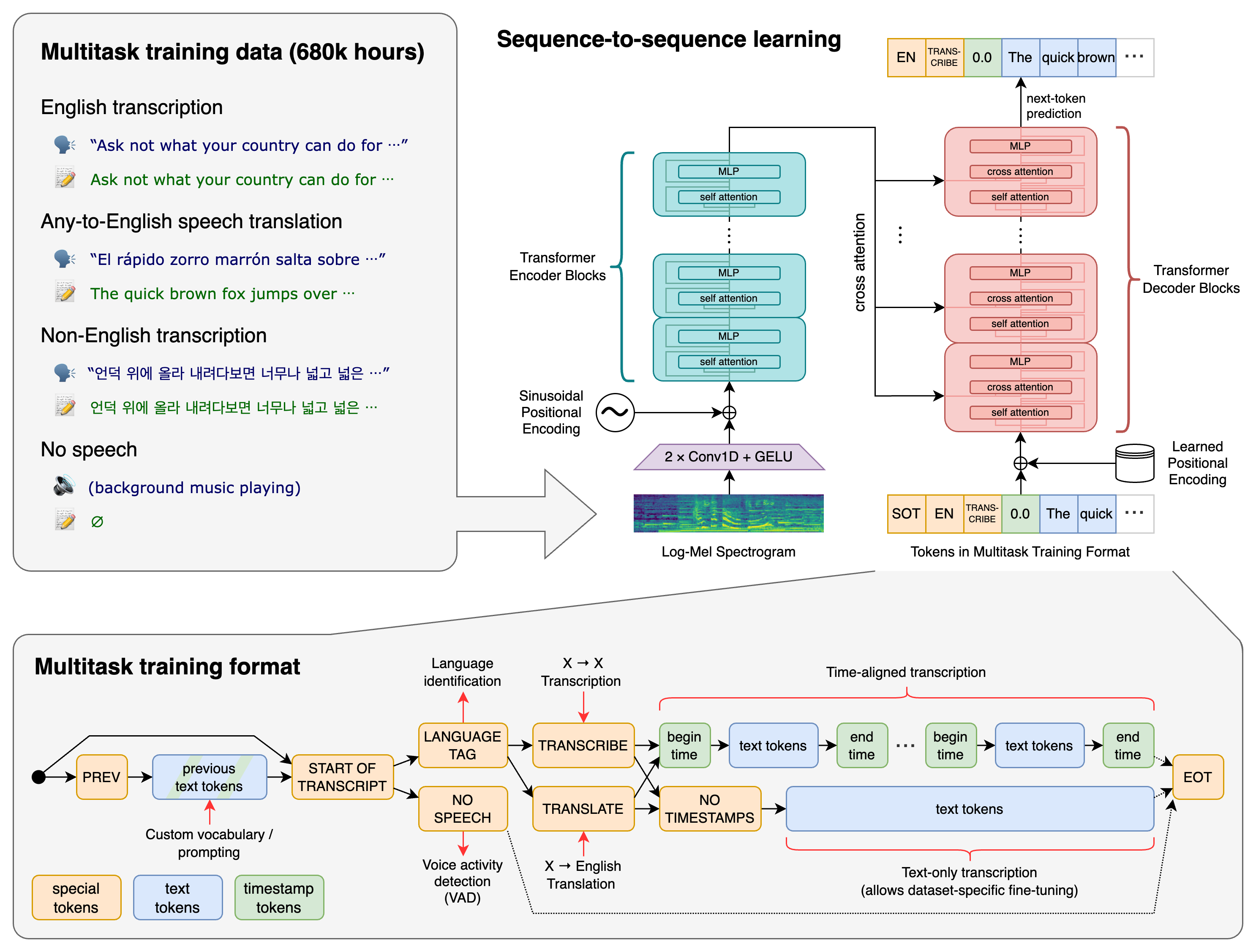
Whisper uses the Transformer architecture familiar from other OpenAI models. The key feature of this approach is combining multiple tasks (recognition, translation, language identification) into a single model using special tokens.
Practical Applications
Here are several scenarios where Whisper can be useful:
- Creating subtitles for videos and podcasts
- Voice notes with automatic transcription
- Multilingual support in applications
- Audio analysis in research projects
- Call center automation and voice input systems
Getting Started with Whisper
Installation is straightforward:
pip install -U openai-whisper
And don't forget ffmpeg:
# Для Ubuntu/Debian
sudo apt update && sudo apt install ffmpeg
Example usage in Python:
import whisper

model = whisper.load_model("base")
result = model.transcribe("audio.mp3")
print(result["text"])
Conclusion: Is It Worth Trying?
Whisper is a powerful yet surprisingly easy-to-use tool. If your application works with audio in any way, it's definitely worth trying to integrate Whisper. It will especially appeal to:
- Voice interface developers
- Educational content creators
- NLP researchers
- Anyone working on multilingual projects
The main advantage of Whisper is that it lets you achieve professional speech recognition results in just a few minutes of work. And given its open-source license, it's an excellent alternative to commercial APIs.
相关项目