Halmak — when AI designs the perfect keyboard layout
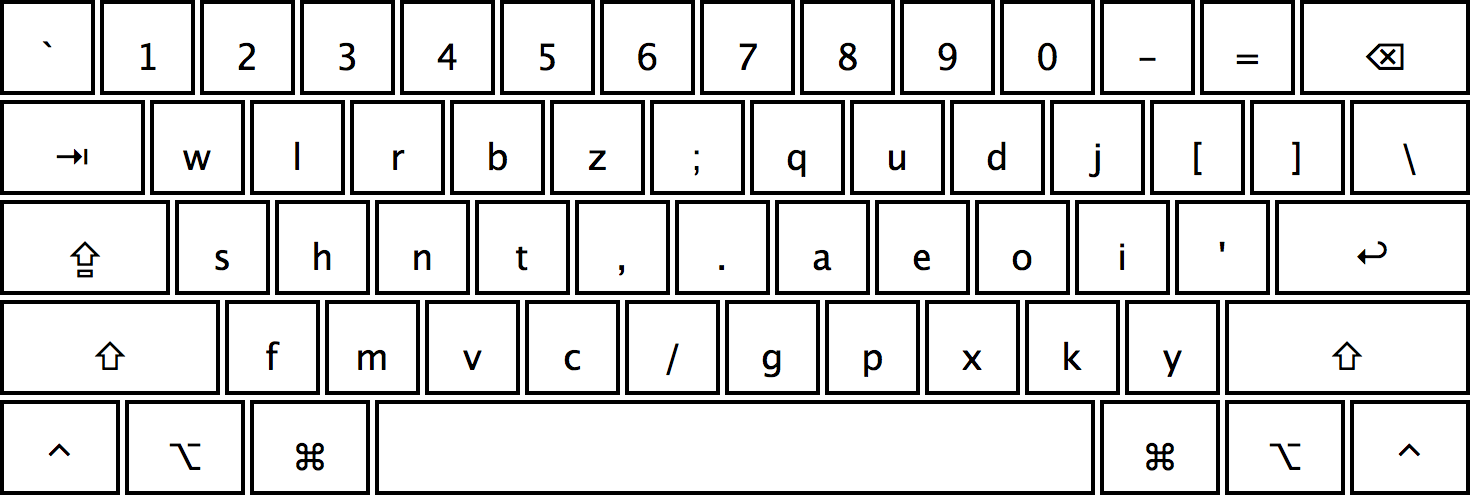
Did you know that the standard QWERTY layout was developed in 1873 to slow down typing on mechanical typewriters? In a century and a half, technology has advanced far ahead, yet we're still using an outdated solution. The Halmak project offers a radically new approach — a layout designed by artificial intelligence for modern English.
Why consider switching your layout?
Developers spend 6-8 hours a day at the keyboard. Minor QWERTY inefficiencies such as:
- Frequent use of weak fingers (e.g., the pinky for the letter A)
- Large distances between frequently used letters
- Uneven workload distribution between hands
...add up to hundreds of unnecessary movements per day. Halmak solves these problems with a scientific approach and machine learning.
How was Halmak created?
The project's author, Nikolay Nemschilov, conducted extensive research within the keyboard-genetics project. The analysis examined:
- Real hand movements during typing
- Letter combination frequency in modern English (especially web content)
- Anatomical characteristics — finger strength, movement comfort
- Ergonomic metrics — travel distance, hand alternation
The results are impressive: compared to QWERTY, Halmak offers:
- +134% efficiency (Dvorak: +77%, Colemak: +84%)
- Minimal finger travel
- Balanced workload for both hands
- Optimal placement for frequent letter combinations
Who will Halmak be especially useful for?
- Developers writing code in English
- Bloggers and technical writers
- Gamers using hotkeys
- Anyone who works extensively with text
How to start using Halmak?
Installation on macOS
git clone https://github.com/MadRabbit/halmak.git
cp Halmak/Halmak.bundle /Library/Keyboard\ Layouts/
After restarting, add the layout in keyboard settings.
Integration with Karabiner Elements
For fine-tuning keys via Karabiner Elements, add to your config:
{"from": { "key_code": "q" }, "to": [{ "key_code": "w" }] },
{"from": { "key_code": "w" }, "to": [{ "key_code": "l" }] }
// ... и так далее для всех клавиш
Learning to type
For practice, you can import the layout into Type Fu — a popular touch typing trainer.
Personal experience of switching
The first few days will be challenging — your brain will stubbornly try to return to QWERTY. But after just 2-3 weeks:
- Typing speed increases by 20-30%
- Hand fatigue decreases
- A pleasant feeling of "flow" emerges while typing
Is it worth switching?
If you:
- Spend 4+ hours a day at the keyboard
- Can tolerate 2-3 weeks of discomfort
- Value ergonomics and efficiency
...then Halmak may become the best working tool you've ever tried. For casual users, it might not be worth the effort.
The project has been developing since 2016, is open source (MIT License), and has an active community of users. Why not make 2024 the year you finally part ways with a relic of the 19th century?
Related projects