Maildrop - Temporary Email Under Your Control
Sound familiar? Need to sign up for a sketchy website but don't want to expose your primary email? Or need to create multiple accounts for testing but email services block bulk registrations? There's a solution – Maildrop, a self-hostable temporary email service.
What's in the box?
Maildrop is a lightweight application that:
- Generates random email addresses on your domain
- Receives incoming emails without setting up a full mail server
- Automatically cleans up old emails
- Allows protecting important mailboxes with a password
The main advantage over public services like Temp-Mail is complete control over your data and no restrictions on the number of addresses.
Key features
-
Flexible address generation
- Random addresses like
[email protected] - Ability to set custom aliases
- Password protection support for individual mailboxes
- Random addresses like
-
Simple interface
- Minimalist web interface without clutter
- View emails directly in the browser
- Automatic email list refresh
-
Ready to use in 5 minutes
- Launch via Docker or native Python script
- Detailed DNS configuration guide
- Flexible configuration parameters via .env file
How does it work technically?
Under the hood, Maildrop uses:
- Flask for the web interface
- Built-in SMTP server for receiving mail
- Simple file-based storage for emails (can be replaced with a database)
The architecture is intentionally kept as simple as possible – it's not a full mail server, but specifically a tool for temporary addresses.
Use cases
-
Safe sandbox Testing new services? Create a unique address for each test – no spam in your main inbox.
-
Development and debugging Need to test email newsletter functionality? Maildrop lets you instantly create dozens of test addresses.
-
Anonymous registrations For forums, temporary accounts, and services where you don't want to expose your primary email.
Setup in 3 steps
- Deploy the server (Docker image or directly via Python)
- Configure DNS records (MX and A records)
- Open port 25 (or use cloud hosting)
Example docker-compose config:
services:
  maildrop:
    image: haileyydev/maildrop:latest
    ports:
      - "5000:5000"
      - "25:25"
    environment:
      - DOMAIN=yourdomain.com
Pros and cons
✅ Full control over temporary email ✅ Simple deployment ✅ Open source (GPLv3)
❌ Requires your own domain ❌ No email encryption ❌ Basic functionality (no search, filters)
Who will find it especially useful?
- Developers testing email functionality
- Power users who care about privacy
- Admins who need a simple way to create many test accounts
Try Maildrop – it might be exactly the tool you've been missing for working with temporary email. And if you find the features lacking, the project is open for improvements – the source code awaits your pull requests!
Project logo:  Interface screenshot: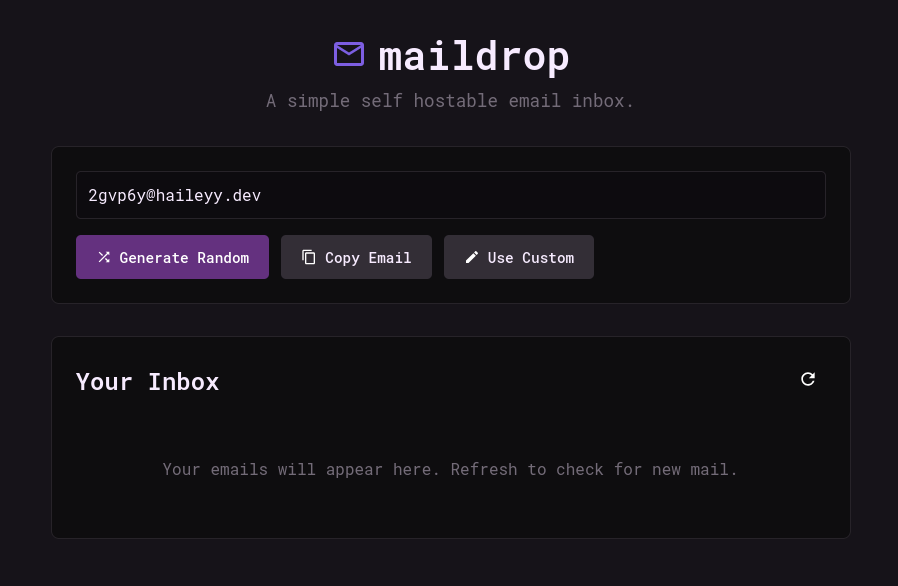
Related projects