Maildrop - E-mail Temporário Sob Seu Controle
Te soa familiar? Precisa se cadastrar em um site suspeito, mas não quer expor seu e-mail principal? Ou precisa criar várias contas para testes, mas os serviços de e-mail bloqueiam registros em massa? Existe uma solução – Maildrop, um serviço de e-mail temporário auto-hospedável.
O que vem na caixa?
O Maildrop é uma aplicação leve que:
- Gera endereços de e-mail aleatórios no seu domínio
- Recebe e-mails recebidos sem configurar um servidor de e-mail completo
- Limpa automaticamente e-mails antigos
- Permite proteger caixas de e-mail importantes com uma senha
A principal vantagem em relação a serviços públicos como o Temp- Mail é o controle total sobre seus dados e a ausência de restrições no número de endereços.
Recursos principais
-
Geração flexível de endereços
- Endereços aleatórios como
[email protected] - Capacidade de definir aliases personalizados
- Suporte a proteção por senha para caixas de correio individuais
- Endereços aleatórios como
-
Interface simples
- Interface web minimalista sem poluição visual
- Visualize e-mails diretamente no navegador
- Atualização automática da lista de e-mails
-
Pronto para uso em 5 minutos
- Inicie via Docker ou script Python nativo
- Guia detalhado de configuração de DNS
- Parâmetros de configuração flexíveis via arquivo .env
Como funciona tecnicamente?
Nos bastidores, o Maildrop utiliza:
- Flask para a interface web
- Servidor SMTP integrado para receber e-mails
- Armazenamento simples baseado em arquivos para e-mails (pode ser substituído por um banco de dados)
A arquitetura é mantida intencionalmente o mais simples possível – não é um servidor de e-mail completo, mas especificamente uma ferramenta para endereços temporários.
Casos de uso
-
Sandbox seguro Testando novos serviços? Crie um endereço único para cada teste – sem spam na sua caixa de entrada principal.
-
Desenvolvimento e depuração Precisa testar a funcionalidade de newsletter por e-mail? O Maildrop permite criar dezenas de endereços de teste instantaneamente.
-
Registros anônimos Para fóruns, contas temporárias e serviços onde você não quer expor seu e-mail principal.
Configuração em 3 passos
- Implemente o servidor (imagem Docker ou diretamente via Python)
- Configure os registros DNS (registros MX e A)
- Abra a porta 25 (ou use hospedagem em nuvem)
Exemplo de configuração docker-compose:
services:
  maildrop:
    image: haileyydev/maildrop:latest
    ports:
      - "5000:5000"
      - "25:25"
    environment:
      - DOMAIN=yourdomain.com
Prós e contras
✅ Controle total sobre e-mail temporário ✅ Implantação simples ✅ Código aberto (GPLv3)
❌ Requer seu próprio domínio ❌ Sem criptografia de e-mail ❌ Funcionalidade básica (sem busca, filtros)
Quem achará especialmente útil?
- Desenvolvedores testando funcionalidade de e-mail
- Usuários avançados que se preocupam com privacidade
- Admins que precisam de uma forma simples de criar muitas contas de teste
Experimente o Maildrop – pode ser exatamente a ferramenta que você estava perdendo para trabalhar com e-mail temporário. E se você achar que os recursos são insuficientes, o projeto está aberto para melhorias – o código-fonte aguarda seus pull requests!
Logo do projeto:  Captura de tela da interface: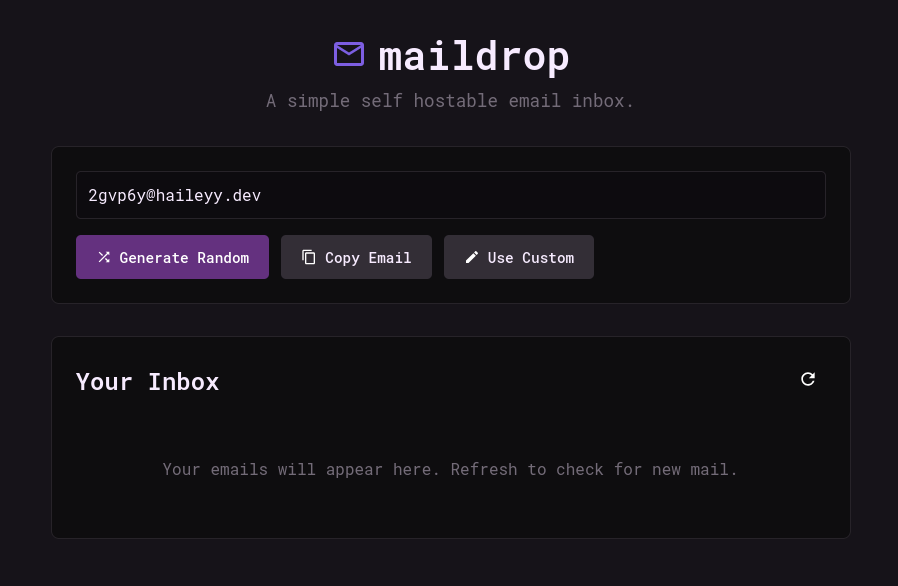
Projetos relacionados