How to Build Clean Documentation Without Gigabytes of node_modules
When you start a new project or maintain a library in a team, the question of basic documentation inevitably comes up. Let's say you don't need a monstrous portal with dynamic routing, reactive components, and hundreds of megabytes of dependencies. You just want to write a few Markdown files, press a button, and get a clean site with tree navigation, search, and mobile adaptation.
Docusaurus or VuePress are common choices in these situations. They're good, but they pull in a whole sea of npm packages. If you want to avoid Node.js in your build pipeline and value lightning-fast generation, it's worth taking a look at the Hugo Book theme by Alexander Shpak.
What this theme is and who it's for
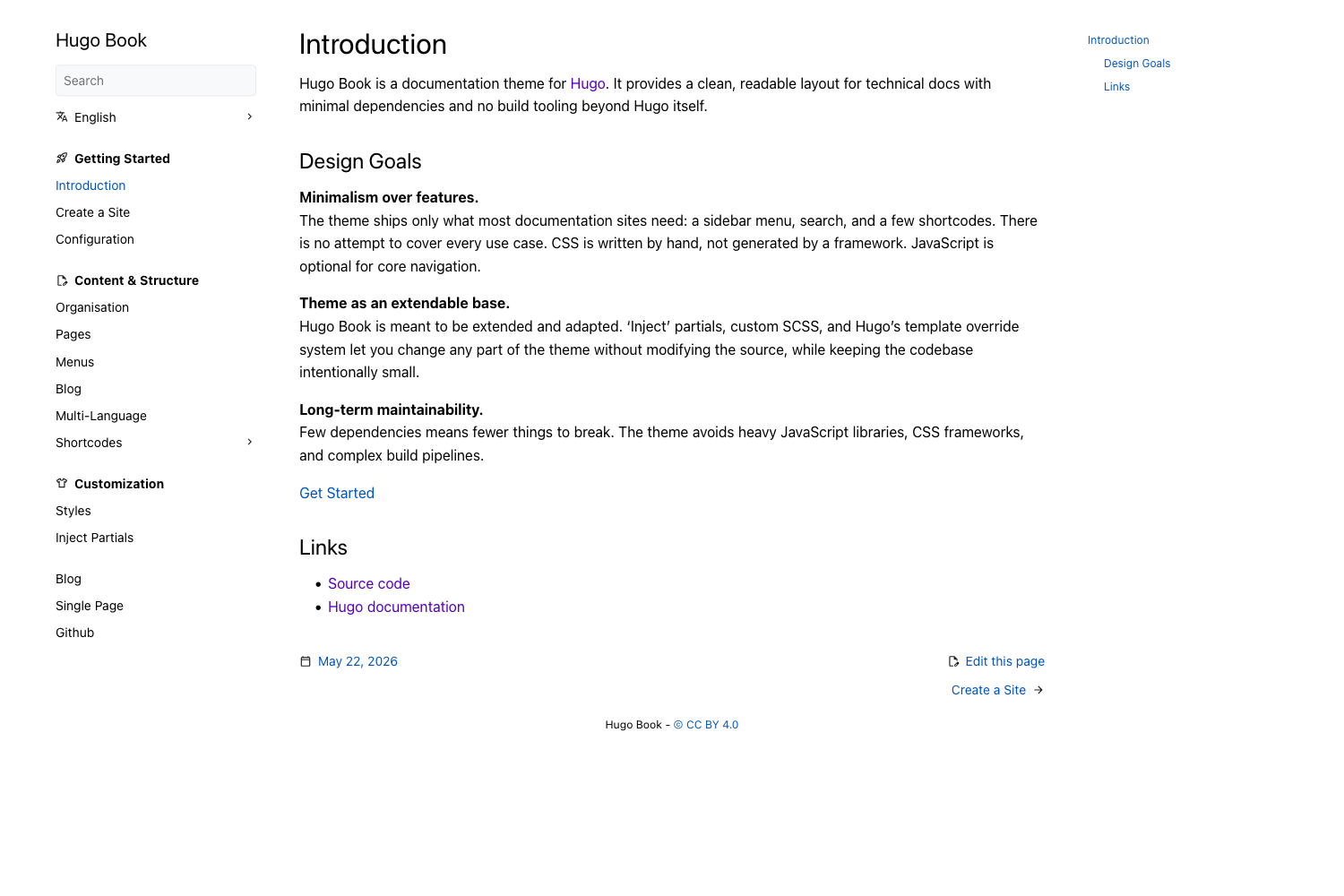
Hugo Book is a minimalist template for the Hugo static site generator, styled like a regular book with a side menu. The project author, Alexander Shpak, had a clear goal: to create a clean design theme that works fast and doesn't force users to spend hours digging through configuration files.
The repository has accumulated over 4,000 stars on GitHub, which is quite respectable for a specialized Hugo theme. The template picks up standard Markdown and automatically builds a tree structure of pages based on folder nesting.
Key features under the hood
Unlike many modern web tools, Hugo Book sticks to a strict diet. The main site functionality works entirely without JavaScript. Mobile menu toggling, expanding nested sections, and tree navigation are all done in pure CSS.
Practical features include:
- Built-in dark theme. It automatically adapts to the operating system's settings, but you can also add a manual toggle.
- Multilingual support out of the box. Hugo can manage parallel folder structures for different languages, and the theme correctly renders a version switcher.
- Convenient built-in shortcodes. For styling notes, warnings, nice buttons, and code tabs, you don't need to invent your own workarounds.
- Built-in search and comments. Search can be implemented via a built-in lightweight script (FlexSearch) or third-party services.
The principle of minimal intervention
The author specifically notes in the project philosophy: the theme should not interfere with user layouts or overload the configuration. To launch a site, you literally don't need to set any specific parameters in config.toml or hugo.toml. The template picks up Hugo's standard content structure.
If you need custom styles, you can override CSS in a couple of lines through a special extension file, without touching the theme's source code. This saves you from maintenance headaches when the theme updates in a few months.
Quick start
You'll need the extended version of Hugo (Hugo extended) version 0.158 or higher installed. The setup process takes two minutes.
The simplest path is to use the ready-made starter repository:
git clone https://github.com/alex-shpak/hugo-book-starter my-docs
cd my-docs
git submodule update --init --remote
hugo server --minify
After starting the local server at http://localhost:1313, a ready-made documentation site will open. When you modify Markdown files, Hugo updates the page in the browser almost instantly. Build time for sites with a couple hundred pages usually doesn't exceed a fraction of a second.
Shortcodes for text layout
Standard Markdown can be too limited when you need to highlight an important note or create columns. Hugo Book has a set of built-in shortcodes.
For example, the hint shortcode is used for nice info blocks:
{{< hint info >}}
Здесь можно написать полезную подсказку для читателя.
{{< /hint >}}

{{< hint warning >}}
А так оформляется предупреждение о возможных ошибках.
{{< /hint >}}
And if you need to show code examples for different operating systems or programming languages, the tabs shortcode comes in handy:
{{< tabs "unique-id" >}}
{{< tab "Linux" >}}
sudo apt install my-tool
{{< /tab >}}
{{< tab "macOS" >}}
brew install my-tool
{{< /tab >}}
{{< /tabs >}}
Versioning approach
The theme is distributed under the MIT license. The author uses incremental versioning (e.g., v0.13.0, v0.14.0). Breaking changes between releases do happen occasionally, so for production it's better to pin to a specific tag rather than stay on the main branch.
Where this comes in handy
The theme is a great fit for:
- Technical documentation for open source libraries
- Internal team knowledge base or corporate Wiki
- Service deployment and API instructions
- Personal engineering blog or note collection
If you need heavy interactivity, 3D graphics directly in the documentation, or deep integration with React components, Hugo Book probably won't fit. In that case, you'd need to look toward Docusaurus or Astro Starlight. But for typical documentation tasks, Hugo Book's simplicity is more than enough.
Pitfalls
With all the advantages, you need to understand the nuances of Hugo's infrastructure. The Go HTML Templates templating engine that underlies Hugo has a specific syntax. If you want to radically rewrite the header or footer structure, you'll need to invest time in learning Go template structure.
Additionally, the search index for local search is generated at build time. For huge sites with tens of thousands of pages, the search file can get hefty, although for typical guides this isn't a problem at all.
The bottom line
Hugo Book is an honest tool without unnecessary gloss. It does exactly what it promises: turns a bunch of folders with Markdown into a fast, clean, and readable site. No npm packages to install, no lengthy builds, and no complex configuration.
Related projects