How to Clone a Terabyte Postgres Database in Ten Seconds

Every backend developer has at least once crashed staging with a botched migration or tested a heavy SQL query on synthetic data of five rows, only to get a deadlock on a table in production for half an hour. Testing on real data volumes is always difficult and expensive: a terabyte database is hard to set up locally, and keeping ten full copies in the cloud for every developer costs a pretty penny.
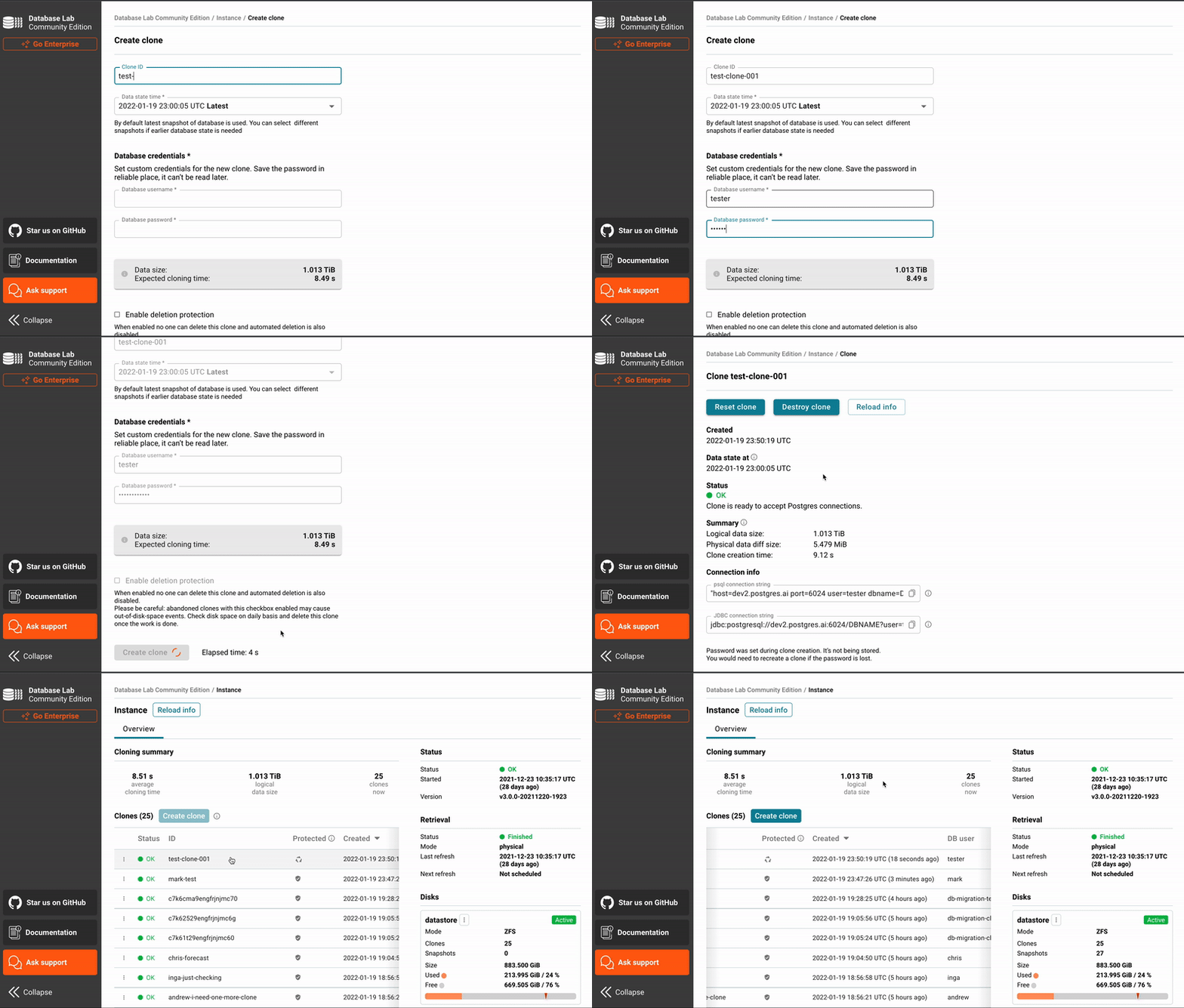
Engineers from Postgres.ai solve this problem with the Database Lab Engine (DBLab) utility. The project enables thin clones of Postgres databases of any size in literally seconds, without consuming terabytes of disk per clone.
Under the Hood
All the magic of thin cloning relies on the Copy-on-Write (CoW) mechanism. By default, DBLab uses the ZFS filesystem, but can also work via LVM.
The scheme is straightforward:
- The engine keeps an up-to-date base snapshot of the data (PGDATA), synchronized with the primary database via replication, dumps, or physical backups (WAL-G, pgBackRest).
- When a developer or CI pipeline needs a database instance, DBLab creates a snapshot and spins up an isolated Postgres in a Docker container.
- All write operations go into a separate CoW layer. Base files remain unchanged, which is why cloning 1 TB of data takes about 10 seconds and requires just a few megabytes of disk space at the start.
You can run dozens of such independent databases on a single server, and developers can safely run DROP TABLE or execute destructive migrations without risking breaking anything for their colleagues.
What DBLab Can Do
The repository includes a foundation for automating work with data snapshots:
- Database branching. You can switch between different branches and timestamps, roll back changes with the
resetcommand, and return to any desired state. - Support for PostgreSQL versions 10 through 18, including popular extensions like pgvector and HypoPG.
- Built-in protection mechanisms: automatic deletion of old unused clones by timeout and retention policies for snapshots.
- Integration with managed cloud databases. If you're on AWS RDS, GCP Cloud SQL, or Supabase where there's no direct filesystem access, DBLab can be deployed on a separate virtual machine alongside and configured for periodic auto-updates of data.
- Ready-made management interfaces: REST API, the dblab CLI console utility, and a web interface.
Practical Scenarios
Testing Migrations in CI/CD
Before rolling out a release, the pipeline spins up a fresh clone of the real production database, applies the migration, and measures execution time and locks. If the migration takes an exclusive lock on a heavy table or fails with an error, the pipeline immediately signals this. After the test, the clone is instantly deleted.
Testing Complex SQL Queries and Hypotheses
Optimizing a slow query on an empty database is pointless: the Postgres planner chooses completely different execution plans for 10 rows versus 10 million rows. A clone in DBLab gives you an honest EXPLAIN (ANALYZE, BUFFERS) on production-scale data without the risk of overloading the live database.
Testing Code from LLMs
If you ask an AI to generate a complex analytical query or data schema, there's a good chance you'll get a hallucination. A clone provides an isolated sandbox where you can quickly run the generated code and verify its correctness.
Who This Project Is For
If your project database is a couple of gigabytes, setting up infrastructure with ZFS and DBLab is probably overkill—just use a regular dump.
But if Postgres has grown to hundreds of gigabytes or terabytes, and your team spends hours on manual test environment preparation and fears every migration, the Database Lab Engine will save a lot of nerves and money on cloud infrastructure.
The engine's source code is open under the Apache 2.0 license. You can try the Community version on your own server following the official guide in the documentation, or test the public demo at demo.dblab.dev.
Progetti correlati