How to Set Up Your Own Mail Server with Docker Without Going Insane

Every system administrator or developer has tried to set up their own mail server from scratch at least once in their lifetime. Usually, this experience leaves deep emotional scars. You install Postfix, hook up Dovecot, configure MySQL for storing users, then struggle with SpamAssassin, set up OpenDKIM, generate certificates, and rack your brain over SPF and DMARC. After a week of suffering, emails still end up in spam on Gmail, and the configs turn into an unreadable mess.
When I needed to set up mail for a couple of pet projects and a small team's domain again, I didn't want to assemble a Frankenstein manually. Paying extra for corporate Google Workspace or Yandex 360 subscriptions wasn't in the plans either. That's how I stumbled upon Mailu — a project that packaged the entire mail server gentlemanly set into neat Docker containers.
What is Mailu
Mailu positions itself as an isolated mail distribution based on Docker. The project has existed since 2016, gathered almost 7.5 thousand stars on GitHub, and is actively maintained.
The main idea is simple: provide a ready-to-use server that deploys in ten minutes via docker-compose, but without dragging along unnecessary bloat. Unlike heavyweight all-in-one solutions like Zimbra or Nextcloud, Mailu does exactly one thing — reliably receives, filters, and sends mail. There's no proprietary code, trackers, or hidden paid features inside. All components are open and distributed under a free license.
What's Under the Hood
The project architecture is modular. Instead of one huge container, Mailu is split into a dozen microservices, each responsible for its own area:
- Nginx frontend handling web traffic and redirecting mail ports
- Dovecot for IMAP and POP3 protocol support
- Postfix as the SMTP server
- Rspamd for spam protection, automatic learning, and reputation checking
- ClamAV for scanning incoming attachments for viruses
- A control panel built with Python and Flask
- Several web clients to choose from, including Roundcube and Snappymail
All these containers communicate through Docker's internal network, and data (emails, user databases, keys) is stored in mounted volumes.
Key Features
Security and Deliverability Without Manual Tedium
In mail, the hardest part isn't receiving a message — it's sending it so the recipient's mail services don't dump it in spam. Mailu handles security configuration for you:
- Automatically issues and renews free TLS certificates via Let's Encrypt
- Generates DKIM keys right in the admin panel and suggests correct TXT records for DNS
- Supports modern delivery protection protocols, including DANE and MTA-STS
- Protects the web interface with Snuffleupagus (a security patch for PHP)
Convenient Admin Panel and Multi-Domain Support
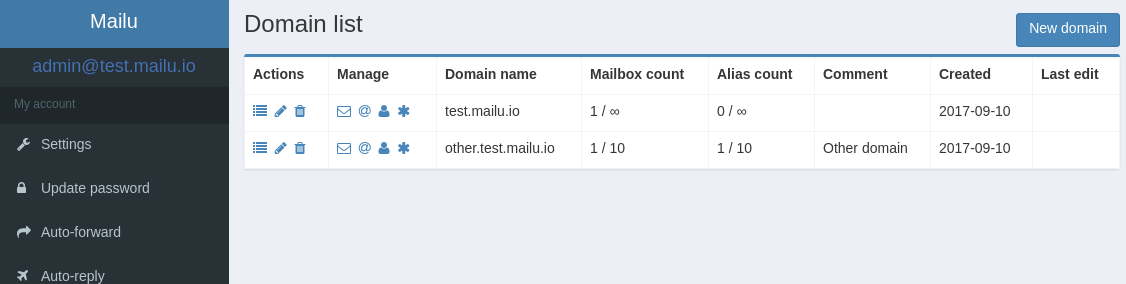
Through the web interface, the administrator creates domains, sets up mailboxes, configures aliases and temporary addresses. A nice detail: you can delegate administration of a specific domain to another person. For example, you host the server but hand over mailbox management to the client's own manager.
Here you can also set disk space quotas for each user, global announcements, and forwarding rules.
Ready-Made Web Clients and Auto-Configuration
Users don't necessarily need to install mail clients on their phone or computer. The package includes the classic Roundcube and lightweight Snappymail.
If someone prefers Thunderbird, Apple Mail, or Outlook, the server provides standard auto-configuration profiles. The user just needs to enter their login and password, and the client will automatically pull in the correct ports and encryption protocols.
Smart Filters and Mail Fetching
Mailu supports ManageSieve. This means users can set up sorting rules, vacation auto-replies, and email forwarding directly from the web client. There's also a built-in fetchmail that collects mail from external third-party accounts and deposits it into your local account.
How to Launch
The developers made an excellent web configuration generator on the official website setup.mailu.io. You simply check off the needed components (which web client to install, whether you need antivirus, which database), specify the server's domain name, and get a ready archive with two files: mailu.env and docker-compose.yml.
After that, launching comes down to three commands in the terminal:
# Переходим в директорию с конфигами
cd /mailu

# Скачиваем образы и запускаем сервисы в фоне
docker compose up -d

# Создаем первого администратора
docker compose exec admin flask mailu admin admin example.com 'ВашСложныйПароль'
Then you just need to go to the control panel, add DNS records at your registrar (MX, SPF, DKIM, DMARC), and the server is ready for full operation.
Pitfalls
No matter how convenient the software is, it doesn't cancel the physics of mail protocols. Before deploying, keep a couple of things in mind:
- RAM consumption. If you enable ClamAV, the server needs at least 3-4 GB of RAM. Antivirus databases are heavy. If you have a weak VPS with 1 GB RAM, you'll have to disable antivirus in settings, leaving only Rspamd.
- IP address cleanliness. Hosting providers often give out addresses with a bad history. Before launching, definitely check the server's IP against blacklists (DNSBL) and set up rDNS (PTR record) through hosting support, otherwise emails won't reach Gmail and Outlook.
- Port 25. Many cloud providers block outbound port 25 by default to combat spammers. Make sure your host allows it to be opened.
Who This Project Is For
Mailu is an excellent choice for web development studios, small companies, and self-hosting enthusiasts. It covers 99% of corporate mail needs, doesn't require hours of manual Postfix config tweaking, and updates with a simple docker compose pull.
If you're tired of constantly rising prices for third-party mail services for domains, or you want to keep your correspondence under your complete control, deploy a Mailu demo. Chances are, you'll never want to go back to manually assembling mail servers again.
Progetti correlati