Managing Traefik from the Browser Without Manual YAML Editing
If you actively use Traefik as a reverse proxy in your home lab or on production servers, you're probably familiar with its main limitation. The built-in dashboard looks nice, but it's completely static. You can view the list of routes, but you can't add a new domain or tweak a middleware directly from the browser. You have to open a terminal, connect via SSH, and edit YAML files. A misplaced space — and all your traffic comes to a halt.
A developer under the nickname chr0n6 encountered this problem and created the Traefik Manager project. It's a web panel for visual management of the router, which frees you from having to dive into a text editor late at night.
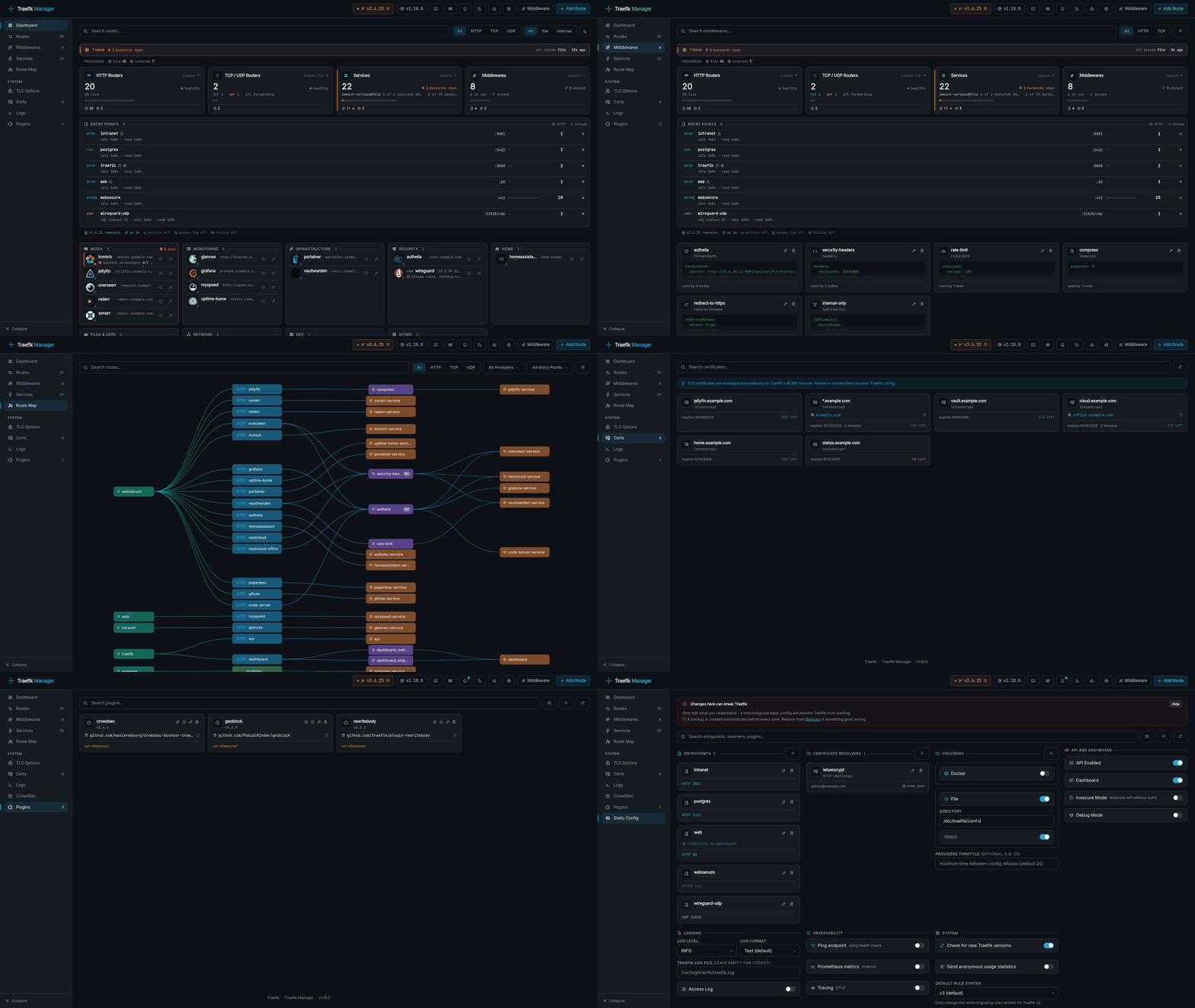
Why Replace Familiar File Editing with a Web Interface
All of Traefik's logic is built around the concepts of Routes, Services, and Middlewares. When you have more than a dozen services, maintaining dynamic configuration turns into a routine chore.
Traefik Manager offers a visual builder for creating and editing dynamic configuration files. The tool doesn't just generate YAML from scratch — it uses the ruamel.yaml library. This means that manual comments and Go templates inside files won't be overwritten when saving from the UI.
The interface handles several common Traefik administration tasks:
- HTTP, TCP, and UDP route builder with support for complex rules like PathPrefix or HostRegexp.
- Ready-made presets for popular media servers like Jellyfin, Plex, and Emby, which configure the correct security headers and streaming parameters in one click.
- TLS certificate management with expiration date display.
- Built-in Monaco Editor with syntax highlighting for cases when you need to write an uncommon or custom rule.
Middleware Setup Wizards Without Reading Documentation
The nicest detail of the project is the step-by-step wizards for Middlewares. Instead of searching the Traefik documentation every time for the exact syntax of authorization headers or request rate limiting, you select the needed scenario from 24 ready-made wizards.
Among the supported scenarios:
- Basic and Digest authorization.
- Forward Auth configuration for working with Authentik, Authelia, and Gatekeeper.
- OIDC / SSO configuration.
- Rate limiting and IP allowlists.
- URL prefix replacement, removal, or addition.
Each wizard asks clear questions in a form and then generates the appropriate section in the file. If you use proxying through Cloudflare or another external service, the utility will suggest how to properly configure trusted hops depth so that client IP addresses don't get lost along the way.
Change Rollback and Automatic Git Backup
The main fear when changing proxy settings is accidentally breaking access to the proxy itself. Traefik Manager has protection against this scenario built in.
Before each file save, the system makes a targeted local backup with a timestamp. If something goes wrong, you can restore the previous working version with the press of a button.
For those who prefer storing configuration in repositories, there's a built-in Git auto-push mechanism. You can link GitHub, GitLab, Gitea, or Forgejo. After any changes, the panel automatically commits and pushes to the branch. There's a history viewer with a visual diff comparison right in the interface, so you can always see who and when changed the configuration.
Managing Multiple Servers via Agent
If you don't have just one server but an infrastructure of multiple hosts, you won't need to deploy and open a separate panel on each one.
The project includes Traefik Manager Agent (TMA), written in Go. You install it alongside Traefik on a remote machine, generate an API key, and connect it to the central interface. A server switcher appears at the top of the panel. Through it, you can view logs, modify routes, and roll back configurations on any of the connected hosts.
What's more, the agent doesn't even need direct Git settings — the main server can fetch their configurations and save them to separate branches of your repository.
Monitoring, CrowdSec, and Security
The panel isn't limited to creating files. It can collect and display live analytics.
The monitoring tab shows the status of all services, the proxy version, and active entry points. It also displays warnings about discovered vulnerabilities (CVEs) that affect your specific Traefik version. This helps you keep the container up to date in time.
If CrowdSec is running on the server, the panel connects to its LAPI. From the browser, you'll be able to see the list of blocked addresses, unblock specific IPs, or forcibly route suspicious traffic through a captcha.
From a security standpoint for the panel itself, everything is well thought out:
- Authorization via bcrypt and TOTP two-factor authentication.
- OIDC support for logging in through a company-wide single account.
- Built-in protection against CSRF, session attacks, and rate limiting.
- Tokens for the mobile app, which deserves a special mention.
The developer also released a mobile client for Android (React Native) that works via API keys. From your phone, it's convenient to quickly disable a failing route or check service status on the go.
Quick Start
You can launch the panel with literally one command via the official installation script or using a standard Compose file.
Example minimal docker-compose.yml:
services:
  traefik-manager:
    image: ghcr.io/chr0nzz/traefik-manager:latest
    container_name: traefik-manager
    restart: unless-stopped
    ports:
      - "5000:5000"
    environment:
      - COOKIE_SECURE=false
    volumes:
      - /path/to/traefik/dynamic.yml:/app/config/dynamic.yml
      - /path/to/traefik-manager/config:/app/config
      - /path/to/traefik-manager/backups:/app/backups
After running docker compose up -d, you navigate to http://localhost:5000 and go through a short initial setup wizard.
Under the Hood
The project architecture is simple and reliable. The backend is written in Python 3.11 and Flask with a Gunicorn server. The frontend got by without heavy frameworks: plain JavaScript, Tailwind CSS for layout, Phosphor icons, and the Monaco editor.
All JS and CSS resources are bundled directly into the Docker image, so the panel works standalone and doesn't make any requests to external CDNs during operation.
Summary
Traefik Manager addresses a long-overdue need in the community. The tool is suitable for home lab owners, small teams, and system administrators who are tired of manually editing YAML files.
If your Traefik serves more than five services or you manage multiple nodes, the project is definitely worth testing. The convenient middleware setup wizards and built-in change rollback will save a lot of time when configuring your network.
Related projects