WiFiAnalyzer — Decode Your Wi-Fi and Speed Up Your Internet on Android
Sound familiar? You're sitting at home or in the office, trying to watch a video, play an online game, or just load work documents, and the internet is frustratingly "lagging." It seems like your provider promises gigabits, the router is brand new, yet nothing works. In most cases, the problem isn't with the internet itself, but with your wireless network: overloaded channels, weak signal, interference from neighbors. And this is where WiFiAnalyzer comes on stage — a true Swiss Army knife for diagnosing your wireless network right from your Android smartphone.
What Is This Tool and Who Is It For?
WiFiAnalyzer is not just another Wi-Fi scanning app. It's a full-fledged analyzer that turns your Android smartphone into a powerful tool for monitoring and optimizing wireless infrastructure. Imagine having a miniature radio lab always in your pocket.

Who needs this? Pretty much anyone dealing with Wi-Fi problems:
- Regular users who are tired of lag and want to get the most out of their router.
- Network engineers and IT professionals for quick on-site network diagnostics and optimization.
- Developers of IoT devices or smart home systems to understand how their gadgets interact with Wi-Fi.
And most importantly: this is an open-source project, completely free, with no ads, and — very important in this day and age — it doesn't require internet access to work. Your privacy is well protected, and no data is sent anywhere. You can install it from Google Play, F-Droid, or directly from GitHub.
Five Features That Will Change How You See Wi-Fi
Let's dive into the most interesting capabilities that WiFiAnalyzer offers. This isn't just a list — these are real scenarios where these features will save your day.
1. Signal Strength Visualization: Seeing the Invisible
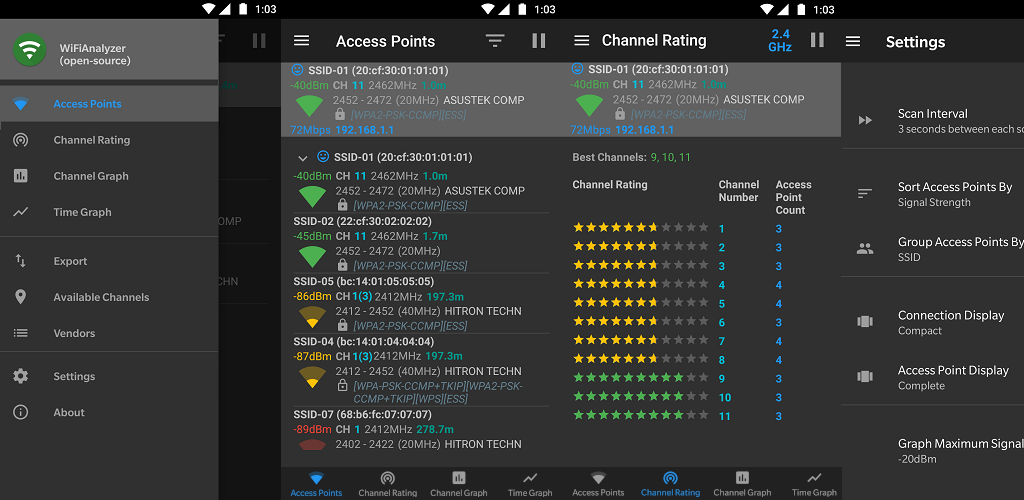
Imagine being able to see the radio waves that permeate your apartment or office. WiFiAnalyzer does something similar by displaying the signal strength of all available access points as clear graphs. You can see how your router's signal (and your neighbors' routers!) is distributed across 2.4, 5, and even 6 GHz channels, as well as track signal strength changes over time. This is invaluable for finding "dead zones" and optimal router placement.
2. Smart Channel Selection: Goodbye, Overload!
One of the most common causes of slow Wi-Fi is an overloaded channel. In apartment buildings or offices, neighboring routers often operate on the same channels, creating interference. WiFiAnalyzer analyzes the load on each channel and recommends the best option with the least interference. No more guessing which channel to choose — the app does it for you!
3. Support for the Latest Standards: Looking Ahead to Wi-Fi's Future
Network technologies are evolving, and WiFiAnalyzer keeps pace. The app supports HT/VHT (High Throughput / Very High Throughput) detection, allowing you to determine if your access points operate in 40/80/160/320 MHz modes. Additionally, it works with 2.4 GHz, 5 GHz, and even the newest 6 GHz band (Wi-Fi 6E/7), if your device and equipment support these frequencies. This means you'll always know your network's capabilities.
4. Access Point Distance Estimation: Almost Like a Locator
An interesting, albeit approximate, feature is calculating the approximate distance to an access point. Of course, it's not a laser rangefinder, and many factors affect accuracy (walls, interference), but for a general understanding of network coverage and problem areas, this feature is quite useful. It helps explain why the signal is great in one room but barely alive in another.
5. Filters and Data Export: For Perfectionists and Analysts
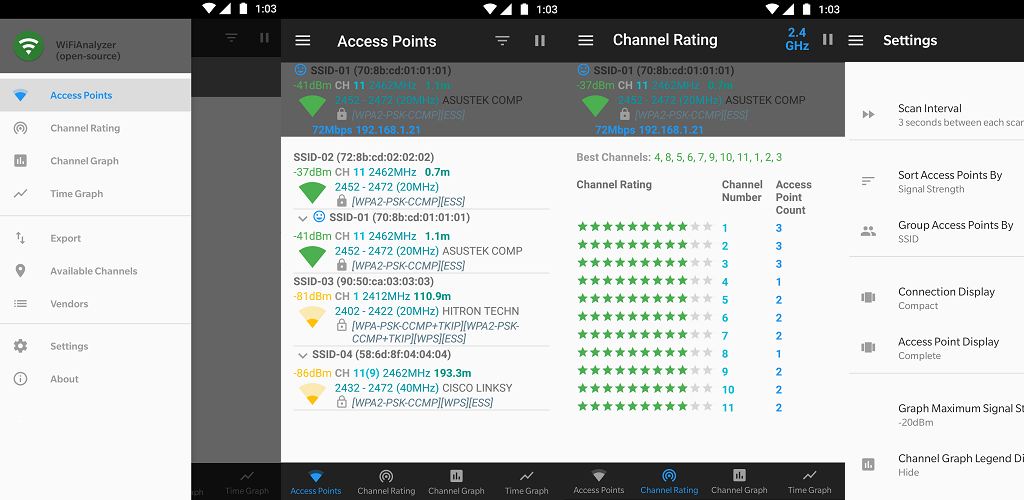
WiFiAnalyzer offers flexible filters by Wi-Fi band, signal strength, security type, and even SSID (network name). This lets you focus only on the data you need, filtering out unnecessary "noise." And if you need raw data for further analysis or documentation, the app allows you to export access point details. Convenient for creating reports or deep debugging.
Under the Hood: What Developers Will Appreciate
As a tech journalist, I can't overlook the technical side of the project. WiFiAnalyzer is written in Kotlin — a modern and beloved language for Android development. The project is fully open, allowing anyone to study the source code, suggest improvements, or find interesting implementations.
Developers actively use GitHub Actions for CI/CD, which speaks to the high quality of the development process. Automated code checks, linting, unit tests with coverage, and instrumentation tests on an emulator — all of this ensures the app's stability and reliability. If you're interested in modern Android development approaches, this repository is an excellent example to study.
For example, to check Kotlin code style, the following command is used:
./gradlew ktlintCheck
And to run all unit tests:
./gradlew testDebugUnitTest
And as I mentioned earlier, the lack of internet access request isn't just a feature — it's a privacy philosophy built into the app's architecture. In an age when apps constantly send something "upstream," this approach is admirable.
Where It Comes in Handy in Real Life
- At home: Optimize your home network. Find the best channel for streaming 4K video or online gaming. Eliminate "dead zones" by repositioning your router or adding a repeater in the optimal location, guided by signal strength readings.
- In the office: Quickly diagnose corporate Wi-Fi issues. Identify sources of interference from neighboring offices. Help plan the placement of new access points for maximum coverage and performance.
- For the curious: Explore how networks around you work. Understand what standards your neighbors use, which channels are most congested in your area (without any malicious intent, of course!).
- For developers: When debugging wireless IoT devices where knowing the signal quality at the installation location is important, WiFiAnalyzer can become an indispensable helper.
Verdict: Is It Worth Trying?
Absolutely yes! If you've ever faced Wi-Fi problems or simply want to better understand how your wireless network works, WiFiAnalyzer is what you need. It's a powerful yet intuitive tool that:
- Is free and ad-free.
- Is fully open-source and privacy-focused (doesn't require internet access).
- Offers rich functionality for analysis and optimization.
It will help you not only understand why the internet "lags" but also provide concrete recommendations for improving the situation. Try it, and I'm confident you'll look at your Wi-Fi in a whole new way. And if you're a developer who wants to contribute to a truly useful and open project, the WiFiAnalyzer community is always happy to welcome new contributors!
Related projects