TermPair — Terminal in de Browser met Volledige Gegevensbescherming
Stel je deze situatie voor: je moet een collega helpen met het configureren van een server, maar elk stapje telefonisch uitleggen is tijdrovend en inefficiënt. Of je wilt een command-line demonstratie geven voor je team, maar screenshots vangen de workflow-dynamiek niet. Dit is precies het soort probleem dat TermPair oplost — een tool voor veilige ekste terminaltoegang rechtstreeks vanuit de browser.
Wat kan TermPair doen?
TermPair is een Python-hulpprogramma dat een veilige brug creëert tussen je terminal en een webbrowser. Hier is wat het bijzonder maakt:
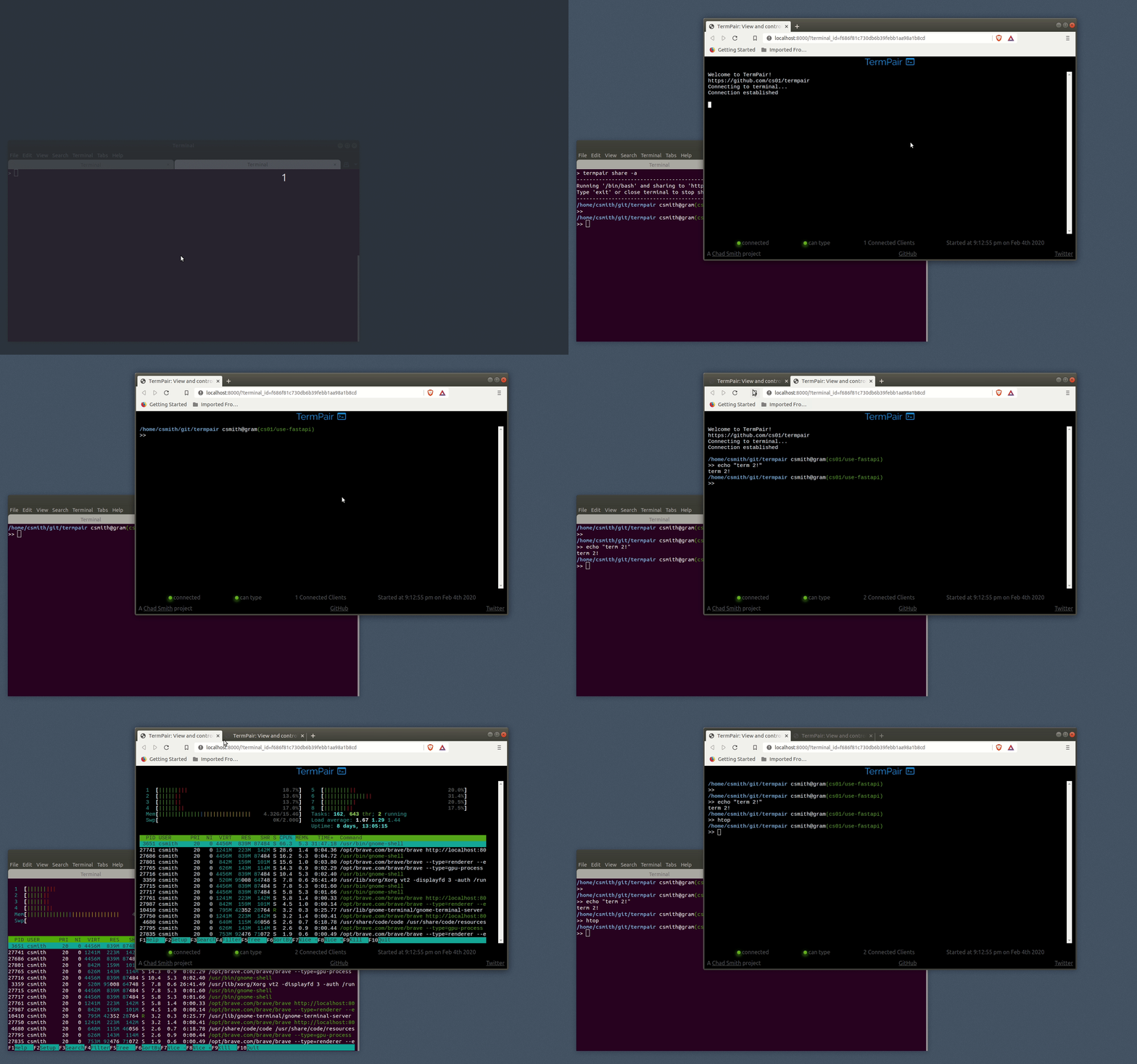
- Realtime: alle terminalacties worden onmiddellijk weergegeven in de browser
- Bidirectionele interactie: je kunt niet alleen kijken maar ook opdrachten invoeren
- Groepstoegang: meerdere gebruikers kunnen verbinden met één sessie
- Flexibele permissie-instellingen: alleen-lezen toegang of volledige controle
- Complete beveiliging: AES-128 end-to-end versleuteling (de server ziet je gegevens niet)
Hoe werkt het technisch?
De TermPair-architectuur bestaat uit drie componenten:
- Server — routeert versleutelde gegevens tussen de terminal en browsers
- Terminalclient — start een sessie en versleutelt gegevens voordat ze worden verzonden
- Webapplicatie — toont de terminal in de browser en verzendt gebruikersinvoer
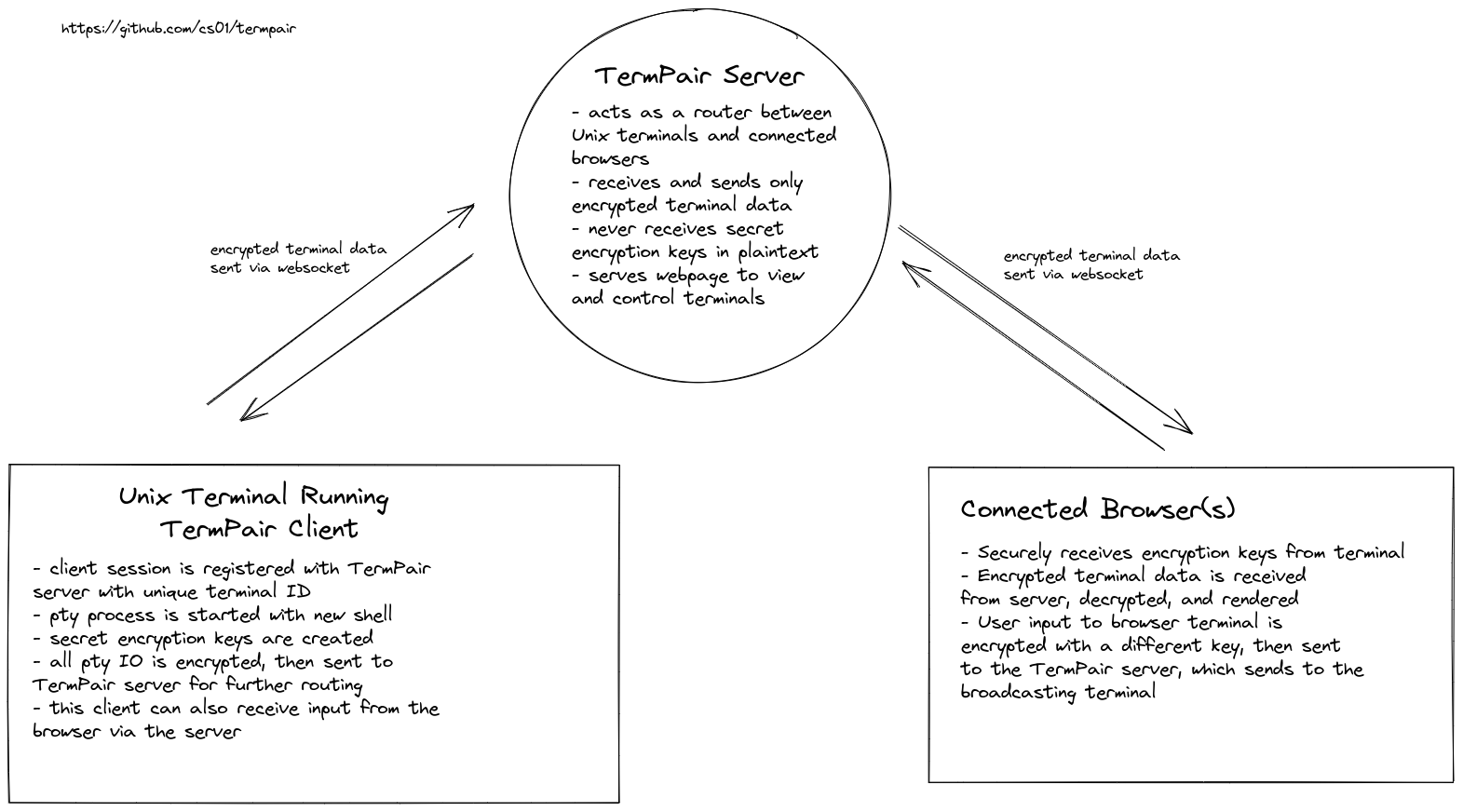
Versleuteling wordt op drie niveaus geïmplementeerd:
- Voor terminaloutput
- Voor browserinvoer
- "Bootstrapping"-sleutel voor initiële verbinding
Sleutels worden automatisch geroteerd na één miljoen berichten, en initialisatievectoren herhalen nooit.
Praktische toepassingen
TermPair is vooral nuttig in de volgende scenario's:
- Ekste ondersteuning: help een collega met het configureren van hun omgeving
- Demonstraties: toon CLI-gebruik op een meetup of webinar
- Training: leg Linux-commando's uit aan beginners in realtime
- Collaboratief debuggen: meerdere ontwikkelaars kunnen samenwerken aan een probleem
- Monitoring: observeer langlopende processen vanaf elk apparaat
Hoe begin je ermee?
Installatie is eenvoudig:
# Рекомендуемый способ через pipx
pipx install termpair

# Или через pip
pip install termpair
De server starten:
termpair serve
Een sessie starten voor gedeelde toegang:
termpair share
Daarna krijg je een unieke link die je naar collega's kunt sturen. Ze kunnen dan via de browser verbinden met je terminal.
Beveiliging voorop
TermPair gebruikt meerdere beschermingslagen:
- Gegevens worden versleuteld op de client voordat ze worden verzonden
- De server fungeert alleen als router
- Optie om de webapplicatie zelf te hosten
- HTTPS-verbinding vereist
Voor de beveiligingsbewuste (op een goede manier) is er een optie om het webgedeelte zelf te bouwen en te hosten op GitHub Pages of een andere hostingprovider.
Conclusie: is het de moeite waard?
TermPair biedt:
✅ Eenvoudige installatie en gebruik ✅ Volledige terminaltoegang vanuit de browser ✅ Betrouwbare versleuteling van verzonden gegevens ✅ Flexibele toegangsinstellingen
Vooral aanbevolen voor:
- DevOps-engineers voor ekste ondersteuning
- Instructeurs die commandoregelwerk onderwijzen
- Teams die met serverapplicaties werken
Probeer de demo nu: https://chadsmith.dev/termpair of installeer TermPair en ervaar de vrijheid van ekste terminalwerk.
Gerelateerde projecten