How to Turn Room Photos into Clean 3D Meshes with Textures, No Mess or Holes
If you've tried reconstructing interiors with classical photogrammetry or via NeRF and Gaussian Splatting, you know their weak spots. Photogrammetry regularly breaks on white walls and glossy tables, producing holes in the mesh. Gaussians give a beautiful viewport picture, but extracting a proper polygonal mesh with PBR materials for Unreal Engine or Blender is still agonizingly difficult.
Researchers from the Technical University of Munich (TUM) and Huawei released GenRecon, a project that tries to solve the problem differently. They combined generative 3D object models with scene reconstruction.
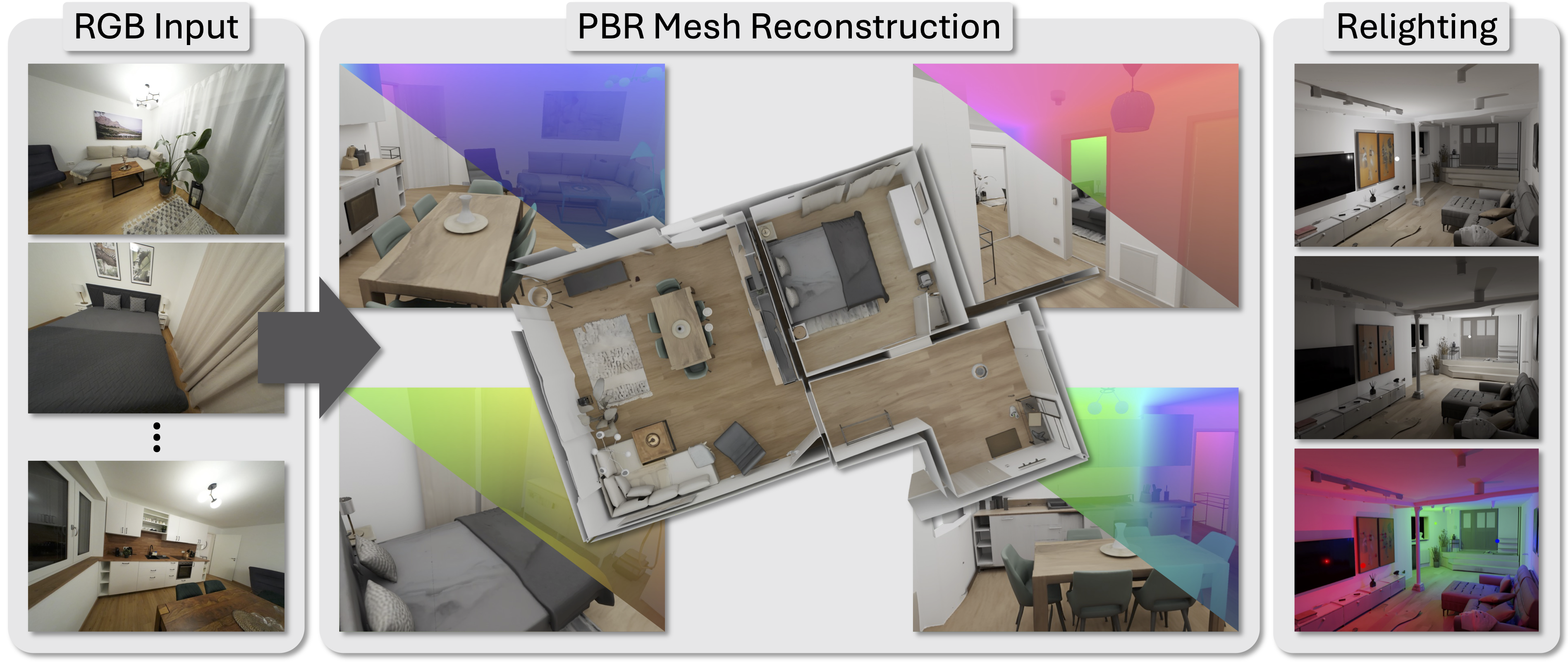
The Idea
Instead of building geometry from scratch based on pixel matching, the authors took Microsoft's generative model TRELLIS.2. On its own, TRELLIS can generate high-quality isolated 3D objects from images. But you can't apply it directly to a whole room: the resolution and context aren't sufficient.
GenRecon divides the room space into overlapping spatial chunks (cubes). For each chunk, the network projects features from camera images directly into 3D space and feeds them into a generative diffusion pipeline.
The model knows what chairs, sofas, walls, and cabinets usually look like. So in places where photos show glare or missing angles, the generator carefully reconstructs correct geometry and materials. In the authors' tests, geometry accuracy improved by 16% compared to standard methods.
How the Pipeline Works
The generation process is split into three stages:
- Sparse Structure (SS). The model determines the overall coarse structure and voxel occupancy in the chunk space.
- Shape SLat. The generator refines smooth surface geometry through latent representations (Structured Latents).
- Texture SLat. PBR textures are applied to the geometry, taking into account lighting and original photos.
After that, all chunks are stitched together, and a separate script bakes the result into a single scene.glb file with proper texture maps. The mesh is immediately ready for import into any game engine or 3D editor.
What You Need to Run It
The build is demanding. You'll need a recent version of PyTorch, CUDA 12.x, and a GPU with Ampere architecture or newer (RTX 3090, 4090, A100), since Flash-Attention and a bunch of custom CUDA extensions run under the hood.
Clone the repository with submodules:
git clone -b main https://github.com/kasothaphie/GenRecon.git --recursive
cd GenRecon
For environment setup, the developers provided an setup.sh script. Before running, set the paths to CUDA and chip architecture:
export CUDA_HOME=/usr/local/cuda
export TORCH_CUDA_ARCH_LIST="8.9" # укажите свою архитектуру, например 8.9 для RTX 4090
. ./setup.sh --new-env --basic --flash-attn --nvdiffrast --nvdiffrec --cumesh --o-voxel --flexgemm
If the script stumbles on compiling flash-attn, the authors suggest installing a pre-built binary wheel from Dao-AILab releases for your Python and PyTorch combination.
Pre-trained weights for all three stages are downloaded directly:
wget https://kaldir.vc.cit.tum.de/genrecon/sparse_structure.pt
wget https://kaldir.vc.cit.tum.de/genrecon/shape_slat.pt
wget https://kaldir.vc.cit.tum.de/genrecon/texture_slat.pt
Scene Reconstruction
If you want to process iPhone or camera video, you first need to compute camera poses via COLMAP. Once poses are ready, run inference:
python reconstruct_scene.py \
  --mode Iphone \
  --path "${WORK_ROOT}" \
  --output_path "${OUT_DIR}" \
  --ss_ckpt "sparse_structure.pt" \
  --shape_ckpt "shape_slat.pt" \
  --tex_ckpt "texture_slat.pt" \
  --num_imgs_per_scene 999 \
  --chunk_size_factor 1.08 \
  --stat_std_ratio 3.0 \
  --radius_nb_points 7 \
  --radius_m 0.2 \
  --pipeline_config configs/pipelines/texture.json \
  --proj_batch_voxels 2048
The script saves intermediate chunk tensors. To assemble them into a final .glb, call the converter:
python chunked_to_glb.py \
    --inputs "${OUT_DIR}/to_glb_inputs.pt" \
    --chunk_inputs "${OUT_DIR}/chunk_inputs.pt" \
    --output_dir "${OUT_DIR}"
The code also includes ready-made profiles for the ScanNet++ benchmark if you want to reproduce the scientific measurements from the paper.
Things to Note
The GenRecon codebase is an academic repository with all that entails. There's no fancy GUI or convenient web interface here—all knobs are turned through console arguments and JSON configs.
Preparing your own data for fine-tuning requires pre-rendering and converting scenes to O-Voxel representation. You won't be able to run training on weak hardware or GPUs with 8-12 GB of VRAM; inference will also require a decent amount of video memory due to the dense voxel grid.
Who Will Find It Useful
The project is worth checking out for 3D generalists, game developers, and computer vision researchers. If you're tired of manually cleaning up noisy room scans and re-baking UV unwraps, GenRecon's approach of generation via ready-made chunks looks like one of the most practical ways to get an editable interior mesh.
Projetos relacionados