OpenProject — When You Need Your Own Jira, But Without a Subscription
Sound familiar? Your team has grown, a task tracker in a Google Docs spreadsheet is no longer cutting it, and you don't want to pay for commercial solutions like Jira or your budget doesn't allow it. This is exactly where OpenProject comes in — a full-featured open-source project management system.
What hides behind the GitHub stars?
With over 12,000 stars on GitHub and activity of 2,700 forks, OpenProject represents a mature alternative to commercial solutions. The project has been in development since 2012 and today offers everything you need for project management — from a simple bug tracker to full-fledged product planning.
What makes OpenProject particularly noteworthy:
- Fully open source code (GPLv3 license)
- Self-hosting capability
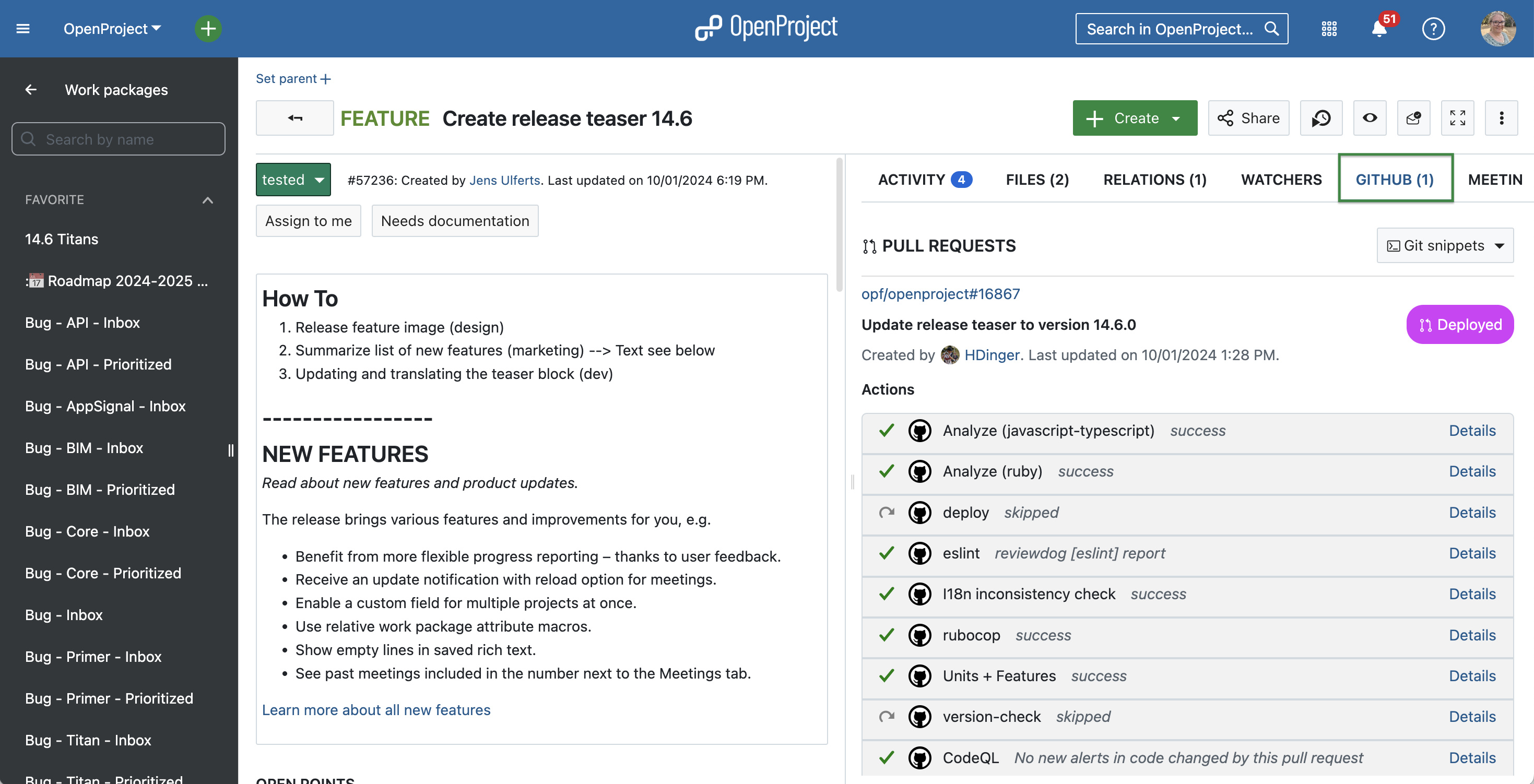
- GitHub integration (linking issues and pull requests)
- Flexible settings for different methodologies (Agile, Scrum, Kanban)
5 reasons to consider OpenProject for your project
1. Everything in one place: from wiki to Gantt
OpenProject is not just a task tracker, but a whole ecosystem for project management:
- Planning: Gantt charts, roadmaps, timelines
- Tasks: Flexible workflows, task relationships, tags
- Documentation: Built-in wiki with WYSIWYG editor
- Communication: Forums, meetings with minutes
2. Flexible integration with development
For technical teams, the GitHub integration is especially valuable. You can:
- Link issues to pull requests
- Automatically update issue statuses
- Track time spent on feature implementation
3. Choosing the right edition for your needs
OpenProject offers several usage options:
- Community Edition — free version for self-hosting
- Enterprise Edition — paid version with support and additional features
- Cloud version — 14-day trial without server setup required
4. Methodology support
It doesn't matter if you work with:
- Scrum
- Kanban
- Classic waterfall
OpenProject adapts to your workflow, not the other way around.
5. Active community and development
The project is supported by both OpenProject GmbH and an active community. There is:
- Detailed documentation
- Discussion forum
- Opportunity to contribute code
The technical side of things
For those curious about what's "under the hood":
- Backend language: Ruby
- Frontend: Angular
- License: GPLv3 (you can use and modify, but changes must remain open)
Developers can:
- Participate in project development
- Customize for their own needs
- Deploy on their own infrastructure
Who OpenProject is especially suited for
- Development teams that need control over their data
- Startups looking to save on software
- Educational projects where openness matters
- Companies with special requirements for security and data storage
Worth trying or not?
If you:
- Are looking for an alternative to Jira/Asana/Trello
- Want to control your own data
- Are willing to invest time in setup (for Community Edition)
- Value open-source solutions
then OpenProject definitely deserves your attention. For a first look, you can start with the 14-day cloud trial — no server setup required.
As practice shows, switching to OpenProject is especially justified for teams of 5 or more people, where the need for structured task management is already felt, but there is no desire or ability to invest in commercial alternatives.
Links to get started:
Related projects