How to stop losing architectural decisions in code with Log4brains

Ever look at a module that's a year and a half old, see a strange architectural decision, and genuinely not understand why it was made? Your hands itch to rewrite it. But then you find out that this quirk was specifically designed to work around a bug in a third-party API or a particular security requirement. The person who came up with it has long since moved to another team, Confluence is empty, and all that remains in git is a commit with the laconic fix: refactor storage.
The Architecture Decision Records (ADR) concept has been solving this problem for thirteen years now. But manually maintaining markdown files and keeping them organized is usually something everyone is too lazy to do. French developer Thomas Vaillant created Log4brains, a tool that turns architectural decision capture into a convenient docs-as-code workflow.
What is this tool
Log4brains takes your ADRs, stored in the repository alongside your source code, parses them, and builds a fast static site with convenient search and a timeline.
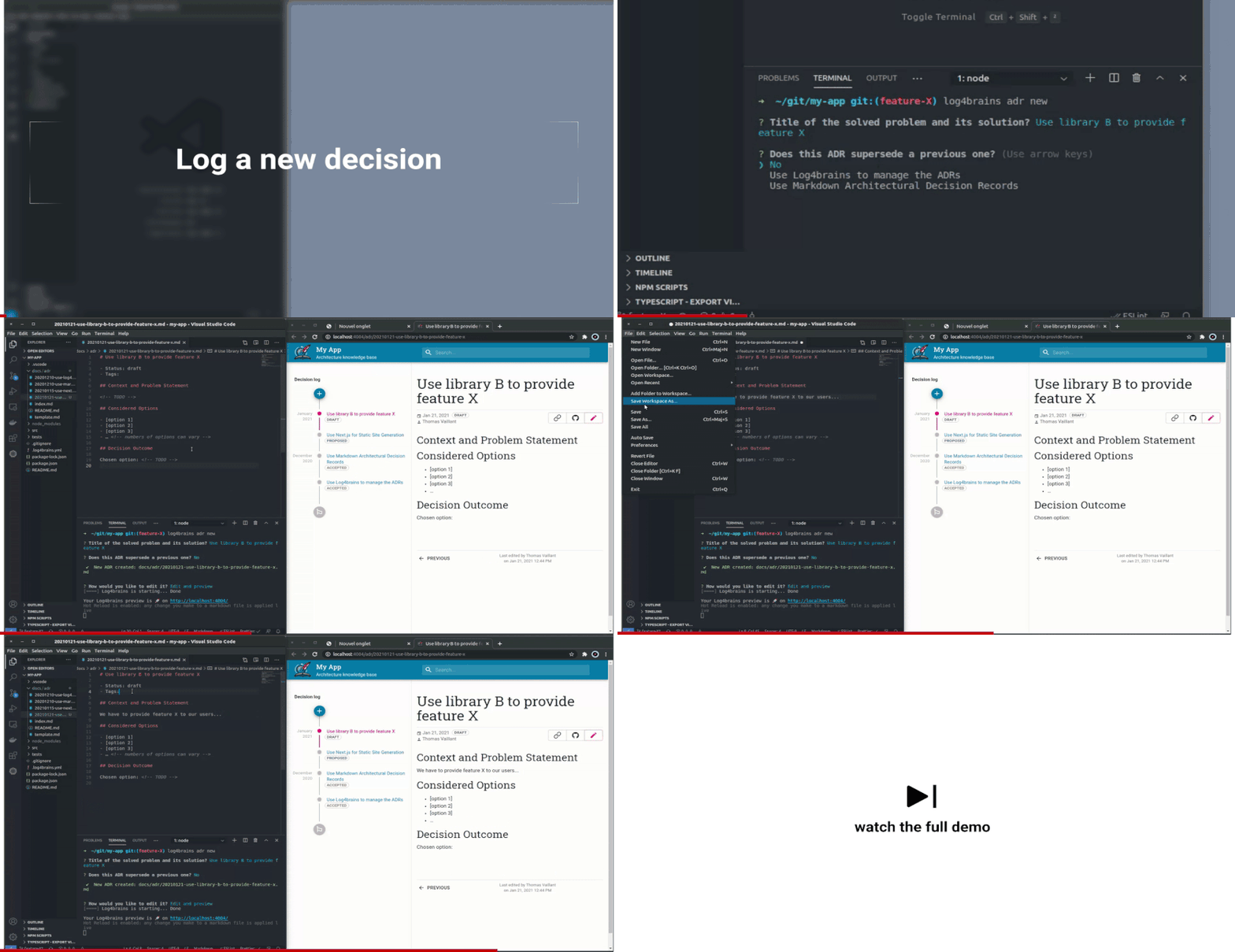
The utility is written in TypeScript and runs via the command line. However, the project isn't tied to the JS ecosystem. You can run it in Python, Go, Java, or Rust repositories via a global npm package or Docker image.
The point of ADRs is that these documents are immutable. You record the problem, context, chosen option, and consequences. If a decision becomes outdated a year later, you don't edit the old file retroactively. You create a new ADR with a supersedes status that references the previous one. The thought history remains intact.
What Log4brains can do
Under the hood, the utility hides several practical features that save time when working with documentation.
Local preview with hot reload
When you're writing documentation in your IDE, there's no need to manually rebuild the static site constantly. The log4brains preview command starts a local server based on Next.js with Hot Reload. You saved the .md file — the browser updates instantly.
Interactive CLI without rigid restrictions
Many ADR utilities require strict file numbering like adr-0001.md, adr-0002.md. This becomes a nightmare during parallel pull requests when two developers create documents with the same number.
Log4brains doesn't rely on rigid numbering. Metadata (author, creation date, status) is read from the text and git log. Templates can be customized to your needs, though the well-proven MADR format is used by default.
Creating a new record looks simple:
log4brains adr new
The command will interactively ask for the title, create a markdown file from the template, and place it in the project structure.
Monorepo support
If the project is split across multiple packages, documentation is often desired to be separated. Log4brains can handle global top-level decisions and package-dependent records within packages/service-name/docs/adr.
How to get started
Everything starts with a couple of commands in the terminal. You'll need Node.js LTS and Git:
npm install -g log4brains
log4brains init
The setup wizard will ask a few basic questions, create the .log4brains.yml configuration file, add a template to the project, and generate your first welcome ADR.
The config ends up being compact:
project:
  name: My Service
  tz: Europe/Moscow
  adrFolder: ./docs/adr
If you have a monorepo, you can expand the structure:
project:
  name: Core Platform
  tz: Europe/Moscow
  adrFolder: ./docs/adr
  packages:
    - name: auth-service
      path: ./packages/auth
      adrFolder: ./packages/auth/docs/adr
    - name: billing-service
      path: ./packages/billing
      adrFolder: ./packages/billing/docs/adr
Publishing to CI/CD
The most valuable part is deploying the knowledge base externally so the team can search for solutions via a web interface. Since the build outputs clean static files, it's easy to push to GitHub Pages, GitLab Pages, or S3.
Example for GitHub Actions:
name: Publish Log4brains
on:
  push:
    branches:
      - main
jobs:
  build-and-publish:
    runs-on: ubuntu-latest
    steps:
      - uses: actions/checkout@v4
        with:
          persist-credentials: false
          fetch-depth: 0 # обязательно, утилите нужна история git
      - uses: actions/setup-node@v4
        with:
          node-version: lts/*
      - name: Build
        run: |
          npm install -g log4brains
          log4brains build --basePath /${GITHUB_REPOSITORY#*/}/log4brains
      - name: Deploy
        uses: JamesIves/[email protected]
        with:
          GITHUB_TOKEN: ${{ secrets.GITHUB_TOKEN }}
          BRANCH: gh-pages
          FOLDER: .log4brains/out
          TARGET_FOLDER: log4brains
An important detail: pay attention to fetch-depth: 0. The utility absolutely needs the full commit history to extract the actual creation dates and authors of each document.
Who will benefit from this project
Log4brains is a good fit for teams of 3-4 engineers or more, where people periodically ask questions like "why did we choose this library/database/pattern".
The tool fits well into the code review process. You discuss architecture in a pull request, merge the code along with the .md file in the same commit. Documentation doesn't live a separate life on forgotten wiki pages — it gets updated automatically during deployment.
If the project is tiny and you're working on it solo, the overhead of documenting decisions might seem unnecessary. But for long-lived products, this is one of the most painless ways to preserve decision context.
Related projects