Enough Chatbots, Time to Build Real Agents with OpenHarness
You know that feeling when ChatGPT gives you a decent code suggestion, but to actually use it you need to create the file yourself, paste the text in, run the tests, and then fix a couple of imports? We've gotten used to calling this "AI assistance," when in reality it's just advanced search with a chat interface.
A few days ago I stumbled upon the OpenHarness repository from the HKUDS team. The guys decided that enough chatbots were enough—it's time to give language models "hands." The project is an infrastructure for building autonomous agents that don't just chat, but live in your terminal, browse the web, and edit code on their own.


What is Agent Harnessing
The authors use a fitting term—Harness. The idea is that an LLM on its own is just a "brain in a jar." To become an agent, it needs eyes (context), hands (tools), and memory.
OpenHarness is a Python framework that handles all the dirty work:
- Managing the Agent Loop cycle (request — streaming — tool call — repeat).
- Access control (so the agent doesn't accidentally delete the root of your disk).
- Integration with MCP (Model Context Protocol).
- Memory organization through files like
MEMORY.md.
The nicest part is that the project doesn't lock you into a specific cloud. You can run it on Claude or OpenAI, or pass through a local model via Ollama.
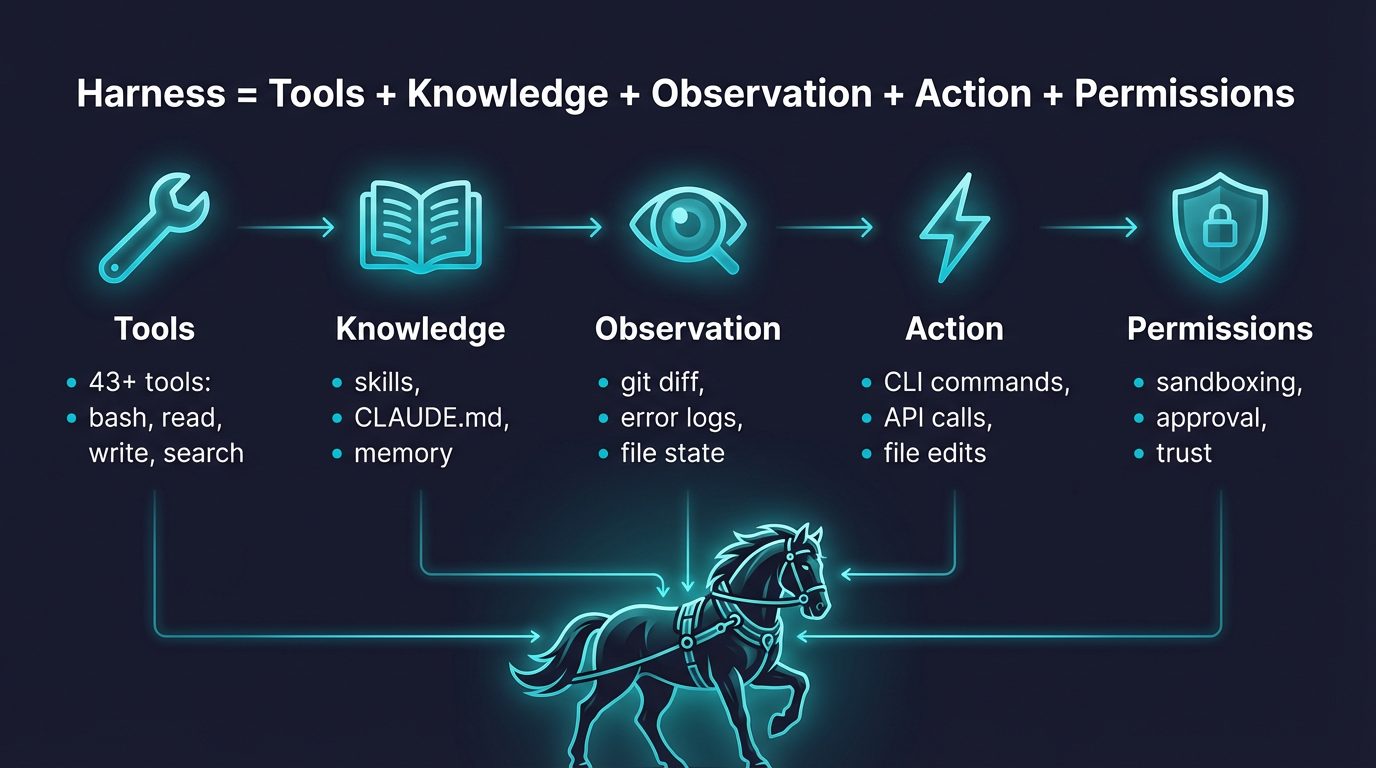
Five Things OpenHarness Can Do
I dug through the source code and README, and here's what seems most useful for everyday developer work.
Out-of-the-Box Tooling
The repository already has over 40 tools implemented. It's not just "run a bash script." There's file search via Grep, Jupyter notebook support, web surfing, and even the ability to spawn other agents for delegating tasks. Tools are typed through Pydantic, so the model understands the input data schema without extra hallucinations.
Skills System
Instead of bloating the system prompt to the size of "War and Peace," OpenHarness uses dynamic skill loading from Markdown files. If an agent needs to do a code review, it loads review.md. If it needs to deploy a project—it grabs the corresponding skill. This saves tokens and makes AI behavior more predictable.
Security and Access Levels
I've always been scared of giving AI access to the terminal. OpenHarness solves this through Permission Modes. In the default mode, the agent will ask for confirmation before each dangerous operation (file write, command execution). There's also Plan Mode—where the agent can only read files and suggest changes, but doesn't touch anything with its hands.
Personal Assistant Ohmo
Inside the repository lives the ohmo project. It's a ready-made agent application that you can connect to Telegram, Slack, or Discord. You write to it in the messenger, and it creates Git branches, fixes bugs, and opens PRs on your workstation. This works through existing subscriptions (like Claude Code or Codex), so you won't pay extra for API calls.
Dry Run Mode
A useful feature for debugging. The command oh --dry-run shows which settings were pulled in, which keys are active, and which tools will be available to the model—without sending a single request to the paid cloud.

How It Works Under the Hood
The project architecture is quite transparent. Everything is broken down into independent subsystems:
- Engine: the heart of the system, managing the model's reasoning loop.
- Permissions: a layer that checks each tool call against rules (for example, blocking edits to
/etc/). - UI: a nice terminal interface built with React and Ink. Yes, right in the console.
- Coordinator: handles multi-agent scenarios when one task is split into multiple subtasks for "helpers."
Interestingly, the project supports the MCP protocol. This means you can connect any context server to your agent—say, a database or a specific API—and it will immediately learn to work with it.
Practical Scenarios
Why bring this into your workflow?
First, automating routine tasks. You can ask the agent: "Find all unused imports in the src folder and clean them up, then run the tests." While it's busy with the files, you drink your coffee.
Second, working with unfamiliar legacy code. The agent can scan the project, build a dependency map, and explain how a specific module works using code search tools.
Third, creating your own specialized bots. If your company has a specific deployment process, you just write SKILL.md with a description of the steps, and your agent now knows how to deploy projects exactly the way you do it.
Is It Worth Trying
The project looks alive: 114 passing tests and active updates (version 0.1.7 was released just days ago). The downsides—documentation sometimes forces you to dig into the code, and while Windows support is claimed to be native, in PowerShell it requires using the command openh instead of the short oh.
If you're tired of copy-pasting code from chat into your IDE and want to feel what agents can really do, OpenHarness is a great starting point. At the very least, it's one of the few projects trying to make agent infrastructure understandable and extensible.
You can get started with a simple installation:
curl -fsSL https://raw.githubusercontent.com/HKUDS/OpenHarness/main/scripts/install.sh | bash
oh setup
And then just try asking it to fix something in your pet project. The results might surprise you.
Related projects