How to Fine-Tune an 8B Neural Network on a Laptop with a 4 GB GPU

Anyone who has ever tried to fine-tune an LLM on their own knows this ritual: you set up the environment, battle with CUDA versions, tune the batch size, catch endless CUDA out of memory errors, and end up renting an H100 in the cloud just to run a couple of epochs on a small dataset. At some point, configuring scripts and messing with servers starts to take more time than data preparation and result analysis.
Recently I came across the Soup repository by Alpamis Makazhan. The author set an ambitious goal: to reduce the entire tuning pipeline to a single console command and a simple YAML file. The most interesting thing about the project is the ability to fine-tune a Llama 3.1 model with 8 billion parameters on a mobile RTX 3050 with just 4 GB of video memory.
Sounds like a marketing trick, but under the hood there's some interesting engineering and an open preprint with benchmarks. Let's break down how it works and how it performs in practice.
What Soup Can Do
Essentially, Soup is a CLI wrapper around a popular ML stack (PyTorch, Transformers, PEFT, TRL). The main idea is to take over the routine: detecting available hardware, quantization, auto-tuning batch size, and formatting datasets.
The utility covers the complete model workflow:
- initializes templates for different tasks (chat, code, tool-calling, classification);
- automatically detects data formats (Alpaca, ShareGPT, ChatML) from JSONL, Parquet, or CSV;
- runs training with SFT, DPO, ORPO, SimPO, or KTO methods;
- tests the result for regressions and merges LoRA adapters into model weights;
- exports the model to GGUF format for running in Ollama or llama.cpp.
For basic usage, you don't even need PyTorch: a lightweight CLI version installs in a couple of seconds and helps inspect data. And if you need training itself, the full stack gets pulled in.
# Установка пакета с зависимостями для обучения
pip install "soup-cli[train]"

# Создание конфига через мастер или из готового шаблона
soup init --template chat

# Запуск процесса
soup train
How an 8B Model Fits in 4 GB of Video Memory
Usually, an 8-billion-parameter model even in quantized 4-bit form (NF4) requires about 5-6 GB of VRAM just to load into memory. If you add context, activations, and LoRA adapters, a card with 4 GB will inevitably throw an out-of-memory error.
The author of Soup used a layer streaming technique.
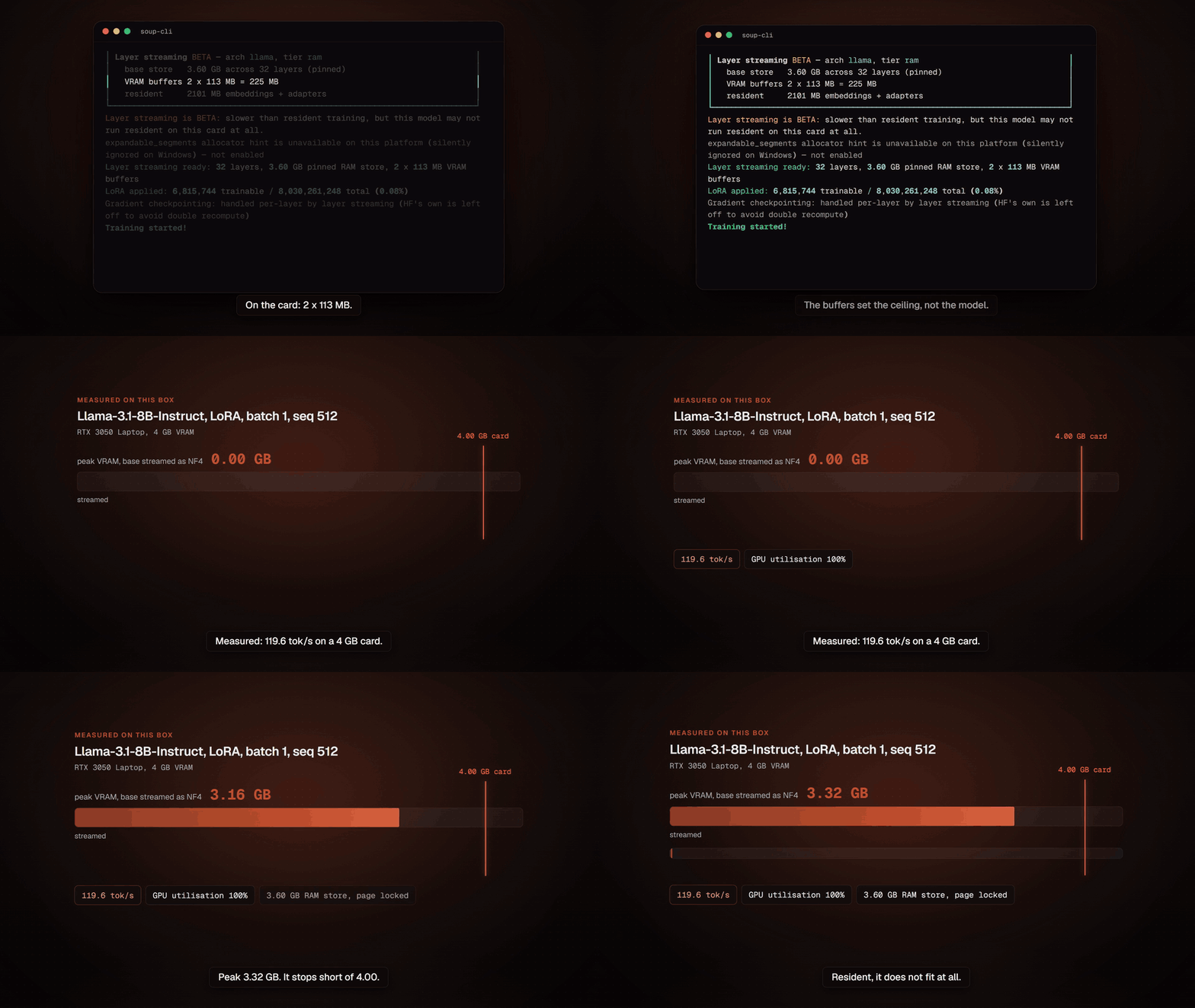
The base model is not kept entirely in video memory. It is stored in the computer's RAM (or even read directly from a fast NVMe disk) and fed to the GPU layer by layer. Only the trainable LoRA adapters and the current decoder layer are kept permanently in VRAM.
In tests on a laptop RTX 3050 with 4 GB VRAM, the Llama-3.1-8B-Instruct model with NF4 quantization showed peak memory consumption of only 3.32 GB at a speed of about 119 tokens per second. The computations produce bit-identical results to conventional resident training.
Layer streaming is enabled literally with a single line in the config soup.yaml:
base: meta-llama/Llama-3.1-8B-Instruct
task: sft

data:
  train: ./data/train.jsonl
  format: alpaca

training:
  stream_layers: true      # стриминг слоев из RAM
  quantization: 4bit       # NF4 квантование
  batch_size: 4
  stream_source: auto      # RAM или NVMe
  lora:
    r: 64
    alpha: 16

output: ./output
In versions 0.72+, layer streaming was extended not only to classic SFT but also to alignment methods like DPO and ORPO. With DPO, you need the base model for comparison, which usually doubles memory usage. Here the utility uses the same streaming layer with the adapter disabled, without creating a duplicate in memory.
Quality Checks and Protection Against Hidden Errors
A common fine-tuning problem: the model seems to have learned to answer your specific questions, but completely forgot how to call functions or started outputting broken JSON.
Soup has a built-in verification tool soup ship. This is an internal quality gate with a set of tests (arithmetic, JSON schema following, tool calling, safety) that runs both the original and fine-tuned models.
soup ship --base ./base --adapter ./my-lora --task-eval my_task.jsonl
The command returns a specific verdict: SHIP or DON'T SHIP. For example, if the adapter improved responses on the target task but broke tool call syntax, the utility will exit with a non-zero code and show where the regression occurred.
Export and Usage
Once the adapter is trained and verified, you can package it into the desired format right away:
# Проверить ответы в интерактивном режиме
soup chat --model ./output

# Влить LoRA в базовые веса
soup merge --adapter ./output

# Сконвертировать в GGUF для Ollama
soup export --model ./output --format gguf --quant q4_k_m

# Или поднять локальный API-сервер с OpenAI-совместимыми ручками
soup serve --model ./output
If you need to run training on a remote machine or in isolation without manually installing drivers, the project has a ready-made Docker image on GitHub Packages (GHCR).
Who Will Find This Project Useful
Soup is aimed at developers who need a fast experiment cycle without diving into the depths of distributed training.
The project is definitely worth trying if you:
- Want to experiment with small models (Qwen 2.5, Llama 3.1, Gemma) on a home PC or laptop.
- Are looking for a ready-made pipeline: from raw dataset to a GGUF file for local use.
- Are tired of writing the same scripts based on HuggingFace TRL for typical SFT tasks.
Limitations: Python 3.10–3.12 is strictly required (PyTorch builds for 3.13 are currently unstable). Full pre-training from scratch on huge clusters via Soup is not recommended—use Megatron or DeepSpeed directly for that. But for applied fine-tuning and prototyping on consumer GPUs, this is a convenient and well-thought-out tool.
Related projects