How to Understand Ontologies Without Pain and Heavy Textbooks
When I first encountered the concept of ontologies in development, I had a strong feeling that I'd stumbled into a philosophy lecture. All these RDF, OWL, knowledge graphs, and semantic web concepts sound impressive, but in practice they often turn into a pile of XML files that are impossible to read with the naked eye. Microsoft recently rolled out the Ontology Playground project, and it's probably the most beginner-friendly way to get into the topic that I've seen lately.
The project is positioned as a sandbox for Microsoft Fabric IQ, but in reality it's useful for anyone who wants to visualize data structure or understand how entities connect in complex systems. It's a completely static web application: no backend, no registration required, just open it in your browser and start drawing graphs.
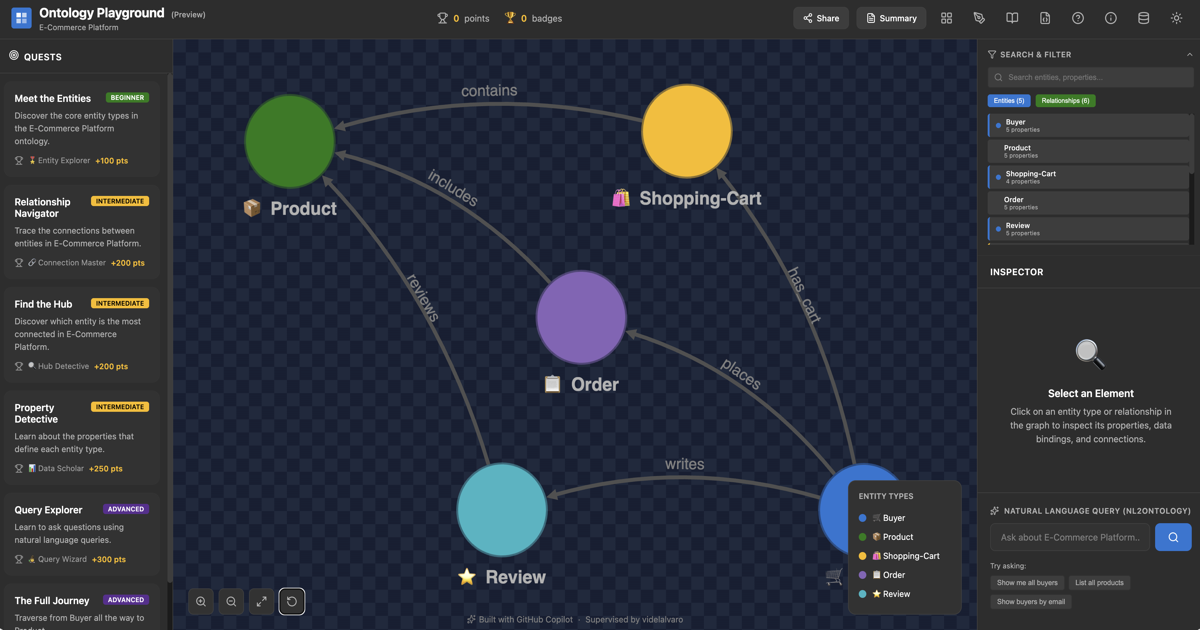
What's inside this sandbox
The nicest part is the visual editor. Instead of manually editing RDF files, you sketch entities on a canvas.
Visual graph design
It relies on the Cytoscape.js library. You create entity types, assign them colors, icons, and properties. Setting up relationships between them is just as easy: you can specify cardinality (one-to-many, many-to-many) right away and see how it looks on the diagram. If you've ever drawn ER diagrams for databases, you'll feel right at home here.
Ready-made catalog for inspiration
If starting from a blank slate feels tedious, the app includes a library of ready-made ontologies. It has examples from various domains: retail, healthcare, finance, manufacturing. You can load any of them, examine the relationship structure, and immediately export to RDF/XML. It's a great way to see how professionals design complex domain areas.
Built-in ontology school
The developers added an Ontology School section. It's not just documentation, but a set of nine interactive courses. They explain the basics: from why ontologies are needed at all, to design patterns. Articles include knowledge quizzes and live graph snippets that change as you progress through the lesson.
Technical stack and architecture
The project is built with React 19 and TypeScript 5. The tool selection is pretty standard for modern Microsoft frontend projects:
- Zustand manages state (designer, quests, settings).
- Vite handles the build.
- Framer Motion adds smoothness to the interface.
The data handling is implemented interestingly. Since there's no backend, all changes are saved locally, and for publishing to the shared catalog, the app uses GitHub Device Flow. It automatically forks the repository, creates a branch, and sends a Pull Request with your changes.
For those who want to use visualization in their own projects, there's a script ontology-embed.js. You can include it with a single line and embed an interactive graph on any page.
Who will find this useful in practice
I see several scenarios where Ontology Playground really saves time.
First, it's data architecture design in the early stages. When you need to explain to analysts or clients how entities will interact with each other, a live graph works better than a static picture in Miro or a cumbersome diagram in Visio.
Second, it's team training. If you're introducing semantic technologies or working with Microsoft Fabric, this tool lowers the entry barrier. It's easier for a newcomer to click buttons in a visual editor than to study W3C consortium specifications.
Finally, it's quick hypothesis testing. You can sketch a schema, validate it with built-in tools, and immediately get a ready RDF file for further work.
How to run the project locally
If the web version isn't enough and you want to tweak it for yourself, the project is easy to run locally. You'll need Node.js 18+ and npm 9+.
After that, the sandbox will be available at http://localhost:5173.
Ontology Playground is a rare example of a complex and boring topic packaged in a cool, almost game-like interface. The project won't replace heavy-duty tools like Protégé for professional ontologists, but for developers and architects who need to quickly design a domain model or understand graphs, it's a must-have.
If you've been wanting to understand what this creature is — an ontology — now is the perfect time to check out the online version and just move some graph nodes around. Sometimes one such session replaces a couple of hours of reading theory.
Related projects