How to Send 50 Gigabytes to a Colleague Without Clouds and Speed Limits

A familiar situation: you need to send a colleague a fresh database dump of twenty gigabytes or an archive with heavy logs. Telegram complains about the file size limit. Google Drive and Yandex Disk require you to upload everything to your own storage first, eating up your disk quota, and then force the recipient to wait for the download. The familiar LocalSend comes in handy at the office, but fails when the other person is on a different ISP.
Recently stumbled upon an interesting project called DashBeam (it was previously developed as AltSendme). The program solves exactly this problem: it forwards files and entire folders directly from one computer to another over the internet, without storing anything on intermediate servers.
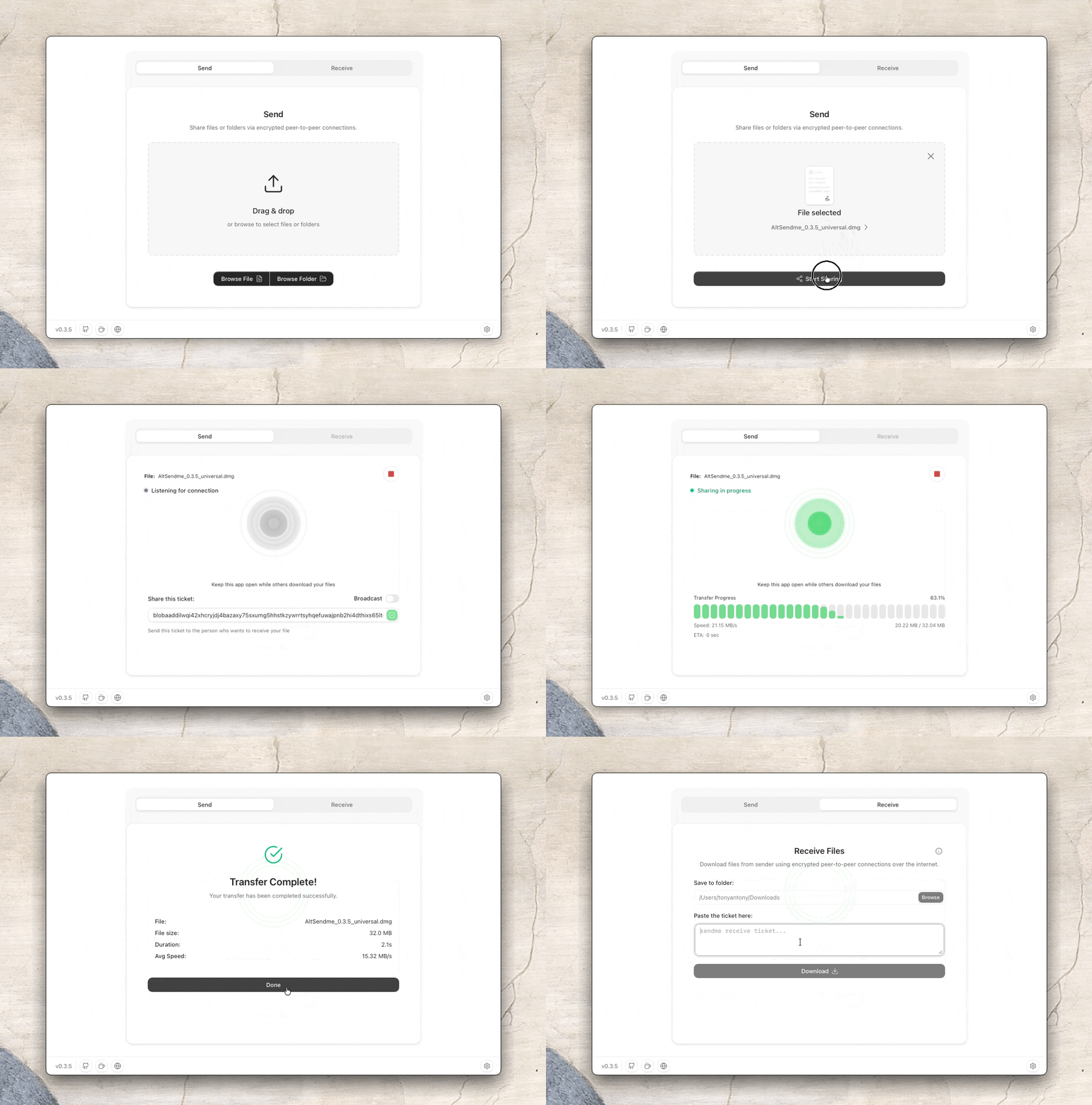
Under the Hood
DashBeam is built on the Iroh networking stack. It's an open-source P2P engine written in Rust. Instead of classic HTTP or temperamental WebRTC, it uses the QUIC protocol over UDP with TLS 1.3 encryption.
The data transfer is designed cleverly:
- Files and folders are split into content-addressed blocks (blobs). Each block is verified with a fast BLAKE3 cryptographic hash. If the connection drops, DashBeam doesn't re-download the file from scratch—it sends only the missing chunks.
- A text ticket is generated for pairing. The string contains the sender's identifier (Ed25519 key), addresses for direct connection, and the hash of the requested file.
- Devices first attempt to punch through NAT via QUIC hole punching to route traffic directly. If both nodes are behind strict firewalls, traffic goes through a relay, but encrypted. The relay sees only noise and cannot read the payload.
- For regular exchange between your own devices, there's permanent pairing. Link your work laptop and phone with a code once, and then files are sent in one click without manually copying tickets.
In benchmarks, the developer shows speeds up to 125 MB/s (capped by a gigabit network link), and the largest recorded transfer was 452 GB.
+----------------+                               +------------------+
| Sender (NodeA) | <====== QUIC / TLS 1.3 =====> | Receiver (NodeB) |
+----------------+        (Direct P2P Link)      +------------------+
        \                                                 /
         \-- [Fallback via encrypted Relay if NAT fails]-/
How DashBeam Differs from Alternatives
The P2P transfer market has no shortage of solutions, but each has its own quirks:
LocalSend works great within a single local network, but can't punch through the internet without VPN configuration, and interrupted transfers have to be restarted from scratch.
Magic Wormhole is wonderful in the terminal, however it lacks a proper official GUI and can't resume interrupted file transfers.
Browser-based utilities like PairDrop are limited by WebRTC constraints and the browser tab's memory, which is why gigabyte-sized folders often crash the page.
DashBeam combines all scenarios. The app is available as a desktop client for Windows, macOS, and Linux, a standalone APK for Android, a lightweight terminal CLI, and even a stripped-down web version for cases where installing software is not an option.
How to Use It
The workflow is straightforward:
- Drag and drop a file or directory into the program window.
- Get the generated ticket and send it to the recipient via any messenger.
- The recipient pastes the ticket into their client, sees a preview of the files, and confirms the download.
If you frequently share test builds or archives between your own machines, it's more convenient to go to the settings section, link devices with a permanent pair, and send data directly with a single click of the Send button.
Who will find this project useful? Developers and DevOps engineers for quickly transferring VMs, backups, and dumps without cluttering corporate disks. Video editors and designers who need to deliver source files to clients without cloud storage size restrictions.
The source code is distributed under the AGPL-3.0 license. If desired, you can deploy your own relay server and DNS discovery on your VPS—the documentation and configurations for this are right in the project repository.
Related projects