How to Stop Searching for Processes via lsof and Tidy Up Your Ports
Familiar situation: you start a local server and the terminal spits out a painfully familiar error Error: listen EADDRINUSE: address already in use :::3000. Yesterday's worker didn't terminate properly, a background process got stuck, or a Docker container is silently holding the required socket.
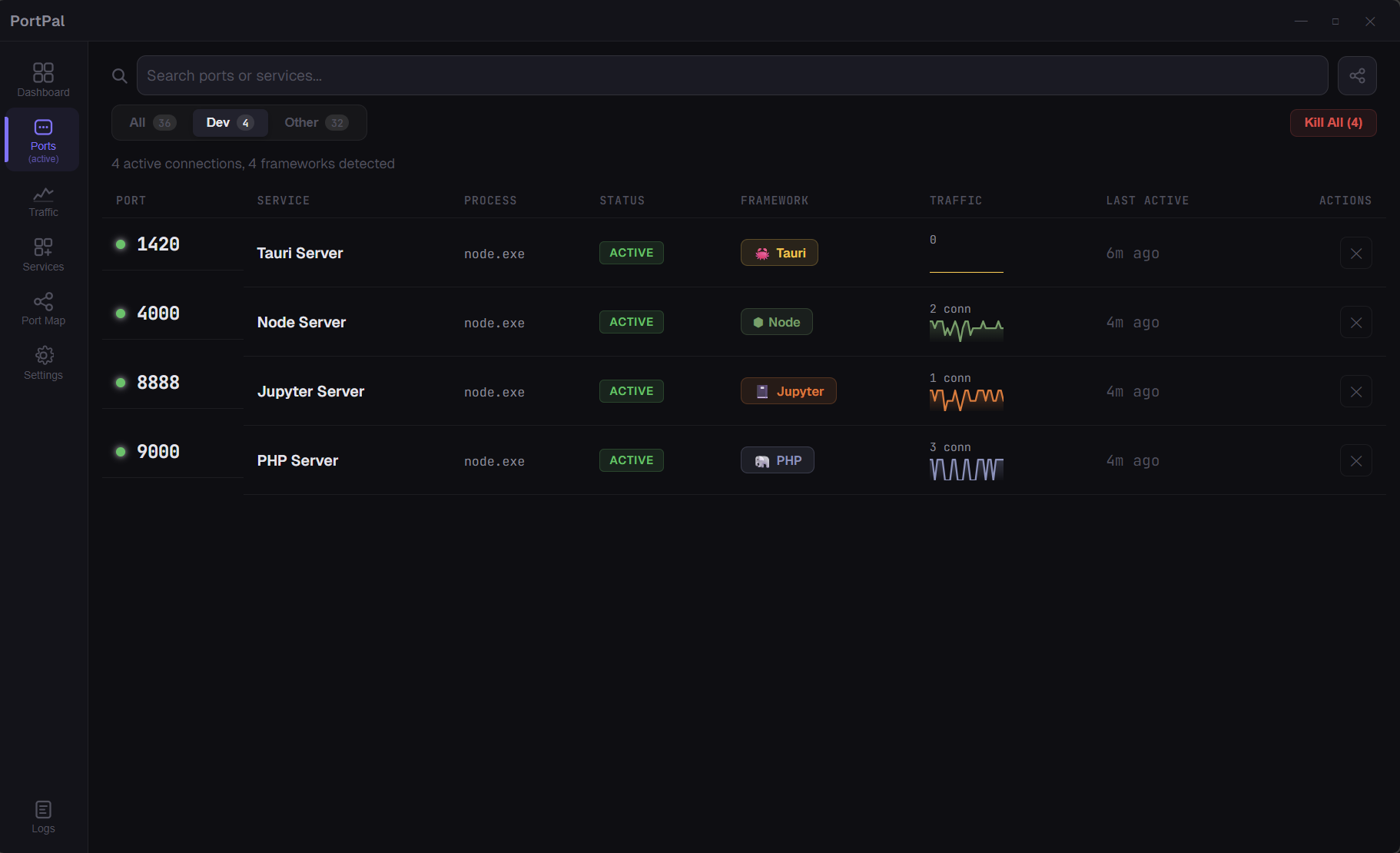
Usually, this is where the routine begins. You open the terminal, recall the lsof -i :3000 syntax on macOS or grep netstat -ano on Windows, copy the PID, and type kill -9. If you have a dozen microservices, the terminal turns into a graveyard of repetitive commands.
The PortPal project solves this small but persistent problem. It's a lightweight desktop dashboard that shows occupied ports, identifies the stack, and kills redundant processes with a single button.
What's Under the Hood and Why You Need It
Most similar utilities are either primitive wrappers around system commands or drag along heavy Electron, consuming a gigabyte of RAM just to display a five-line list.
The creators of PortPal took a more pleasant route and built the application on Tauri 2, Rust, and React 19. Thanks to Rust, the backend barely loads the CPU in the background, and the native window opens instantly.
The tool solves several everyday tasks:
- Finds hanging local ports and extracts process metadata.
- Recognizes the environment based on file context and default ports.
- Helps forcibly stop a process or restart it.
- Visualizes network connections between services as a graph.
Key Features
Project Recognition Instead of Dry Numbers
A regular system monitor will only tell you the PID and binary name (for example, node or python). If five different Node.js projects are running, distinguishing them by terminal output is impossible.
PortPal works smarter. It doesn't just look at the socket number but also scans working directories. The program looks for manifest files (package.json, Cargo.toml, go.mod) and matches the port number with popular development environments:
3000  -> React / Next.js
5173  -> Vite
4200  -> Angular
8000  -> Django
5432  -> PostgreSQL
6379  -> Redis
As a result, the panel displays clear cards: you can immediately see that your frontend is running on port 5173 and the database is listening on 5432.
Interactive Connection Map
The most curious detail of the interface is the topological map built with the D3.js library.
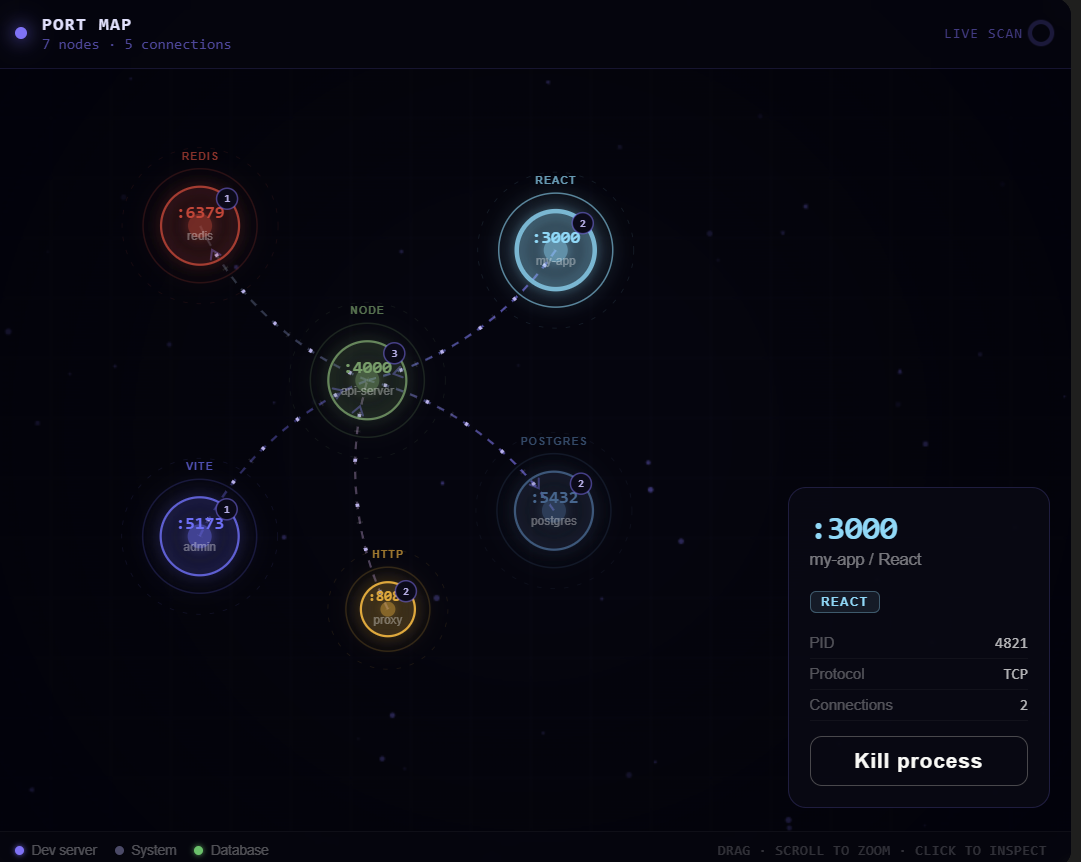
Instead of a flat table, you get a physical simulation with nodes. Nodes are colored according to their technologies: blue for databases, purple for Vite bundlers, green for Node.js backend. The nodes can be dragged across the screen, zoomed with the mouse wheel, and active network links can be examined in real time. If you're developing a system with multiple microservices, such a graph helps quickly understand who is currently holding a connection with whom.
One-Click Management and Emergency Button
Each process has a termination button next to it. Click the cross — the process terminates instantly, the socket is freed.
If a port is occupied by a crashed script that PortPal has remembered, a restart button remains nearby. It runs the command again in a separate terminal.
In the interface, ports are divided into two groups: development processes and system services. Accidentally killing a system service is harder. And for cases when you've finished your workday and want to close the entire zoo of running local servers at once, there's a Kill All button for the Dev Frameworks group.
Background Operation and System Tray
PortPal minimizes to the notification area. The tray icon changes color depending on the presence of port conflicts. While the window is closed, a background thread records events: when a new process came up, which socket was freed, and where a traffic spike occurred. The history with all timestamps is stored on a separate logs tab.
Architecture and Stack
The technical stack of the project looks modern:
Backend:      Rust (sysinfo + системные API сетевого стека)
Runtime:      Tauri 2
Frontend:     React 19 + TypeScript + Vite 7
Графика:      D3.js v7 (симуляция графов на силах)
Стили:        Vanilla CSS со стеклянными эффектами
By abandoning heavy frontend component libraries and using native Webview, the application is lightweight and consumes minimal resources during constant socket scanning.
How to Launch
Developers publish ready-made builds on the repository releases page:
- For Windows,
.msiand.exeare available. - For macOS, builds
.dmgare prepared for Apple Silicon chips and Intel processors. - For Linux, there are
.debpackages and the universal.AppImageformat.
If you want to build the utility from source or add your own detection rules, you will need Rust version 1.70 or higher and Node.js 18+:
# Клонируем репозиторий
git clone https://github.com/wisher567/Portpal.git
cd portpal

# Ставим зависимости и запускаем в dev-режиме
npm install
npm run tauri dev
In dev mode, hot reloading of React components via Vite works in parallel with Rust part compilation.
Personal Impressions
The project is young, currently at version 0.2, but it already looks like a ready-to-use everyday tool. The basic port table and cards work fast. The D3.js map initially seems like decoration, but when simultaneously debugging an API gateway, database, and a couple of clients, it proves genuinely helpful.
Minor drawbacks include the limited database for automatic framework recognition. If you run a custom service on a non-standard port like 9211, PortPal will show it as a regular process until you manually bind the context. But since the project is open source under the MIT license, adding to the signature list in the code is straightforward.
Who will find it useful: web developers, full-stack engineers, and everyone who regularly juggles a dozen local microservices and is tired of memorizing socket cleanup commands.
Related projects