Compressing SQLite Without the Pain: The Magic of sqlite-zstd
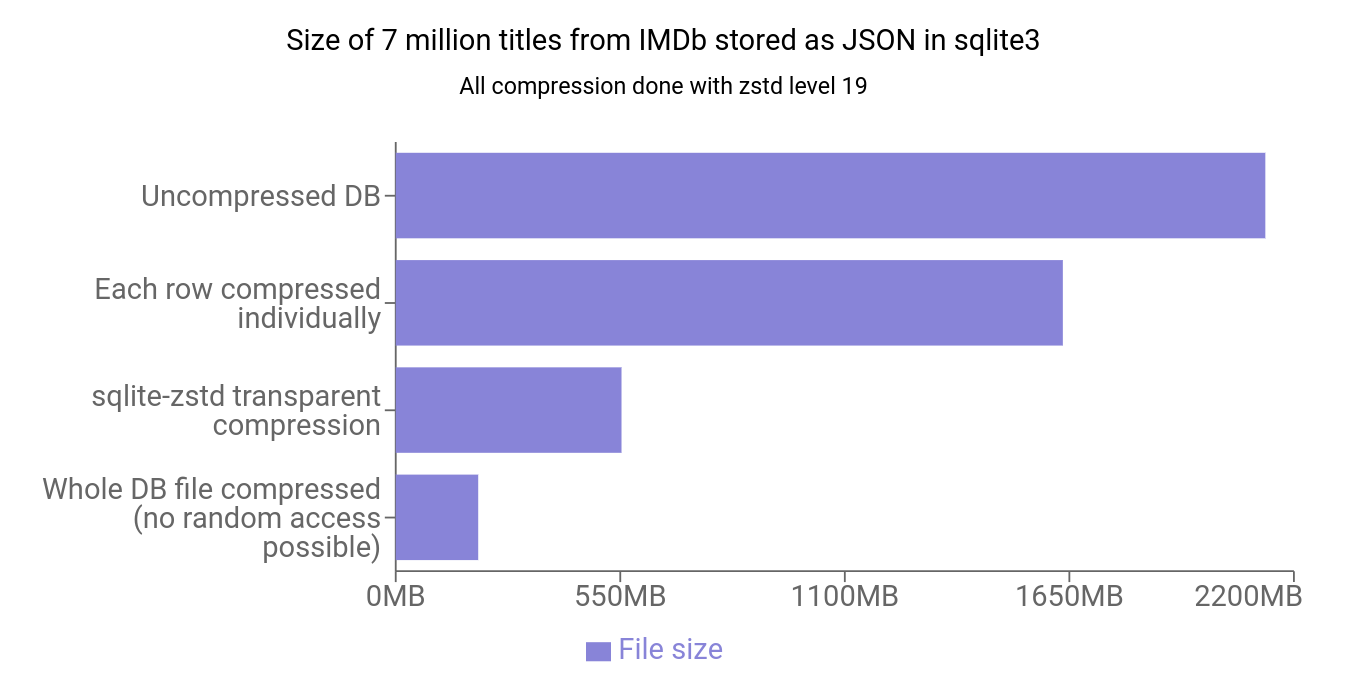
Imagine this: your app with a SQLite database has grown to gigabytes, backups take forever, and I/O operations are slowing everything down. Sound familiar? The sqlite-zstd extension offers an elegant solution — row-level compression while preserving random data access.
What Is This Thing?
sqlite-zstd is a SQLite extension written in Rust that adds transparent row-level data compression using the Zstandard (zstd) algorithm. Unlike compressing the entire database at once, this approach enables:
- Saving up to 80% of space (according to the author)
- Preserving random access to data
- Minimizing performance impact
Who Is This For?
The project is especially useful for:
- Mobile developers, where every megabyte counts
- Services with large logs or historical data
- Applications working with JSON/text data in SQLite
- Embedded systems developers with limited storage
Key Features
1. Transparent Compression
SELECT zstd_enable_transparent('{"table": "logs", "column": "data", "compression_level": 19}')
After this, all operations on the logs table will automatically compress/decompress data in the data column. Your code won't even notice the changes!
2. Incremental Maintenance
SELECT zstd_incremental_maintenance(60, 0.5);
This function allows you to gradually compress data without locking the database for long. You can specify how long to work and how much time to leave for other operations.
3. Dictionary Support
The project can create and use dictionaries for better compression:
SELECT zstd_train_dict(data, 100000, 1000) FROM logs
This is especially effective for structured data (e.g., JSON with repeating keys).
How It Works Under the Hood
- A hidden
_table_zstdtable is created for each compressible table - The original table becomes a VIEW that transparently compresses/decompresses data
- On INSERT/UPDATE, data is automatically compressed
- On SELECT, it is decompressed
Practical Use Cases
Example 1: Application Logs
# Python пример с Datasette
import sqlite3
import sqlite_zstd

conn = sqlite3.connect('logs.db')
sqlite_zstd.load(conn)

# Включаем сжатие для колонки с логами
conn.execute("""
    SELECT zstd_enable_transparent('{"table": "logs", "column": "message"}')
""")
Example 2: Storing JSON API Responses
// Rust пример
let conn: rusqlite::Connection;
sqlite_zstd::load(&conn)?;

conn.execute(
    "SELECT zstd_enable_transparent('{\"table\": \"cache\", \"column\": \"json\"}')',
    [],
)?;
Limitations
- Not production-ready yet (in the author's opinion)
- Does not support ATTACH for compressed databases
- Limited DDL operation support
- Only for TEXT/BLOB columns
sqlite-zstd is:
✅ A simple solution for reducing SQLite database size ✅ Minimal changes to existing code ✅ Flexible control over the compression process
Try it if:
- Your SQLite database has grown to an unreasonable size
- You need to store a lot of text/binary data
- You're ready for experimentation (but with backups!)
The project is actively developing and has already gathered nearly 1.6k stars on GitHub. Want to save space? Now is the perfect time to integrate sqlite-zstd!
Related projects