How to Collect Data Without Pain or Code Using Spider- flow
Imagine this: you need to collect data from a dozen websites, process it, clean out the junk, and neatly store it in a database. Usually, this means hours of writing code in Python or Node.js, wrestling with selectors, configuring proxies, and endless debugging. But what if I told you that the entire process can be "drawn" in a browser, just like a regular flowchart?
Today we'll break down Spider-flow — a powerful Java-based platform that turns parser creation into visual programming. This project has over 11 thousand stars on GitHub, and it definitely deserves your attention if you value your time.
What is Spider-flow and Why It's Convenient
Spider- flow is not just a library, but a full-fledged development environment (IDE) for parsers. Instead of writing hundreds of lines of code, you use a graphical interface. You drag and drop nodes, connect them with lines, and configure the logic of operation.
Who will this be useful for?
- Developers who need to quickly sketch out a prototype or automate data collection without diving into writing boilerplate.
- Analysts who want to get data on their own without waiting for help from the backend team.
- Everyone who's tired of maintaining a zoo of parsing scripts.
Five Reasons to Take a Closer Look at This Project
1. Visual Logic Control
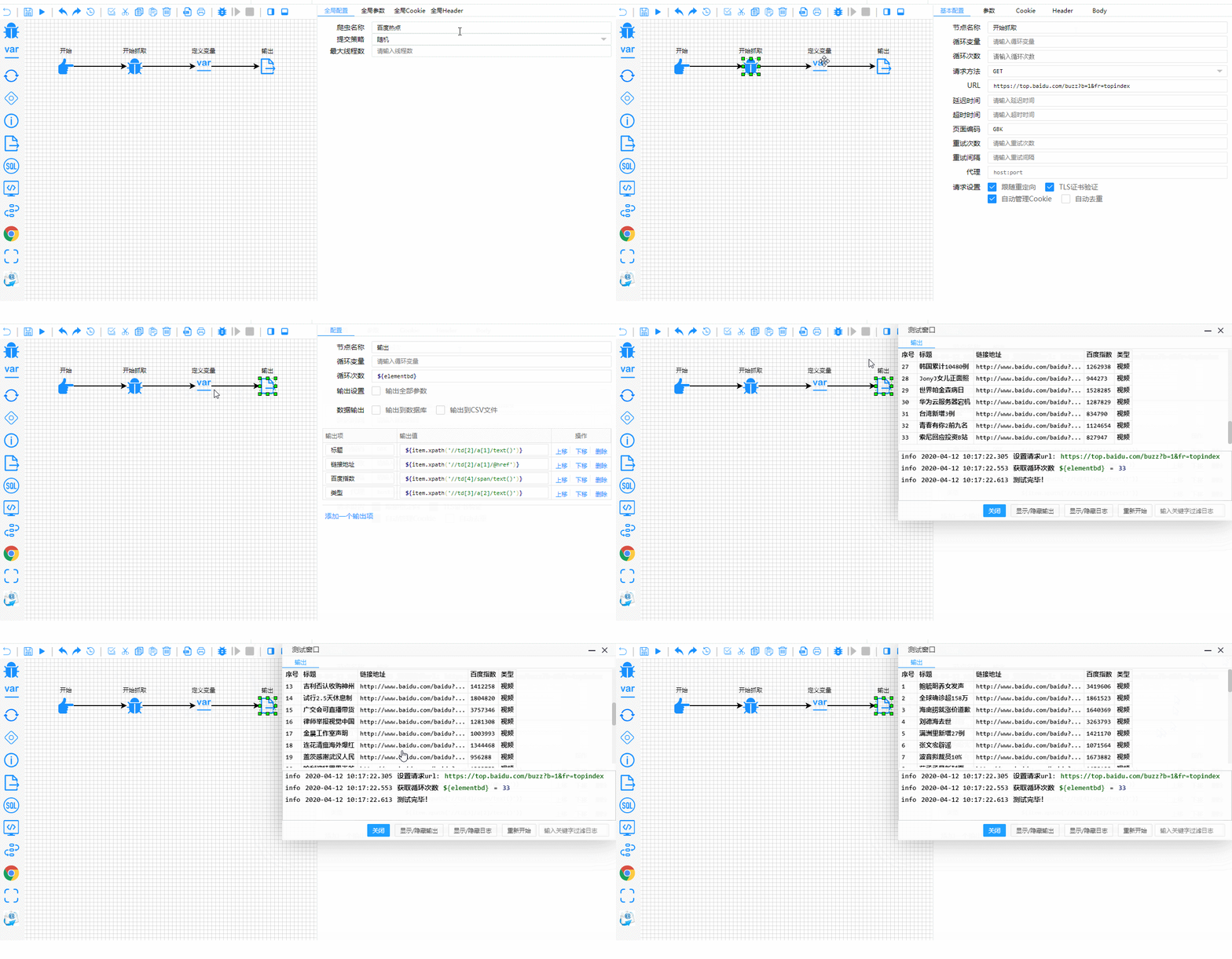
The main feature is the Flow interface. You see the entire data path: from the HTTP request to writing to the table. This makes debugging many times easier. If an error occurs at some stage, you immediately see where the chain "broke."
2. Versatility in Data Extraction
Spider- flow doesn't limit you to just one thing. In a single project, you can combine:
- XPath and CSS selectors for classic HTML.
- JsonPath for working with APIs.
- Regular expressions for complex text.
- Binary formats if you need to extract something specific.
3. Direct Database Work
Forget about intermediate CSV files (although they are supported). The platform can communicate with SQL databases "out of the box." You can execute select, insert, or update right during the parsing process. For example, check if a record already exists in the database, and if not — add it.
4. Dynamic Content Is No Longer a Problem
Many modern websites are built on React or Vue, and you can't fetch them with a regular GET request. Spider- flow has an excellent plugin for Selenium that allows rendering JS pages and simulating real user actions.
5. Flexible Extension Through Plugins
The project is built on a modular principle. If standard features aren't enough, you can connect plugins for:
- Captcha recognition (OCR).
- Working with Redis and MongoDB.
- Using proxy pools.
- Sending email notifications.
What It Looks Like in Reality
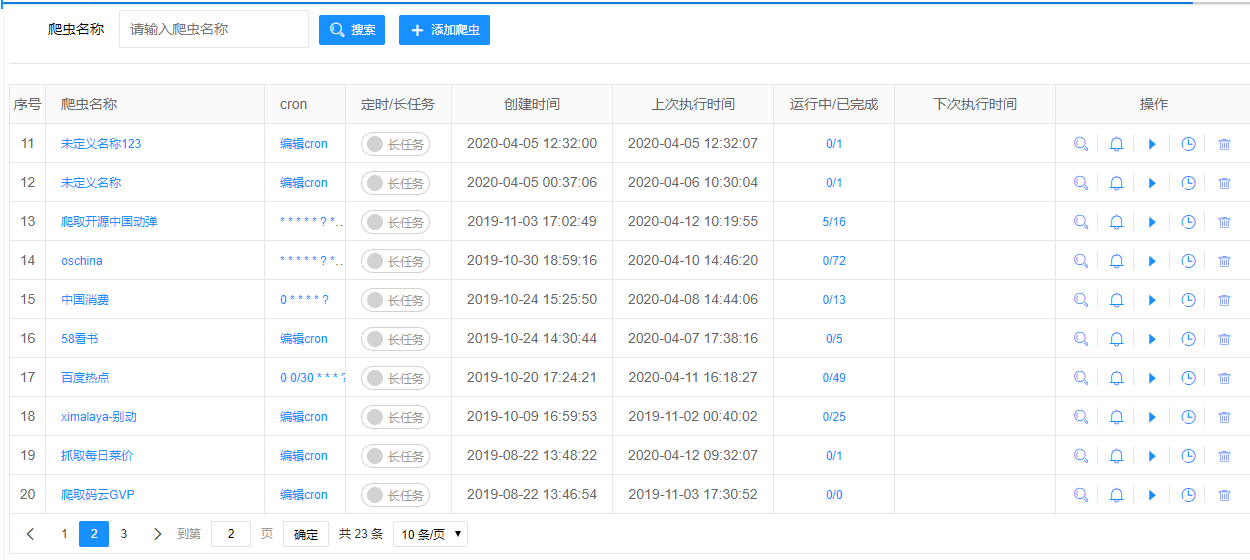
The system interface is concise and functional. Here's what your list of "spiders" looks like:
And here's the real-time testing and debugging process. Notice how clearly the execution steps are highlighted:
Technical Internals
Under the hood, Spider- flow uses a proven stack: Java 8+ and SpringBoot. This ensures stability and high performance. The platform supports automatic Cookie management, header handling, and even custom JavaScript functions if you still want to write a bit of code for complex data transformation.
For those who want to integrate Spider- flow into their ecosystem, an HTTP API is provided. You can trigger tasks externally or retrieve work results through requests.
Practical Use Cases
Where will Spider- flow show itself best?
- Competitor price monitoring: Set up a flow, add a proxy pool, and save price changes to the database every half hour.
- News aggregators: Collecting data from different sources and bringing them to a unified format through built-in string and date processing functions.
- Filling online stores: If a supplier only provides a website without an API, Spider- flow will help extract product descriptions and download images (there's a plugin for OSS).
Is It Worth Trying?
If your work involves data, then definitely yes. Spider- flow wins you over by lowering the barrier to entry for web scraping, while not cutting capabilities for professionals. It's a great example of how low-code tools can actually speed up development, rather than just creating pretty pictures.
The project is actively developed by the community, has detailed documentation, and even a demo where you can "play around" with the interface before installation.
Useful links:
Try building your first flow, and chances are, you won't want to go back to writing parsers manually!
Related projects